
Most restaurants lose revenue through their menus without realizing it.
The problem usually isn't the food. It's the path to the order. Guests scan a crowded list, compare prices instead of value, miss your best-margin items, ask staff basic questions, then default to the safest choice. That hurts average check, slows decisions, and puts extra pressure on the floor.
A strong menu fixes that. It guides attention, supports faster choices, makes profitable items easier to say yes to, and gives operators a cleaner way to update pricing, test placement, and manage changes across channels. If you're still treating your menu like a design file instead of a sales system, you're leaving too much up to chance.
Table of Contents
- Your Menu Is Either Your Best Salesperson or a Silent Cost
- What Menu Design Services Actually Deliver
- The Business Case Why Modern Menu Design Matters
- Print vs Digital Menus A Practical Comparison for 2026
- Integrating Your Menu into Restaurant Operations
- How to Choose the Right Menu Design Partner
- Your Vendor Evaluation Checklist and Key Questions
Your Menu Is Either Your Best Salesperson or a Silent Cost
It is 7:15 on a Friday. A four-top is ready to order, but the menu makes them stop. They scan too many items, ask the server for guidance, skip the add-on, and default to the safest entrée. You still make the sale. You just lose the better one.
That is the core job of a menu. It should guide attention, speed up decisions, and steer guests toward items that improve margin without creating confusion in the kitchen. If it fails at any of those jobs, it becomes an operating cost disguised as a piece of branded collateral.
Strong restaurant menu design services fix that by treating the menu as a revenue system. Layout matters. So do naming, pricing presentation, item grouping, mobile readability, update speed, and the ability to test what changes ordering behavior. If you want a reference point, study examples of high-performing restaurant menu designs through that lens, not by asking whether their appearance is polished.
The menu is not a one-time project. It is a working sales tool tied to check average, server workload, and how quickly guests commit to an order. In 2026, that means judging menu performance across print, QR, online ordering, and any channel where a guest makes a buying decision.
What poor menus usually cost you
- Lower-margin ordering: Profitable items get buried while low-impact choices absorb the attention.
- Longer decision time: Guests hesitate when categories are crowded, descriptions are vague, or pricing is hard to scan.
- More server intervention: Staff fills gaps the menu should handle on its own.
- Messier operations: Price changes, sold-out items, and limited-time offers take too long to update across channels.
- Weak measurement: You cannot improve what you do not track. A static menu with no testing or item-level review leaves money on the table.
Good operators stop treating the menu like a print file. They manage it like front-of-house infrastructure. That shift improves revenue, reduces friction, and gives you cleaner data on what to promote, cut, rename, or move.
What Menu Design Services Actually Deliver
Most owners hear “menu design” and think fonts, colors, and layout. That's the basic layer. Real restaurant menu design services go much further.
One reason this matters so much is concentration. A widely cited industry stat says 80% of sales often come from just 16% of menu items, which makes naming, placement, and emphasis highly consequential, as noted in Lavu's article on customer data and menu design.
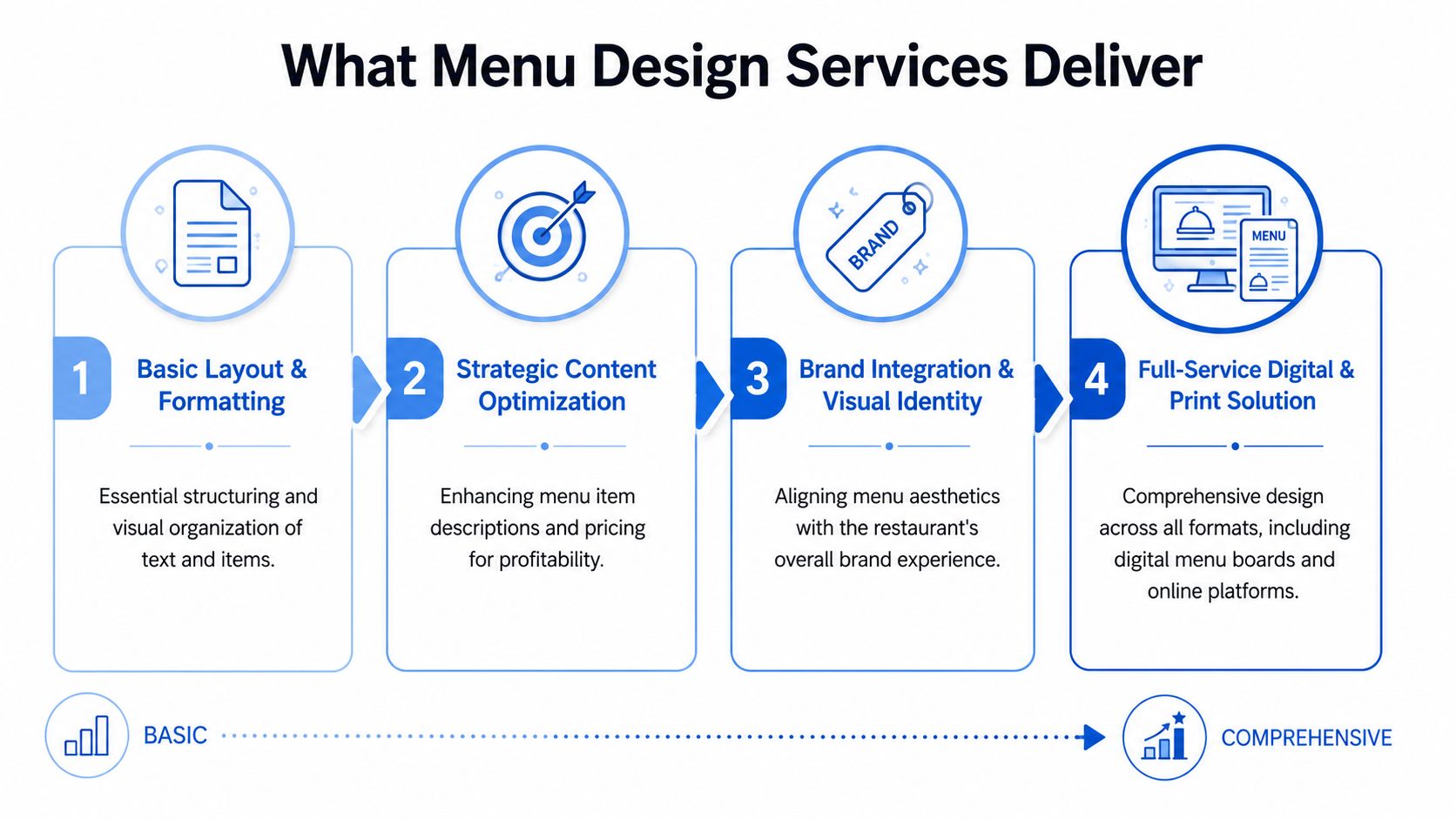
Four service levels you'll actually see
Basic layout and formatting
This is the entry level. A designer cleans up sections, aligns pricing, improves spacing, and makes the menu readable. It's useful if your current menu looks chaotic, but it won't solve deeper performance problems on its own.
Strategic content optimization
This level gets closer to commercial value. The service includes item naming, tighter descriptions, selective emphasis, and price presentation designed to steer attention. At this level, menus stop being informational and start becoming persuasive.
Brand integration and visual identity
Here the menu starts matching the rest of the guest experience. The typography, tone, photos, and structure reinforce what kind of restaurant you are. That matters because a premium concept with a bargain-looking menu sends the wrong signal before the first bite.
Full-service digital and print solution
This is the serious operator tier. The provider handles print, QR, mobile viewing, digital boards, version control, and multi-format consistency. If you run multiple locations or update menus often, this is usually the only level that keeps up with operations.
For examples of how layout and visual presentation can support a more intentional guest journey, it's worth reviewing best designed menu examples.
What each level means in practice
A neighborhood café might need level two. The menu is readable, but it still undersells pastries, extras, and seasonal drinks.
A fast-casual group usually needs level four. Different stores run different promos, availability changes quickly, and digital ordering has to match what's on in-store screens and printed collateral.
The wrong service gives you a prettier menu. The right service gives you a menu your team can actually operate.
If you're evaluating providers, ask what happens after the first design file is approved. If the answer is basically “we send the PDF,” keep looking. Modern menu design should support updates, testing, and day-to-day control.
The Business Case Why Modern Menu Design Matters
Friday dinner service. A four-top opens your menu, stalls for two minutes, asks three basic questions, skips the add-on you wanted to sell, and orders the safest option. That is not a branding problem. It is a revenue and throughput problem.
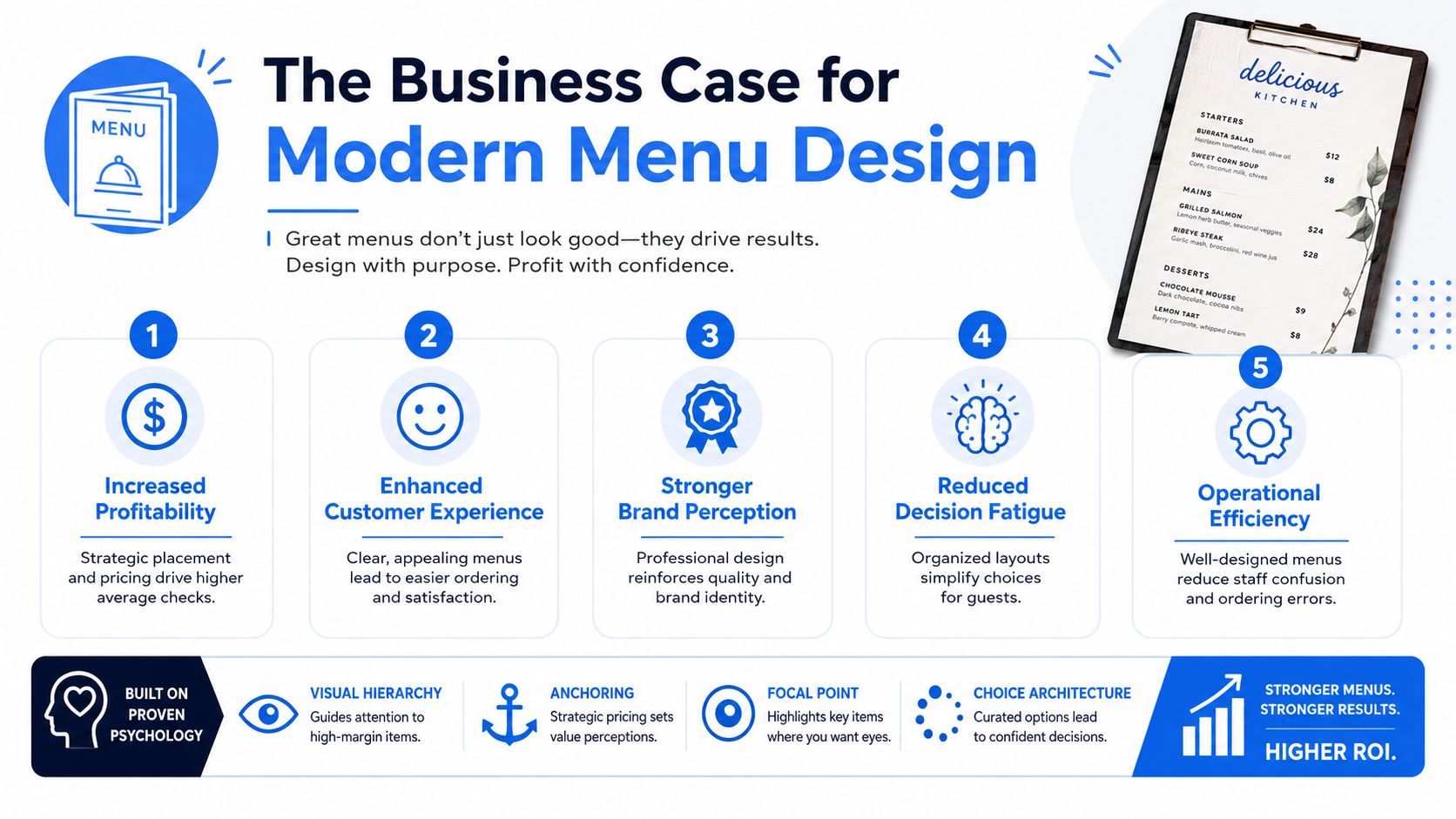
Modern menu design affects three numbers that operators should care about: average check, item mix, and ordering speed. If a redesign does not improve one of those, it was decoration.
Layout changes that influence ordering behavior
Guests do not read menus line by line. They scan for anchors, compare a few options, and decide fast. Your design job is to guide that scan toward high-margin items, profitable combos, and easy upgrades.
Classic menu psychology still matters, but operators should stop treating it like a set of print-era tricks. A key question in 2026 is whether layout changes produce measurable gains across dine-in, QR, online ordering, and digital boards. If you cannot track item mix before and after the redesign, you are guessing.
According to Escoffier's menu design best practices, placement patterns such as the Golden Triangle and principles like primacy and recency can influence what guests notice first. The practical takeaway is simple. Put your highest-contribution items where attention naturally lands, and stop giving equal space to weak sellers.
The same source recommends limiting choice within sections to reduce decision fatigue. That matters on the floor. A tighter menu cuts hesitation, reduces clarification questions, and helps staff move orders through the line faster.
For operators focused on measurable profit gains, restaurant menu optimization strategies are more useful than generic design inspiration.
Here's a quick walkthrough worth watching before your next redesign discussion.
Pricing and readability affect conversion
Poor pricing display creates friction. Friction lowers conversion.
UPrinting's restaurant menu design guidance recommends formatting prices in ways that reduce unnecessary attention on cost, keeping descriptions tight, limiting font variation, and preserving strong contrast for readability. Those are not cosmetic choices. They help guests process options faster and make staff spend less time decoding the menu for them.
Operators often make the same expensive mistake. They add more items, more modifiers, more callouts, and longer descriptions because they want the menu to sell everything. The result is slower decisions, weaker merchandising, and more orders flowing to familiar low-margin choices.
A profitable menu makes profitable choices easy to spot, easy to understand, and easy to order. That standard applies to print, QR, first-party ordering, and any screen a guest touches. In 2026, menu design earns its budget when it improves measurable performance across all of them.
Print vs Digital Menus A Practical Comparison for 2026
Print still has a place. Digital now has the advantage where speed, flexibility, and operational control matter most.
The mistake is treating this as a style decision. It's an execution decision. You're choosing between a fixed asset and a live system.
Where print still works
Print is still useful when the dining experience depends on tactile presentation. A well-made wine list, a premium tasting menu, or a concise café menu can benefit from a physical format that supports the brand.
Print also works when the menu changes rarely and the operation is simple. If availability is stable, pricing is steady, and the menu is short, the maintenance burden stays manageable.
That said, print becomes frustrating fast when any of these are true:
- Frequent price changes: You can't react quickly without reprints or ugly edits.
- Seasonal items: Temporary inserts create clutter and inconsistency.
- Multiple locations: Version control turns into a constant cleanup job.
- Allergy and modifier updates: Staff end up filling the gap verbally.
Why digital now carries the bigger upside
Digital and QR menus solve the update problem first. That alone is enough for many operators. But the bigger upside is control.
A digital-first menu lets you:
- Update instantly: Change pricing, availability, or descriptions without waiting on print.
- Reduce staff repetition: Guests can see current specials, modifiers, and bundles on their phones.
- Support channel consistency: Website, QR, and in-venue menus can match instead of drifting apart.
- Test merchandising decisions: You can move items, rewrite descriptions, and compare results over time.
- Use real menu analytics: You can finally see what people click, view, and order.
That's why static menu advice is aging badly. The stronger direction now is dynamic design tied to operations, with instant updates, QR access, ADA-aware design, and consistency across channels, as highlighted in The FoodyGram's take on restaurant menu design services.
If you're planning for 2026, don't ask whether digital menus are trendy. Ask whether your current menu system lets you react quickly without creating extra work for managers and servers. That's the better question.
Integrating Your Menu into Restaurant Operations
A modern menu isn't a standalone file. It's part of the operating system of the restaurant.
If the menu doesn't connect cleanly to ordering, reporting, and updates, the design quality won't matter for long. Staff will work around it, guests will hit friction, and the menu will drift out of sync with what the kitchen can deliver.
Your menu should connect to the rest of the stack
At minimum, your menu system should fit around the tools you already use.
That includes the POS, any online ordering layer, table QR flow, kitchen coordination, and location-level editing. If a manager has to update the same item in multiple places, the system is inefficient. If staff have to explain mismatches between the QR menu and the in-house offering, the system is breaking trust.
A practical setup should support:
- Fast mobile loading: Guests won't wait around for a slow menu page.
- No app requirement: Scanning should open the menu immediately.
- Simple item control: Managers should be able to pause or edit items quickly.
- Channel alignment: Dine-in, pickup, and web menus should stay consistent.
- Location variation: Multi-unit operators need store-specific control without chaos.
For operators evaluating how digital menu systems can support front-of-house and back-of-house coordination together, menu board and kitchen workflows are worth studying.
If your menu update process still depends on texting files back and forth, it's too fragile.
What operators should watch on privacy and usability
Good menu tech should make ordering easier, not more invasive.
That means consent should be clear, data collection should be deliberate, and guest experience should stay simple. If your digital menu asks for too much too early, people bounce. If it hides key information behind bad mobile design, you create the same friction you were trying to remove.
The operational side matters too. ADA-aware design, readable typography, accessible color contrast, and clear tap targets aren't extras. They reduce confusion for guests and lower support load for staff.
The best test is simple. Open the menu on your own phone, on weak Wi-Fi, with one hand, while standing at a busy table. If the experience feels slow or cluttered to you, it's worse for guests.
How to Choose the Right Menu Design Partner
Friday night. A best seller is buried in the middle of page two, the QR menu loads slowly, and servers keep explaining modifiers that should be clear on the screen. Guests order the safe option, staff lose time, and your menu drags revenue down.
Choose a partner who can fix that.
The right menu design partner should improve sales performance, reduce update friction, and make the menu easier to run across print, web, QR, and third-party ordering channels. If the conversation stays stuck on fonts, colors, and mockups, you are talking to the wrong vendor.
What to value more than visual taste
Start with business understanding.
A strong partner asks how you make money. They ask which items carry margin, which categories need better visibility, where guests hesitate, how often pricing changes, who updates menus, and how menu differences across locations are handled. They should also ask what success looks like after launch. Higher average check. Better attachment rates. Faster menu updates. Fewer ordering mistakes.
Use these filters:
- Commercial thinking: They connect design choices to item mix, margin, and average check.
- Operational fit: Their process works for operators who need quick edits and clean version control.
- Digital fluency: They know how menus behave on phones, QR pages, kiosks, and online ordering flows.
- Measurement discipline: They define what to track after launch and how often to review it.
- Support clarity: They spell out who handles edits, approvals, rollout timing, and issue resolution.
One more test matters. Ask how they handle menu decisions when brand preference conflicts with sales data. A serious partner gives a business answer, not a design answer.
The wrong buying criteria
A polished portfolio is easy to overvalue.
Pretty menus do not guarantee stronger performance. In 2026, the useful question is whether the partner can prove they understand menu ROI and can build a system your team can maintain. If they hand over static files and disappear, your managers inherit the inherent cost.
Watch for these warning signs:
| What they emphasize | What it usually means |
|---|---|
| Visual style above all else | They may ignore product mix, ordering flow, and margin priorities |
| One-time file delivery | Your team will struggle with updates almost immediately |
| No post-launch review process | They are not set up to improve performance over time |
| Weak mobile and QR experience | They are solving a print problem, not a modern revenue problem |
| No questions about operations | They do not understand how menu changes affect service and staff workload |
Hire the team that can explain trade-offs clearly. Why one item should be promoted and another should be demoted. Why a digital menu needs a different structure than a printed one. Why update speed matters as much as layout quality.
The best partner acts like a revenue operator with design skills. That is the standard.
Your Vendor Evaluation Checklist and Key Questions
A vendor call should tell you one thing fast. Can this team improve menu performance, or are they selling polished files your staff will have to babysit?
Use the call to test operating fit, not creative chemistry. In 2026, the right partner should speak clearly about QR conversion, update speed, analytics, and rollout control. If they keep drifting back to fonts, colors, and mockups, you are talking to a designer, not a revenue partner.
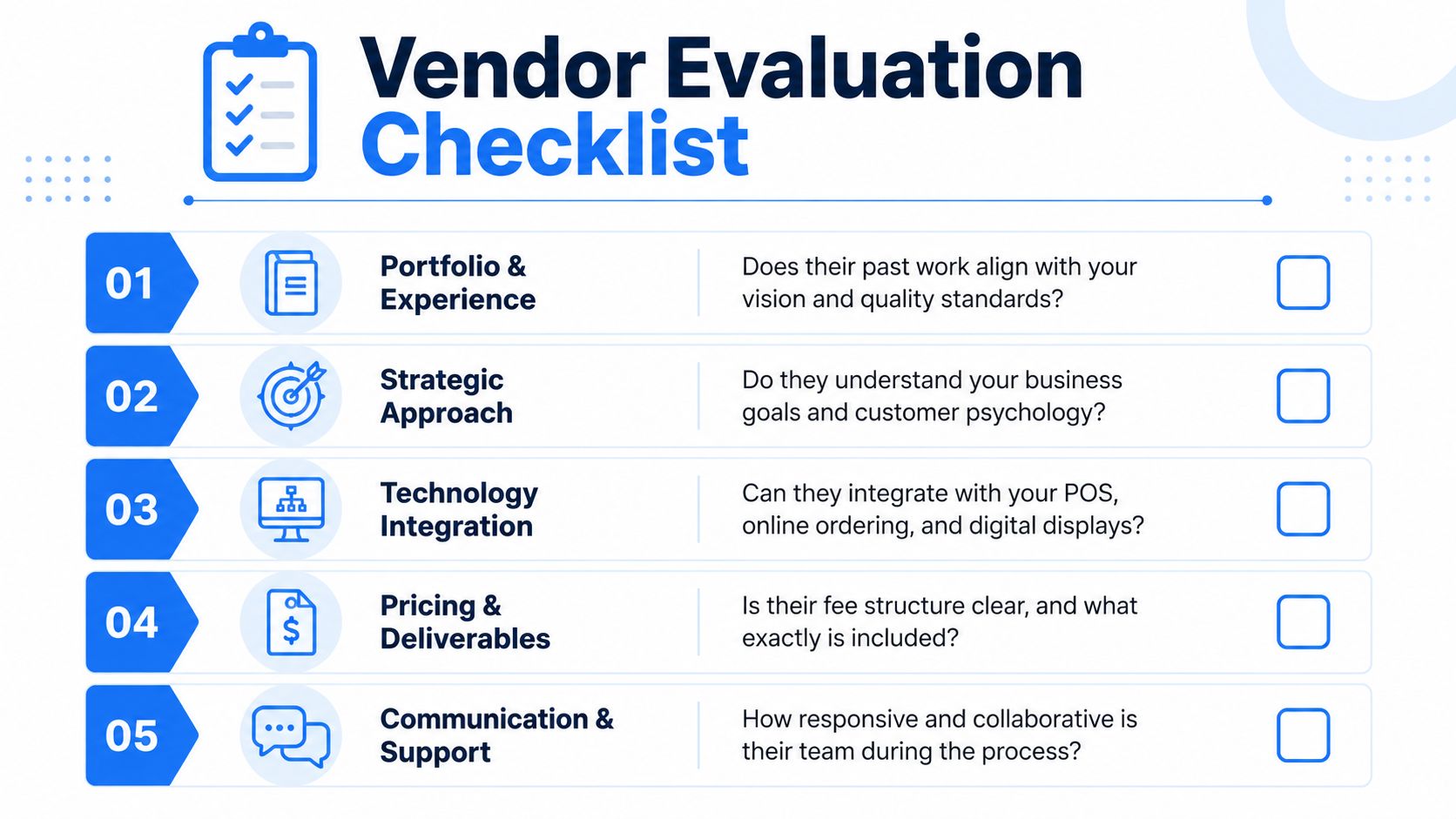
Core requirements
- Mobile-first usability: Ask them to show the menu on a phone, not a desktop screen.
- Fast update workflow: A manager should be able to change pricing, availability, or promos without waiting on an agency queue.
- Clear selling logic: They should explain why high-margin items get priority and how the layout supports better ordering behavior.
- Digital and print coordination: Digital-first operators still need consistent pricing, naming, and placement across every format.
- Analytics visibility: You need access to menu performance data, not just exported design files.
- Multi-location control: If you run more than one store, location-level edits and permissions should be built in.
- Accessibility basics: Readability, contrast, tap targets, and clean navigation should be part of the system from day one.
Questions to ask on every vendor call
Ask blunt questions. Good vendors answer with process, owners, and examples.
- How do you measure success after launch?
- Which menu performance metrics should we review every month?
- How do you handle updates for outages, dayparts, limited-time offers, and price changes?
- What is your approach to QR flow and mobile usability?
- How do you support store-level variation without creating brand drift?
- Who owns the files, platform access, and menu structure after launch?
- What happens when we need a change during service or on a weekend?
Push for specifics. Ask who makes edits, how long changes take, what gets tracked after launch, and how they decide whether a menu revision worked. If the answer is vague, the work will be vague too.
The best vendor treats hard questions like standard operating questions, not a threat.
If a provider cannot connect design decisions to revenue, labor time, and update control, keep looking. Static design is cheap to buy and expensive to live with.
If you want a menu system built around revenue, speed, and day-to-day practicality, RevMenue is worth a look. It helps restaurants replace static menus with fast QR experiences, instant updates, built-in upsell logic, and analytics that make menu decisions easier to justify. For operators who care about margins and cleaner execution, that's the right direction.