
Most restaurants aren't losing money because the team isn't working hard enough. They're losing it because the operation is busy, messy, reactive, and full of small leaks that stack up all day.
You know the pattern. Full dining room. Printer spitting tickets. Staff running. Owner covering gaps. End of week, margins still look thin, labor feels heavy, and nobody has the energy to fix the system because service starts again in a few hours.
That's why learning how to improve operational efficiency matters. Not as a corporate exercise. As a way to get control back. Better efficiency means fewer wasted steps, fewer avoidable errors, better guest flow, stronger average tickets, and less pressure on your team. Done properly, it makes the restaurant easier to run and more profitable at the same time.
Table of Contents
- From Busy to Profitable Why Efficiency Matters
- First Find Your North Star KPIs
- Map and Streamline Your Core Workflows
- Reduce Friction with Smart Digital Tools
- Engineer Your Menu and Schedule for Profit
- Your 30-Day Rollout Plan and Common Pitfalls
From Busy to Profitable Why Efficiency Matters
A packed restaurant can still be badly run.
That's the trap. Owners often mistake motion for performance. If the floor is full and the kitchen is pumping, it feels like the business is healthy. But if service is slow, the menu is bloated, labor is scheduled by habit, and managers spend their day chasing problems, the restaurant is carrying unnecessary weight.
Operational efficiency is just this. Getting more output from the same effort without making the guest experience worse. In restaurants, that means fewer wasted touches, cleaner handoffs, better menu design, tighter scheduling, and faster decisions.
Why busy teams still feel stuck
Most operators don't have an effort problem. They have a design problem.
Common signs include:
- Staff doing low-value tasks: rewriting specials, answering the same menu questions, double-entering orders, chasing stock issues
- Managers acting as firefighters: fixing shift gaps, comping avoidable mistakes, solving preventable kitchen delays
- Revenue left on the table: strong footfall but weak add-ons, poor item mix, and inconsistent upselling
- Guests feeling friction: slow payment, long waits to order, and confusion at the table
Efficiency should remove stress before it cuts cost.
That's the right way to think about it. If a change reduces workload, sharpens service, and improves margin, keep it. If it creates admin for the sake of admin, skip it.
What smarter operations look like
A more efficient restaurant doesn't feel robotic. It feels calmer.
Servers spend more time selling and less time explaining. Kitchen staff work from clearer tickets and cleaner prep systems. Managers review a few meaningful numbers instead of drowning in reports. Guests get a smoother experience because the operation stops fighting itself.
Practical examples:
- A café reduces ordering friction with a mobile menu, so staff can focus on hospitality instead of repeating modifiers.
- A casual dining venue trims underperforming dishes, making prep simpler and service more consistent.
- A multi-site operator standardizes opening and handoff routines, so every location starts service in control.
If you want better margins, lower workload, and a business that doesn't depend on constant heroics, efficiency isn't optional. It's the operating system.
First Find Your North Star KPIs
Most operators track too much and act on too little. You don't need a dashboard full of vanity metrics. You need a short list of numbers that tell you whether the restaurant is becoming easier to run and more profitable.
Track the numbers that actually move margin
Start with prime cost.
Prime cost is food cost plus labor cost, and it should ideally stay below 60% of total sales. Operators who track it weekly instead of monthly can catch problems like incorrect portioning before they snowball, and those errors often inflate costs by 2% to 4% before payroll closes, according to restaurant efficiency benchmarks.
If you want a useful KPI reference point, this guide on restaurant KPI tracking is worth keeping open while you build your scorecard.
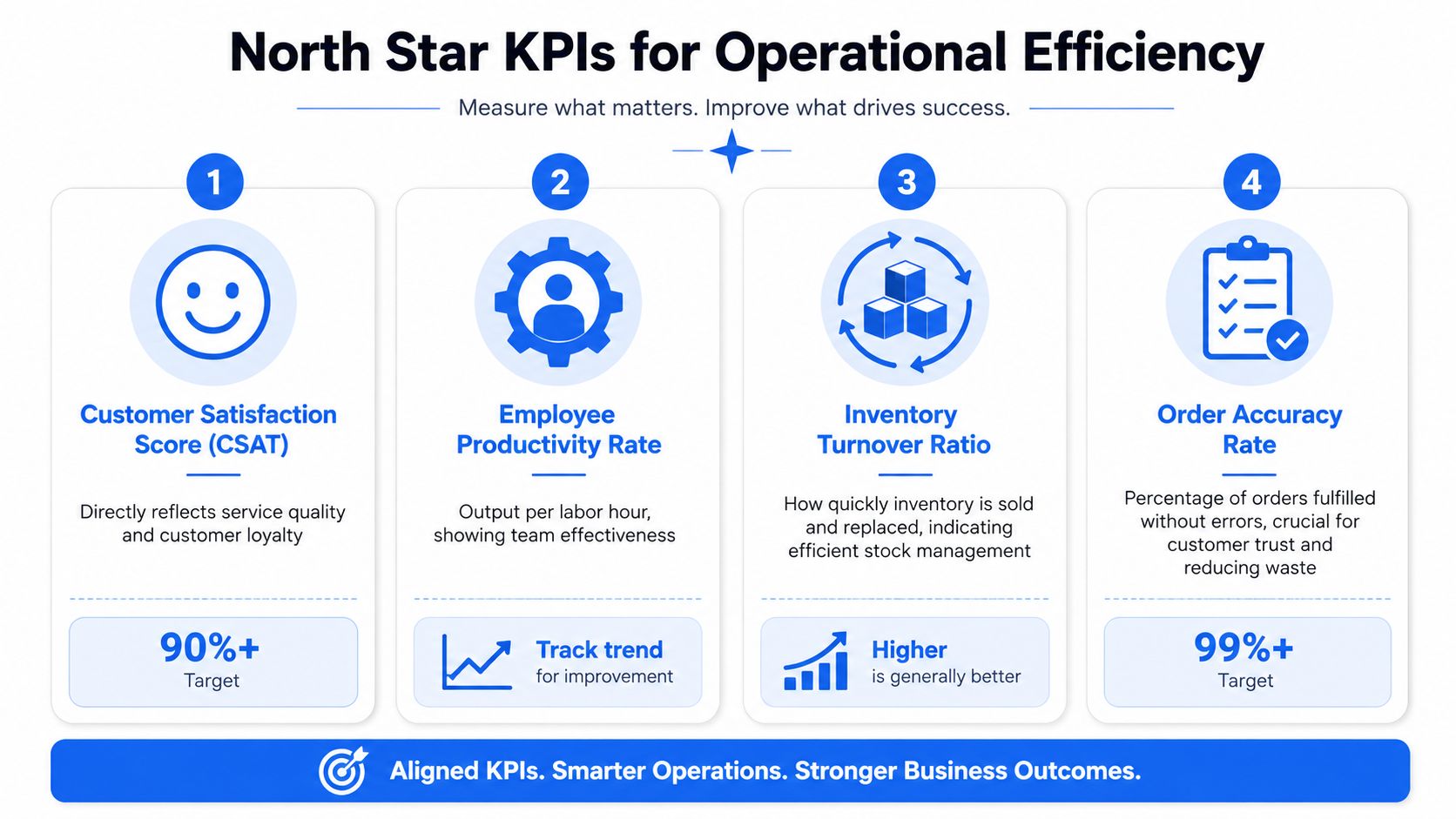
Then add the three operating metrics that show whether service flow and sales quality are improving:
| KPI | What it tells you | Simple way to calculate |
|---|---|---|
| Average Order Value | Whether guests are buying enough per transaction | Total sales divided by total orders |
| Table Turnover Rate | How efficiently you use seats | Number of parties served divided by number of tables |
| RevPASH | Revenue per available seat hour | Sales divided by available seats and operating hours |
A simple scorecard for operators
Don't overcomplicate this. Build one weekly scorecard and review it at the same time every week.
Focus on:
- Prime Cost: Your main control metric for margin.
- AOV: A quick read on menu design, upselling, and order flow.
- Table Turnover: A clean indicator of front-of-house friction.
- RevPASH: The best reality check for whether your seating capacity is producing enough.
Here's a practical way to use them together:
- If AOV is flat but traffic is strong: your menu isn't guiding guests toward higher-margin combinations.
- If turnover is weak: ordering, firing, or payment is too slow.
- If RevPASH is soft during peak windows: the room is full, but the seat economics are poor.
- If prime cost creeps up: fix labor deployment and portion control first.
Practical rule: Review these numbers weekly, not monthly. Monthly reviews are late reviews.
A neighborhood bistro, for example, might think the problem is “not enough covers.” But the underlying issue could be slower table turns on weekends and weak drink attachment. Another site might blame labor, when the deeper problem is an overbuilt menu creating prep drag and ticket delays.
Good operators don't chase every metric. They protect a few numbers that tell the truth.
Map and Streamline Your Core Workflows
Most efficiency gains are hiding in plain sight. Not in a strategy deck. On the floor, at the pass, at the payment moment, and in the dead time between one task and the next.
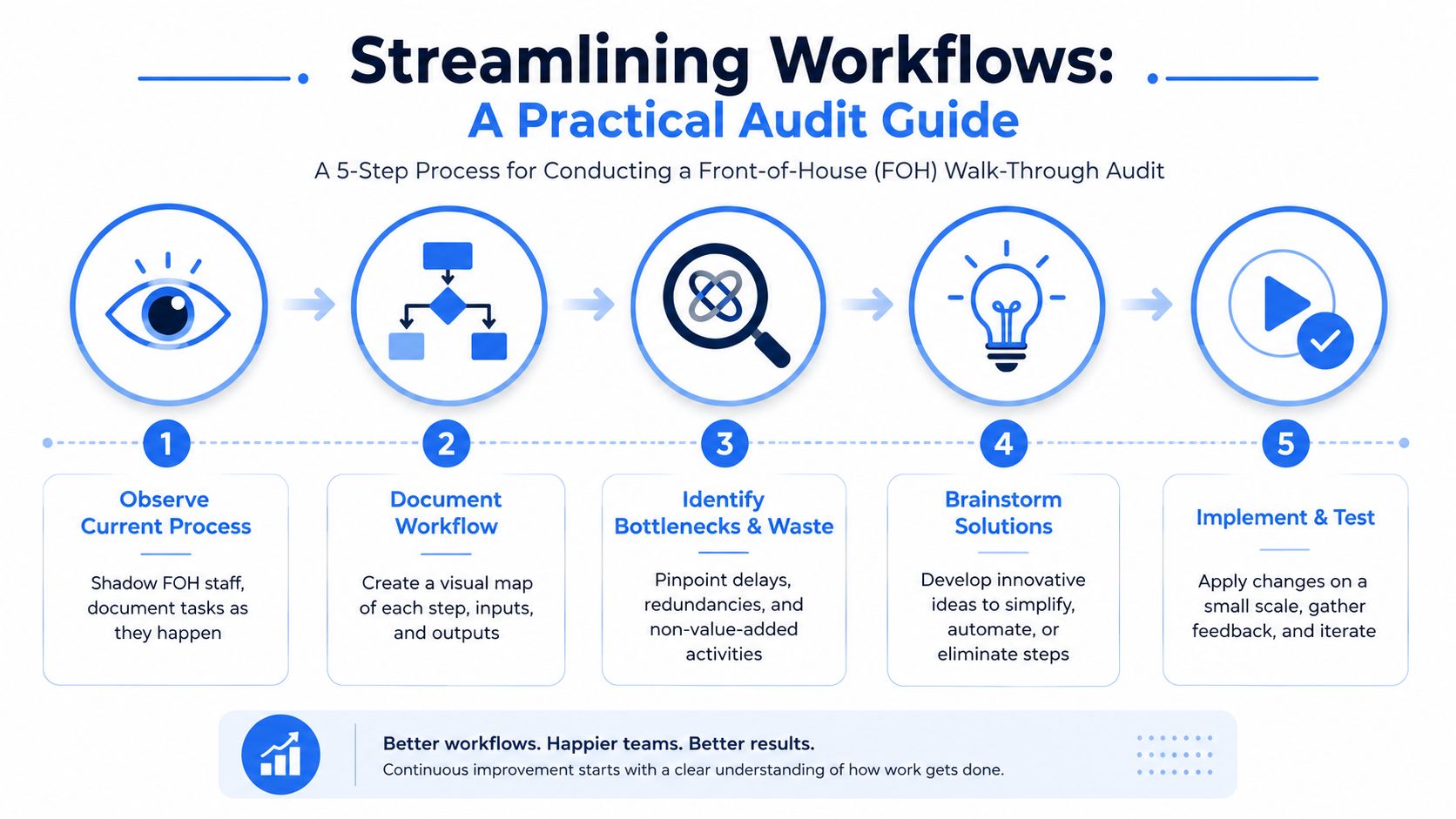
Start with a walk-through audit. Watch what happens during service. Don't ask people what they think happens. Follow the work.
Audit the guest journey in real time
Front-of-house problems usually show up as delays that everyone has normalized.
Walk the full guest path:
- Arrival: How long before someone acknowledges the guest?
- Seating: Is the host stand creating a queue?
- Ordering: Are servers repeating menu explanations table after table?
- Mid-meal service: Are drinks, condiments, and check-backs happening smoothly?
- Payment: Is the final step taking too long and blocking table reuse?
Watch for friction such as:
- Repeated questions: menu layout may be unclear
- Long gaps before first order: staffing or section design may be wrong
- Servers bunching at terminals: order entry is creating a bottleneck
- Slow bill settlement: payment flow is eating table time
A realistic example. In a busy brunch café, the issue often isn't kitchen capacity. It's the cluster at the till when half the room wants to pay at once. Fix that one moment, and the whole room feels faster.
A useful operations video can help your team see workflow issues with fresh eyes:
Tighten the kitchen handoffs
Back-of-house audits should follow one ticket from order to table.
Look at:
- Prep readiness: Are ingredients and stations set for service, or are cooks hunting for basics?
- Ticket clarity: Do modifiers create confusion?
- Expo discipline: Are dishes dying in the window because handoffs are messy?
- Communication gaps: Are FOH and BOH solving the same preventable mistakes every shift?
You're not looking for dramatic failures. You're looking for small, repeated interruptions.
A kitchen rarely has one giant problem. It has twenty small ones that steal seconds all night.
Turn the fix into a repeatable standard
Once you find a better way, lock it in.
A structured approach of auditing, standardizing, and optimizing workflows works because it forces operators to baseline cycle times and error rates first, then build SOPs for core tasks. The same operational guidance also notes that 30-day training refreshers are often needed to make adoption stick, as outlined in this operational excellence playbook.
SOPs don't need to be bloated manuals. Keep them lean.
Use them for tasks such as:
- Opening routines: who checks what, in what order
- Table reset standards: exact sequence, exact setup
- Order handoff process: when FOH flags allergies, fires courses, or escalates a delay
- Shift close: stock counts, cleaning priorities, and next-day prep notes
A good SOP removes guesswork. A bad SOP creates paperwork.
If your team can't use it during a live shift, it's too long.
Reduce Friction with Smart Digital Tools
It's 7:15 on a Friday. A server is explaining modifiers at table 12, another is chasing a card machine, and the kitchen is waiting on an order that still has not been keyed in correctly. That is not a staffing problem. It is a systems problem.
Smart tools fix friction when they remove repeat work, cut errors, and help the team serve more covers without adding pressure. If a tool does not save labor, protect margin, or improve guest flow, do not buy it.
Put digital tools where the work is repetitive
Start with the points in service where the same questions and delays happen every shift. Ordering, modifier handling, sold-out items, payment, and basic upsells are usually first.
A good digital menu or contactless ordering setup helps by:
- answering common item questions before a server gets pulled over
- reducing the lag between seating and ordering
- hiding unavailable items in real time
- making modifiers clearer and more consistent
- shortening the payment process
The benefit is practical. Faster, cleaner ordering creates more table capacity and frees staff to handle exceptions, recover service issues, and sell well instead of acting like data-entry clerks.
If you are reviewing options, this guide to restaurant management apps is a useful starting point.
Build upsells into the flow, not into a script
Too many operators rely on staff to remember every add-on prompt during a busy shift. That is lazy design.
Digital ordering lets you place the right prompt at the right moment. A side appears when a main is selected. A drink prompt shows before checkout. A bundle appears when the guest is already signaling intent. That raises average spend without turning the team into robots.
Use the reporting as hard as you use the interface. Toast outlines how restaurant analytics software helps operators track sales mix, item performance, labor, and inventory trends so they can make faster decisions on pricing, promos, and menu changes.
Use that visibility to answer questions that affect margin:
- Which items get attention but convert poorly?
- Which modifiers sell often enough to become bundles or defaults?
- Which add-ons deserve better placement?
- Which categories slow guests down and create unnecessary choice friction?
Roll this out in phases. Week one, fix digital ordering and payment. Week two, add upsell prompts. Week three, review item and modifier data, then clean up what is not converting. Busy operators do better with a short list of changes that stick than a full tech stack dumped on the team at once.
Keep the standard clear. Automate low-value tasks. Keep people focused on hospitality, judgment, and recovery. Those are the moments guests remember, and the moments that still need a human.
Engineer Your Menu and Schedule for Profit
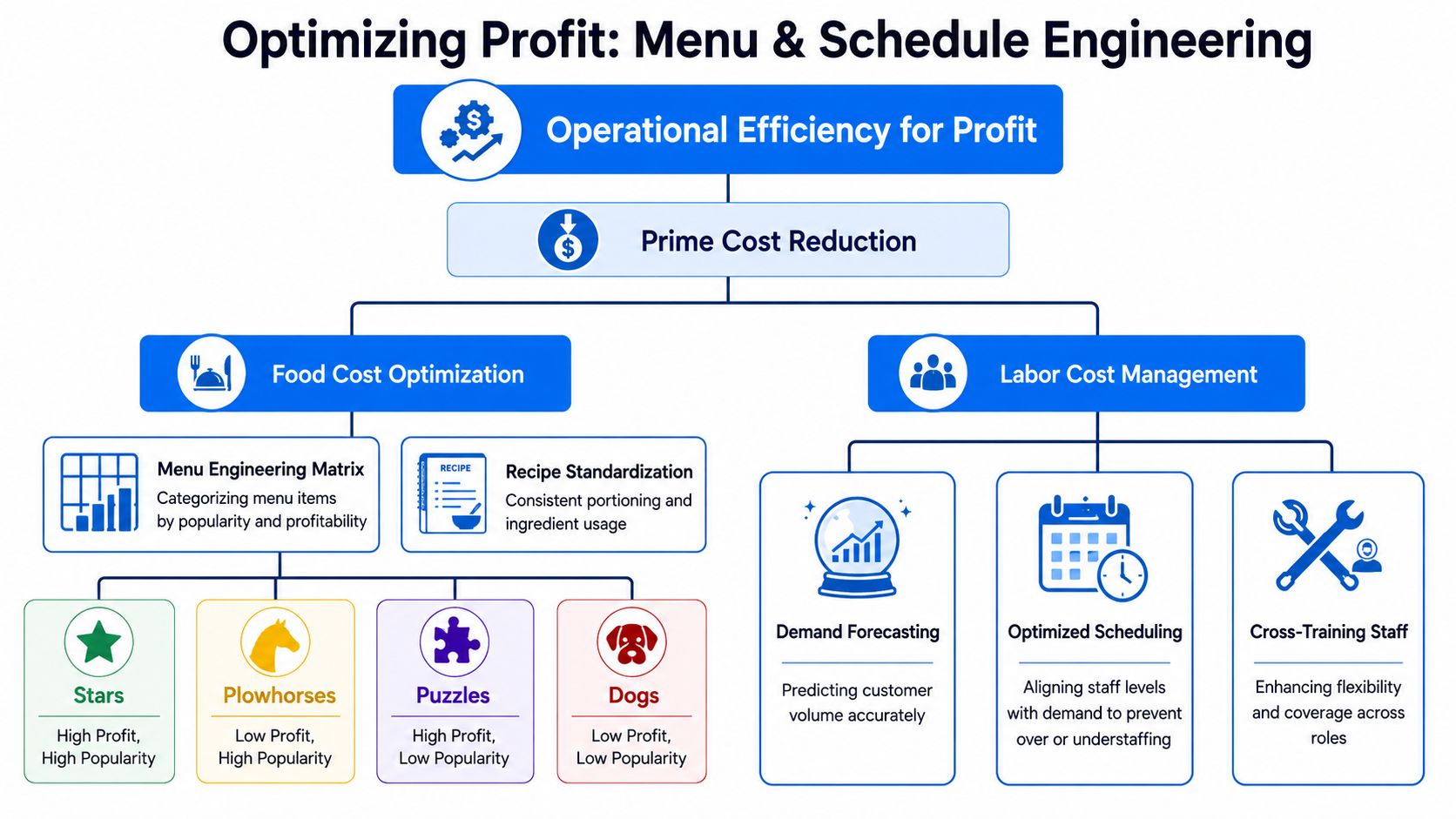
A restaurant can run smoothly and still underperform financially. Efficiency without margin discipline isn't enough. You need to shape both the menu and the labor plan around profit.
Cut menu confusion before you cut costs
Start with a simple menu engineering matrix. Four buckets are enough:
| Category | What it means | What to do |
|---|---|---|
| Stars | Popular and profitable | Feature them hard |
| Puzzles | Profitable but less popular | Rename, reposition, train staff to recommend |
| Plowhorses | Popular but less profitable | Adjust price, portion, or add-ons |
| Dogs | Low popularity and low profit | Remove or redesign |
This isn't theory. It's how operators stop protecting dishes that are sentimental but commercially weak.
Use your own sales mix and margin data. Then make decisions fast:
- keep high-margin crowd favorites visible
- rewrite confusing item names
- reduce duplication across similar dishes
- remove menu clutter that slows the kitchen and weakens choice architecture
For a practical framework, this guide to restaurant menu optimization can help structure the review.
A realistic example. If your burger variants sell evenly but three of them use separate low-volume ingredients, your menu isn't giving guests more choice. It's giving your kitchen more complexity.
Schedule to sales, not habit
Labor is usually the largest controllable cost, and too many operators still build rotas from memory.
That's expensive.
Demand-based scheduling can reduce labor costs by 5% to 15%, and labor typically represents 30% to 35% of total restaurant operating expenses. Those numbers make the case for aligning hours with real sales patterns instead of fixed assumptions, as noted earlier in the operational benchmark section.
Use POS trends by daypart, day of week, and sales volume. Then schedule to expected demand, not what “usually feels right.”
Practical changes:
- Trim weak shoulder periods: don't carry peak staffing into slow transitions
- Stage start times: bring people in when the sales curve rises, not all at once
- Cross-train key roles: give yourself flexibility when demand shifts
- Review actual versus scheduled: every week, compare rota decisions against sales reality
If you're always overstaffed on slow hours and short on rushes, the schedule isn't neutral. It's damaging both service and margin.
Menu engineering and smart scheduling work together. A tighter menu simplifies production. A better labor plan supports the actual demand pattern. That combination improves guest experience and protects profit at the same time.
Your 30-Day Rollout Plan and Common Pitfalls
Most operators don't need more ideas. They need a rollout plan they can survive.
The mistake is trying to fix everything at once. That creates implementation fatigue, confuses the team, and turns a good efficiency push into another half-finished project. A better approach is phased, narrow, and commercial from day one.
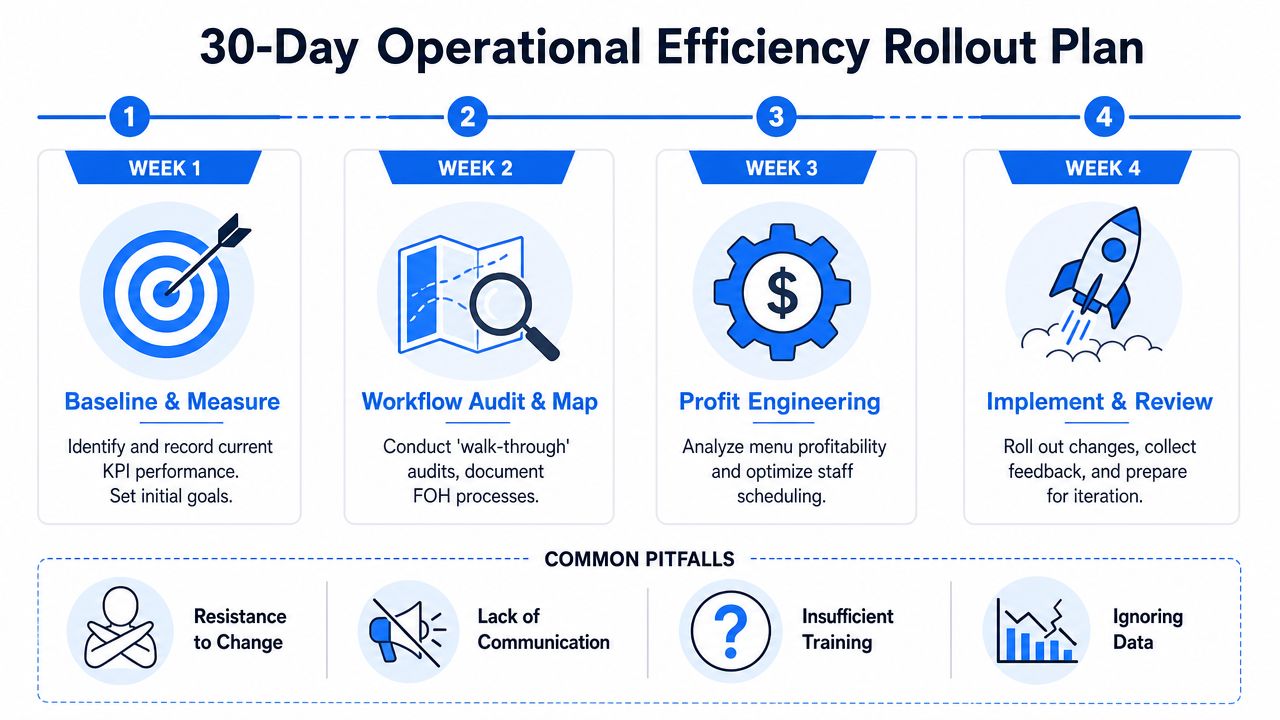
Week 1 and Week 2 focus
Week 1 is for baseline and one quick win.
Don't start by rewriting the whole operation. Start by measuring the handful of KPIs that matter and fixing one obvious source of friction.
Do this in Week 1:
- Pull a basic scorecard: prime cost, AOV, turnover, RevPASH
- Walk one full service: observe guest flow and kitchen handoffs
- Pick one friction point: slow payment, menu confusion, bunching at order entry, inconsistent table reset
- Set one team rule: something simple, visible, and easy to repeat
Examples of good Week 1 wins:
- removing a confusing menu section
- changing who owns the payment moment
- tightening pre-service setup so staff stop hunting for basics
- reducing duplicated side options that slow order-taking
Week 2 is for one digital fix.
Choose a tool that removes repetitive work quickly. Don't roll out a whole tech stack. Pick one high-friction area and solve it cleanly.
Good Week 2 targets:
- QR menu rollout
- digital ordering for selected tables or dayparts
- a better order-tracking flow
- simple menu analytics reporting
Train the team, then revisit the process after a few shifts. If the tool adds effort, simplify the setup.
Week 3 and Week 4 focus
Week 3 is for one profit decision.
By now you should have enough operating visibility to make one hard commercial choice.
Pick one:
- cut weak menu items
- reprice or reposition a profitable underordered item
- redesign bundles and add-ons
- shift labor coverage to match actual sales rhythm
Many operators frequently stall because they seek greater certainty. Don't. If the data is directionally clear and the operational burden is obvious, act.
Week 4 is for review and standardization.
Look at what changed in service flow, workload, and sales quality. Then lock in what worked.
Use Week 4 to:
- Review team feedback: what became easier, what still drags
- Check KPI movement: especially AOV, flow, and cost control
- Write lean SOPs: only for the changes that proved useful
- Schedule a refresher: reinforce the new routine before it slips
A short reset meeting at the end of the month is usually enough. The point isn't ceremony. The point is preventing the operation from drifting back to old habits.
The mistakes that drag good plans down
The biggest problem for small operators isn't lack of ambition. It's overload.
68% of small hospitality businesses lack dedicated operations staff, and 45% of small business efficiency initiatives fail because teams spend more time documenting processes than executing them. The operators who get results often simplify instead. Some improve flow by cutting 20% of menu items to reduce complexity rather than adding more process, according to this analysis of efficiency implementation fatigue.
That's the part many efficiency guides miss. More systems don't automatically mean better operations.
Watch for these common mistakes:
- Over-documenting: if your team is writing more than changing, you've gone too far
- Launching too much at once: one clean win beats five messy pilots
- Ignoring staff reality: if the team is already stretched, strip steps out before adding new ones
- Over-automating the guest experience: keep genuine interaction in front-of-house moments that matter
- Skipping follow-up: a change without reinforcement usually fades
Here's the simple rule. Make the business easier to run first. Then make it more advanced if needed.
If you're serious about how to improve operational efficiency, the smartest path is usually this:
- measure a few numbers
- remove one source of friction
- use one tool that saves labor and supports sales
- simplify the menu or schedule
- standardize only what proved useful
That's manageable. And manageable gets done.
If you want a practical place to start, RevMenue helps restaurants turn menus into an efficiency and revenue tool instead of a static PDF. It gives operators fast QR menus, cleaner digital ordering, built-in upsell logic, and usable analytics without forcing a full system overhaul. For busy teams, that makes it a smart first move when you want better flow, higher average tickets, and less manual work.