
You can have a line wrapped around the truck and still leave money on the table.
That happens when every order has to pass through one cramped service window, one staff member, one card reader, and one verbal handoff to the kitchen. The line looks healthy. The operation isn't. People see the wait, do the math, and walk to the next vendor.
A good food truck ordering system fixes the bottleneck. It doesn't just take payments. It moves ordering, payment, production, and pickup into a cleaner flow so your truck can serve more people without turning the inside of the truck into a traffic jam.
Table of Contents
- Your Line Is Long But Your Profits Are Not
- The Digital Hub for Your Mobile Kitchen
- Non-Negotiable Features for Mobile Operations
- A Checklist for Selecting Your Ordering System
- Your Quick Launch Timeline
- Key Metrics That Show Your System Is Working
Your Line Is Long But Your Profits Are Not
A slow line is a sales cap
Most operators notice the wrong signal first.
They see a long queue and assume demand is strong enough to carry the day. But if that line crawls, your truck is training customers to give up. At lunch, that means lost walk-ups. At festivals, it means lost volume during the only hours that really matter.
The problem is usually manual flow:
- One-person order taking slows the whole front end
- Verbal modifiers create mistakes and repeats
- Payment at the window holds up everyone behind the current guest
- Pickup crowding blocks the next order from even starting
When that happens, the line becomes a visual warning, not a sales asset.
Practical rule: If customers have time to study your wait before they study your menu, you're losing orders.
According to industry data reviewed by IBISWorld, food trucks with self-service ordering can process up to three times as many orders per hour during peak festival periods compared with counter-only service. The same review says this can raise average revenue per event by 40 to 50% and lift average ticket value by 25 to 35% through smart upselling.
Those numbers matter because they point to the same truth operators feel on the ground. Speed isn't a service issue alone. It's a profit issue.
What actually changes when ordering goes digital
The strongest setups split the order journey into parallel lanes.
Customers browse and pay on their phones or at a kiosk. Staff focus on making food. Pickup happens when the order is ready, not when the guest finally reaches the window. That removes the pileup caused by forcing every action into one narrow handoff point.
A practical example:
| Service model | What happens |
|---|---|
| Counter only | Customer waits to order, waits to pay, then waits again for food |
| Digital ordering flow | Customer orders and pays while staff produce, then collects when called |
This is why the best food truck ordering system isn't really about tech for tech's sake. It's about protecting your peak.
When your busiest hour is your whole margin, every extra order you can push through cleanly matters. Every abandoned customer matters too.
The Digital Hub for Your Mobile Kitchen
More than a card reader
A food truck ordering system should work like the digital hub of the truck. One connected setup should handle customer ordering, payment, kitchen communication, and reporting without forcing staff to jump between separate tools.
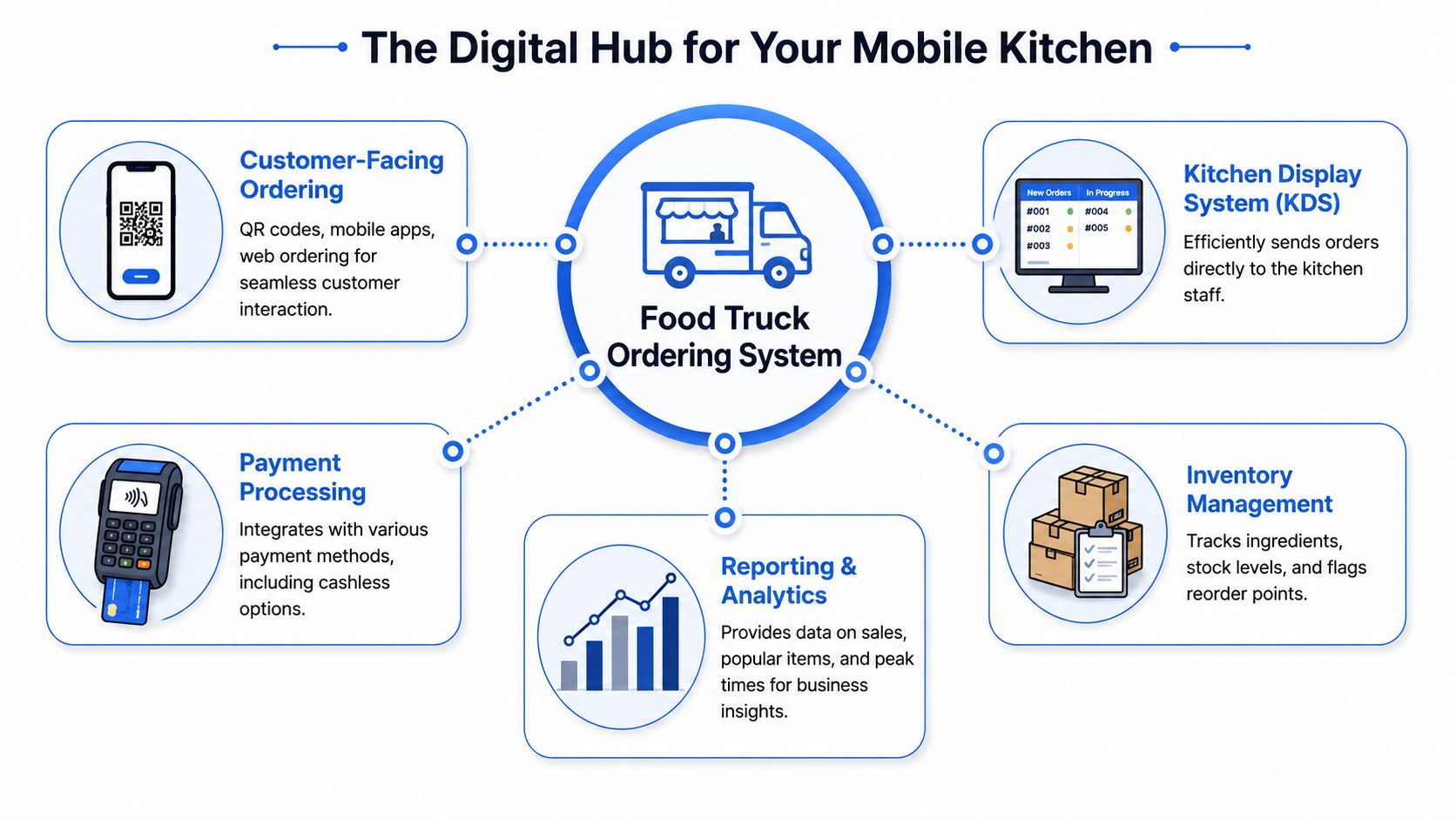
If you're still treating the POS as one thing, QR ordering as another, and kitchen tickets as a third, you're creating work for yourself. In a small truck, disconnected systems cause duplicate entry, missed modifiers, and dead time between payment and production.
That connected flow is why so many operators have moved this direction. In an industry survey reported by Business.com, nearly 9 in 10 food truck owners rely on digital tools such as mobile POS systems and online ordering platforms to run their businesses.
The old way versus the integrated way
The old method is familiar:
- Shout the order to the cook
- Mark it by hand on a pad or paper ticket
- Take payment separately
- Answer "Is mine ready?" ten times during the rush
It works until volume hits.
An integrated setup changes the rhythm:
- Customer scans and orders from a QR menu or web page
- Payment clears immediately through the same flow
- Order appears in the kitchen with modifiers attached
- Pickup notice goes out when the food is ready
That matters even more when menu changes happen fast. If you're running out of a protein, swapping a side, or changing a combo price before an event wave, digital updates beat crossed-out boards and verbal corrections every time.
If you're comparing front-of-house formats, it's worth looking at how digital menu boards for food trucks fit into the same system. The board attracts attention. The ordering stack handles the volume that follows.
A strong setup reduces the number of times staff have to repeat, re-enter, or re-explain an order.
Non-Negotiable Features for Mobile Operations
What matters inside a truck
A food truck has tighter constraints than a standard quick-service counter. Space is limited. Signal can get shaky at events. Staff don't have room for clunky hardware or slow screens. The system has to work fast with very little handholding.
That speed gain is real when the pieces are properly integrated. In field studies of mobile POS deployments, operators reported average order turnaround dropping from 3 to 5 minutes per order to 1.5 to 2.5 minutes with an integrated ordering system, while queue throughput increased by roughly 15 to 30% during peak hours.
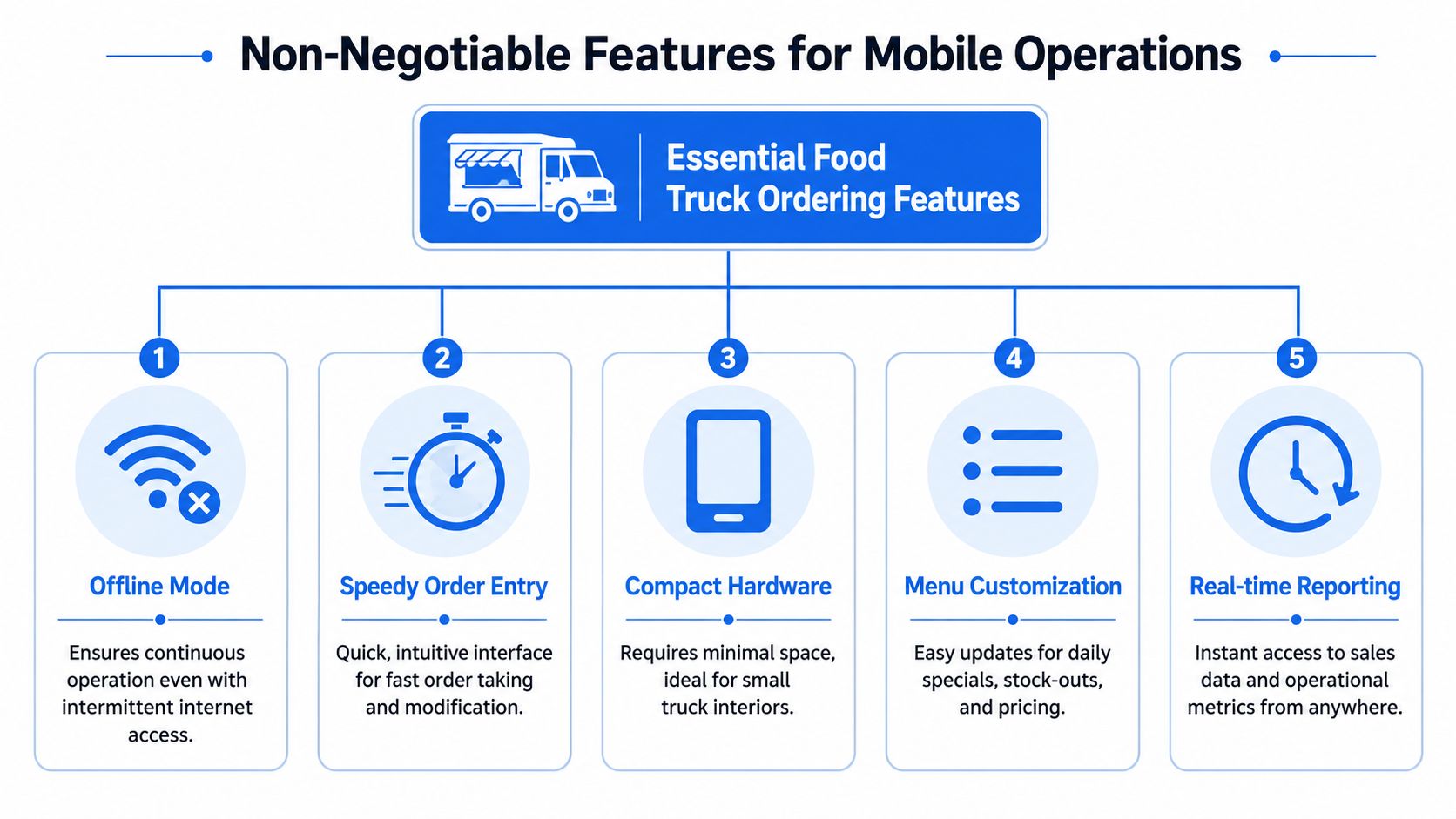
Here's the visual summary most operators should use when evaluating systems:
Features that earn their keep
Not every feature matters equally. These do.
QR ordering that loads fast
QR menus reduce crowding at the service window. They work best when the menu opens instantly, the item photos are clear, and the path to checkout is short. If guests need too many taps, they'll drift back to ordering verbally and your queue problem returns.Offline capability
Festivals, stadium lots, and dense downtown stops can be rough on connectivity. You need a system that keeps taking orders when signal drops and syncs cleanly later. If the tool freezes every time the network gets messy, it's not built for mobile operations.POS and payment integration
Orders, modifiers, taxes, and payment status should sit in one workflow. If staff have to confirm online orders in one app and card transactions in another, you create delay and extra mistakes.
A clean QR experience matters enough that many operators now start with digital menu QR code tools before adding more advanced workflows.
What weak systems get wrong
Some systems look impressive in a demo and fall apart in service.
Here are the common misses:
Too much hardware
A truck doesn't need a full counter footprint. You want compact tablets, a reliable printer or kitchen screen, and a payment device that doesn't eat workspace.Slow menu edits
If 86'ing an item takes support tickets or back-office gymnastics, you're stuck selling food you can't make. Good systems let you hide items, change modifiers, and push specials in seconds.No pickup communication
Customers bunch up at the window when they don't know what's happening. Order status texts or clear ready notifications reduce crowding and let staff keep producing.Weak upsell prompts
The best systems suggest add-ons at the right moment. Not every item needs a forced upsell. But fries with a sandwich, a drink with a combo, or an extra sauce before checkout is smart menu psychology, especially when staff don't have time to sell verbally.
This walkthrough is useful if you want to see how operators think about mobile setup in practice:
If your staff still have to memorize sold-out items, repeat modifiers back manually, and chase guests for pickup, the system isn't doing enough.
A Checklist for Selecting Your Ordering System
A vendor demo can make every platform sound polished. The right questions expose whether the system will reliably hold up in a truck.
Ask about integrations first
Start here, not with design.
Ask:
- Does it work with my current payment setup?
- Will orders flow into my existing POS, or do staff need a second screen?
- Can kitchen tickets print automatically or route to a kitchen display?
- Does it support SMS or on-screen pickup status?
If a platform wants to replace everything, be careful. Full replacement can work for some operators, but many trucks do better with software that fits around tools they already trust.
Keep hardware simple
Every extra device takes up space and creates one more thing to charge, mount, clean, and troubleshoot.
Use this quick check:
| Question | What you want |
|---|---|
| Can I use my own tablet? | Flexibility and lower setup friction |
| Does the reader pair quickly? | Fewer service interruptions |
| Can staff operate it with one hand? | Better use in tight service spaces |
| Is it readable outdoors? | Less slowdown in sunlight |
A practical setup is usually better than a flashy one. The truck environment punishes complexity fast.
Check the pricing model carefully
Don't stop at the monthly fee.
Ask whether the vendor charges:
- A flat subscription
- Per device fees
- Per location fees
- A percentage of online sales
- Extra charges for text notifications, menu changes, or support
The cheapest-looking option can turn expensive if every order runs through extra transaction layers. Operators should understand the full operating cost before they sign anything.
Don't ignore privacy and consent
Many owners get caught off guard by this.
If your QR menu collects emails, tracks order history, runs loyalty, or captures customer data for analytics, privacy rules may apply based on where you operate and where your customers are. According to guidance summarized here on food truck ordering system privacy risks, markets like the EU, UK, and Australia require explicit consent before collecting customer data via QR menus, and many guides leave that out.
That means you should ask vendors:
- How do consent notices appear in the ordering flow?
- Can guests manage preferences easily?
- What data is stored by default?
- How long is data retained?
- Can I turn off unnecessary collection?
Collect only the data you can explain, protect, and actually use.
A system that helps you sell more but creates avoidable compliance risk isn't a smart buy.
Your Quick Launch Timeline
You don't need a drawn-out rollout. You need a calm one.
Before you go live
Build the menu at the commissary, not during service. Clean up item names, modifiers, and photos. Remove anything that creates confusion at checkout.
Then prepare the operational basics:
- Print large QR signs customers can spot from the queue
- Create a short pickup instruction so guests know what happens after ordering
- Set sold-out rules for staff before service starts
- Test every modifier path on a customer phone, not just the admin view
Your first service
Don't debut the full system during your biggest rush.
Use a soft launch first. A slower weekday stop, friends-and-family service, or the first hour before peak is usually enough to reveal weak spots. Watch where people hesitate. That's where your flow needs work.
Good first-day practice looks like this:
- One person guides guests to scan and order
- One person watches production flow for modifier errors
- One person owns pickup so the window doesn't clog
After week one
Review what happened, not what the demo promised.
Look for repeated customer questions, items that slowed the kitchen, and add-ons nobody bought. Then simplify. Usually that means trimming modifiers, tightening combo structure, and making pickup messaging more obvious.
The operators who get good results fastest don't launch more features. They remove friction.
Key Metrics That Show Your System Is Working
Watch the numbers that change behavior
A food truck ordering system is worth keeping only if it improves flow and margin. The dashboard should help you spot that quickly.
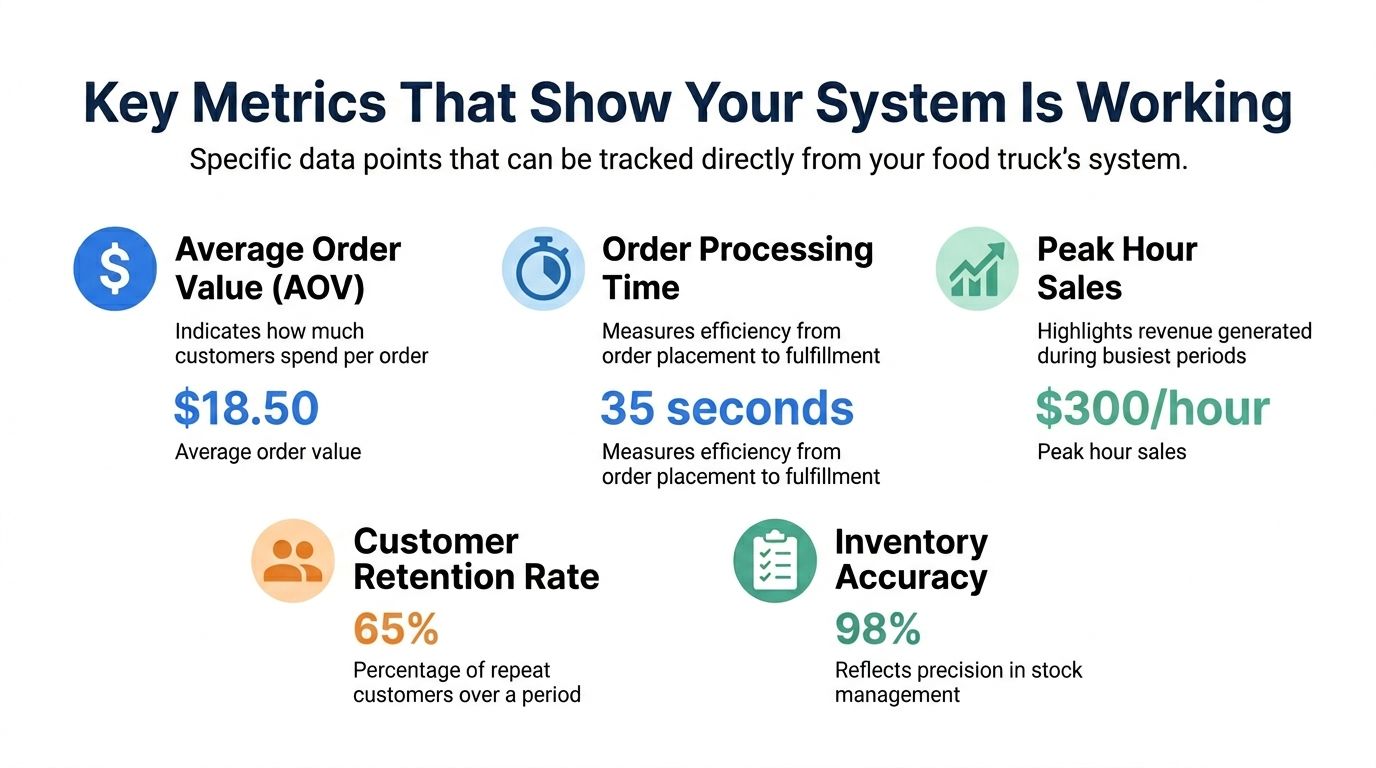
Track these first:
Average order value
If your digital menu is doing its job, customers should add extras, bundles, or drinks more consistently than they do in a rushed verbal order.Orders per hour
This is your cleanest throughput measure. If you changed the ordering flow but volume per hour didn't improve, something is still blocking the line.Ticket time
Watch the gap between order placement and ready-for-pickup. Long ticket times often mean the kitchen view, prep sequence, or menu structure needs tightening.Upsell attachment rate
Check how often sides, drinks, sauces, or combo upgrades get added. This tells you whether your menu psychology is working or your prompts are being ignored.
If you want a broader framework for dashboard review, these restaurant KPI examples are a good starting point.
What good movement looks like
You're not chasing vanity metrics. You're looking for cleaner service and stronger peaks.
The bigger market is already moving toward off-premises behavior. GoFoodservice's industry overview notes that off-premises dining accounts for nearly 75% of restaurant traffic, and it projects the US food truck market to reach USD 3.56 billion by 2033. That doesn't tell you which software to buy. It does tell you that digital ordering expectations aren't going away.
The win is simple:
- Customers order faster
- Staff answer fewer repetitive questions
- The kitchen gets cleaner tickets
- Your best hours produce more revenue
The right numbers should help you make next week's service better, not just describe last week's sales.
If you're ready to tighten service flow and turn more scans into higher-margin orders, RevMenue is worth a look. It helps operators replace static menus with fast QR ordering, smart upsells, and real-time menu analytics, while working alongside existing POS and payment tools so you don't have to rebuild the whole operation.