
Digital menu board software is a cloud-based system that lets you control what's shown on in-venue screens, allowing instant updates to prices, items, and promotions from a single dashboard. It matters because operators can move menu updates from hours to seconds, and one reported rollout at McDonald's was linked to a 3% to 5% lift in average ticket value.
Most restaurants lose money through menu friction every day. An item sells out, the board still shows it, staff waste time explaining, guests get annoyed, and the line slows down.
That's the core reason digital menus matter. Not because they look modern. Because they fix operational drag, protect margin, and give you more control over what people buy.
If your current setup still depends on printed inserts, manual tape-ons, or a manager hunting for the “latest version” of the menu file, you're already behind. Good digital menu board software solves that. Bad software just gives you a prettier headache.
Table of Contents
- What Is Digital Menu Board Software Really
- The Real Business Case for Digital Menus
- Core Features That Drive Restaurant Profit
- Your Digital Menu Board Implementation Checklist
- How to Choose the Right Software Partner
- Making Your Digital Menu a Revenue Engine
What Is Digital Menu Board Software Really
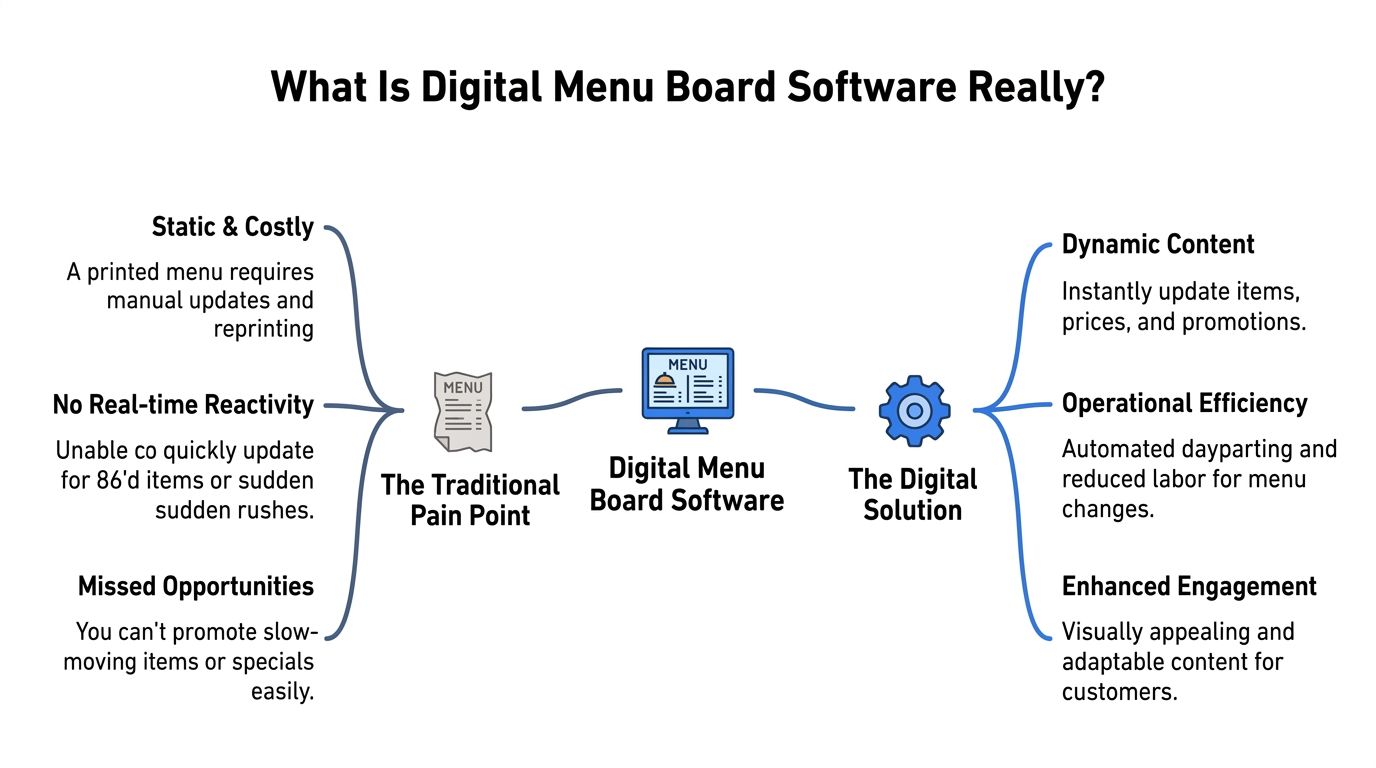
A printed menu is a static cost center. Once it's on the wall, it can't react to an 86'd item, a sudden ingredient shortage, or a push to sell a higher-margin combo before close.
Digital menu board software fixes that by giving operators live control over the menu in service, not after service. The useful definition isn't technical. It's practical. It's the system your team uses to change what guests see without reprinting, reformatting, or calling someone from head office.
It's not a slideshow
A lot of operators buy the wrong thing because they confuse a screen with a system. A TV running a looping image isn't digital menu board software. It's just a digital poster.
What you need is a cloud-based CMS that controls the content on in-venue screens, supports real-time edits, daypart scheduling, multi-location management, and analytics from one dashboard. And there's one operational test that matters more than the feature list. Staff should be able to push a mid-service change from a phone or browser in under about two minutes, or the setup isn't built for hospitality workflows, as noted in this guide on choosing the right digital menu board software.
Practical rule: If your manager can't remove a sold-out item during service fast enough to stop the next few orders, the software isn't helping.
What the system should handle without drama
At minimum, digital menu board software should make these jobs easy:
- Price updates: Change pricing once, push it live, and stop relying on staff memory.
- Item availability: Remove sold-out items before the next guest asks for them.
- Daypart switches: Show breakfast in the morning, lunch later, and happy hour when it starts.
- Promotion control: Feature the items you need to move, when you need to move them.
- Location consistency: Keep stores aligned without sending revised PDFs back and forth.
That's the shift. Static menus force work onto staff. Good software removes that work.
Here's the mindset I'd use. Don't buy digital menu board software to “go digital.” Buy it to reduce menu lag between what your kitchen can sell and what your guests can see.
The Real Business Case for Digital Menus
Friday lunch rush. The fryer is backed up, one prep item runs out early, and the menu board is still pushing the combo your kitchen can't assemble fast enough. Now your cashier has two jobs at once. Take the order and translate the menu into what is available. That is where digital menus either pay for themselves or become expensive screens.
The business case comes down to control in live service. You need to control what guests see, when they see it, and whether the item can be sold without slowing the line. If the board stays aligned with kitchen reality, service gets faster, order accuracy improves, and staff stop burning energy on avoidable explanations.
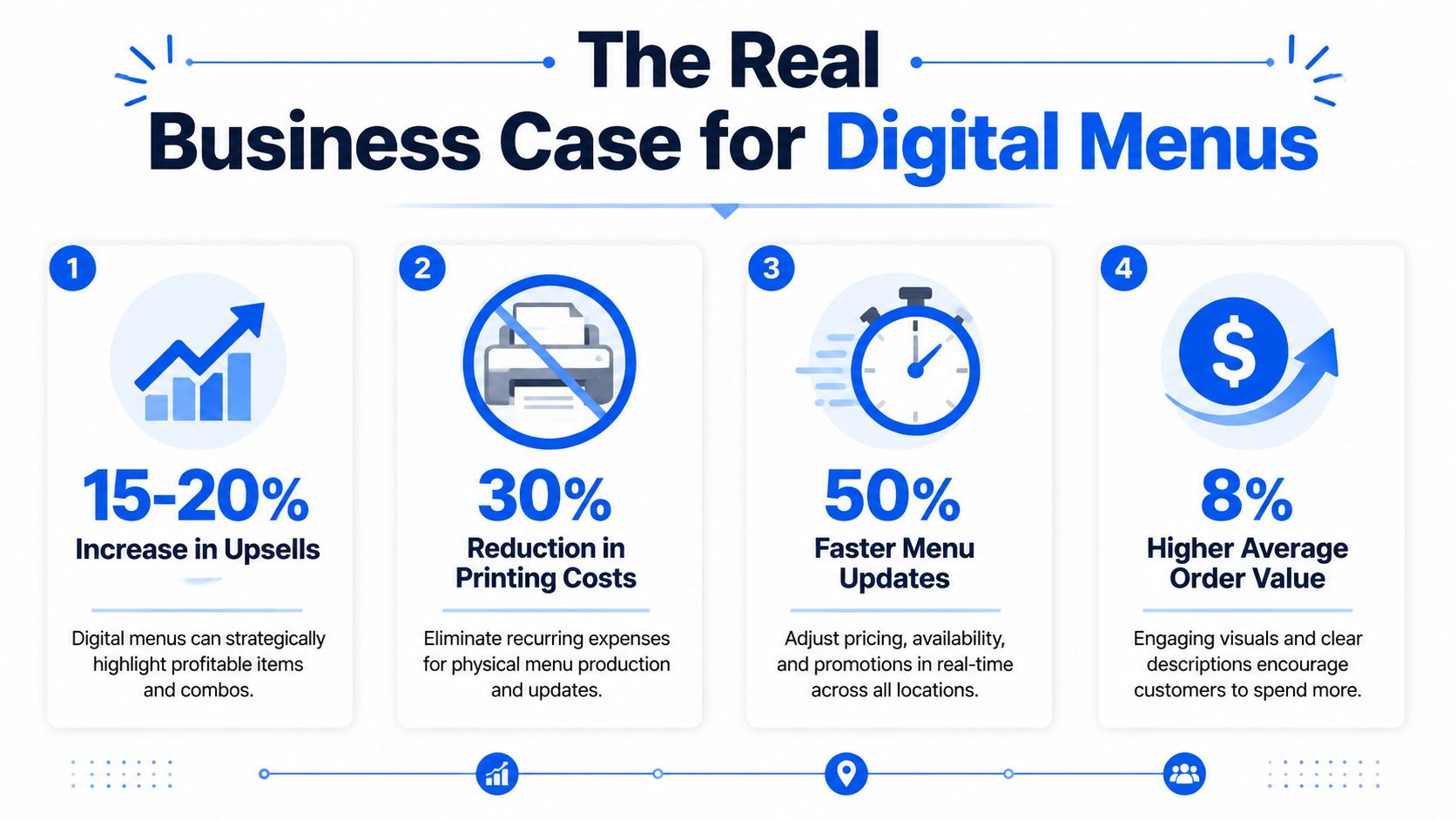
A useful benchmark is in this analysis of digital menu board revenue impact. It notes that menu updates can move from “hours to seconds” after implementation. The same source reports McDonald's saw average ticket values rise by 3% to 5% after deploying digital menu boards across U.S. locations. For a site doing $2 million annual revenue, that implies roughly $60,000 to $100,000 in additional sales.
Revenue comes from menu control you can use during service
Money usually shows up in a few places first.
- Better item mix: Put high-margin products in the positions guests scan first.
- Tighter daypart execution: Show the right menu at the right hour without relying on staff memory.
- Stronger promotion timing: Run combos, add-ons, and limited offers only when they fit labor, inventory, and demand.
- Cleaner decision-making at the counter: Remove low-stock or slow-ticket items before they create a service bottleneck.
The screen itself matters too. If guests cannot read the board from the ordering position, the offer does not sell. Bright dining rooms, drive-thru glare, small fonts, crowded layouts, and weak contrast all kill performance. Operators spend too much time discussing templates and not enough time asking a blunt question. Can a guest scan the board in a few seconds, pick a profitable item, and keep the line moving?
Here's a quick look at the category in action:
Efficiency matters as much as sales lift
In practice, weak setups fail.
When the kitchen changes faster than the board, the team becomes the workaround. Cashiers explain stock issues, suggest substitutions from memory, and absorb guest frustration that should have been prevented upstream. A digital menu should reduce those interruptions, not turn them into a staff training problem.
Good operators also track whether the board is changing behavior, not just displaying content. That means watching sales mix, promo attachment, and daypart performance in your restaurant data analytics workflow, then adjusting the menu based on what the store can execute well.
The strongest digital menu setups sell more because they make ordering easier, faster, and clearer for both the guest and the team.
That's why cloud-managed boards mattered. They gave operators a way to keep pricing, promotion, readability, and availability in sync with live operations instead of forcing staff to patch the gap.
Core Features That Drive Restaurant Profit
Feature lists are where software vendors hide weak products. Every platform says it has scheduling, templates, and easy updates. What matters is whether those features solve service problems quickly enough to affect revenue.
Dayparting and fast edits
Start with two basics.
First, you need daypart automation. Breakfast should disappear when breakfast ends. Lunch promos should appear on schedule. Seasonal drinks should show only when they're available. If staff still have to switch screens manually, you've bought extra equipment, not operational efficiency.
Second, you need a content editor that a working manager can use without support tickets. If a promotion takes too many clicks to launch, it won't get used. That means the feature has no commercial value, even if it looks great in a demo.
Look for software that handles:
- Live menu edits: Price, item name, modifier, or promo changes from a browser or phone.
- Scheduled content: Automatic switching by daypart, weekday, or event window.
- Simple layouts: Clean templates that don't require a designer every time you change an item.
POS integration is where this gets serious
This is the feature that separates helpful software from valuable software.
A proper digital menu board stack has three layers: the display, the media player, and the signage software or CMS. Add POS integration, and the system can automatically remove 86'd items and sync menu availability with sales data. That keeps pricing and inventory displays aligned with the live POS state, while reducing customer disappointment and manual staff intervention, as explained in this overview of digital menu board system components and POS-linked availability.
Before POS integration, the cycle looks like this:
- Kitchen runs out
- Cashier keeps getting orders for the item
- Staff apologize
- Guests re-decide at the counter
- The line backs up
After POS integration, that item disappears from the board when it should. That's a real operational gain.
If your POS knows an item is gone but your menu board doesn't, you're training guests to mistrust the menu.
Multi-location control and analytics
Chains and hospitality groups need one source of truth. Otherwise every location starts drifting. Prices vary. Limited-time promos go live at different times. One site updates the board, another forgets.
That's why centralized control matters. A single dashboard lets head office manage brand standards while still allowing store-level overrides where needed.
Analytics matter too, but only if they help someone act. You don't need pretty charts for the sake of it. You need visibility into what sells, what gets pushed, and what should be repositioned or removed. If you want that discipline applied beyond screens, this kind of restaurant data analytics approach is the right direction.
A short shortlist of profit-driving features:
- Multi-location publishing: Push updates across stores without email chains.
- Role-based access: Let managers edit what they should, not everything.
- Performance visibility: Spot weak items, promo winners, and timing problems.
- Hardware flexibility: Work reliably with commercial displays and dedicated players.
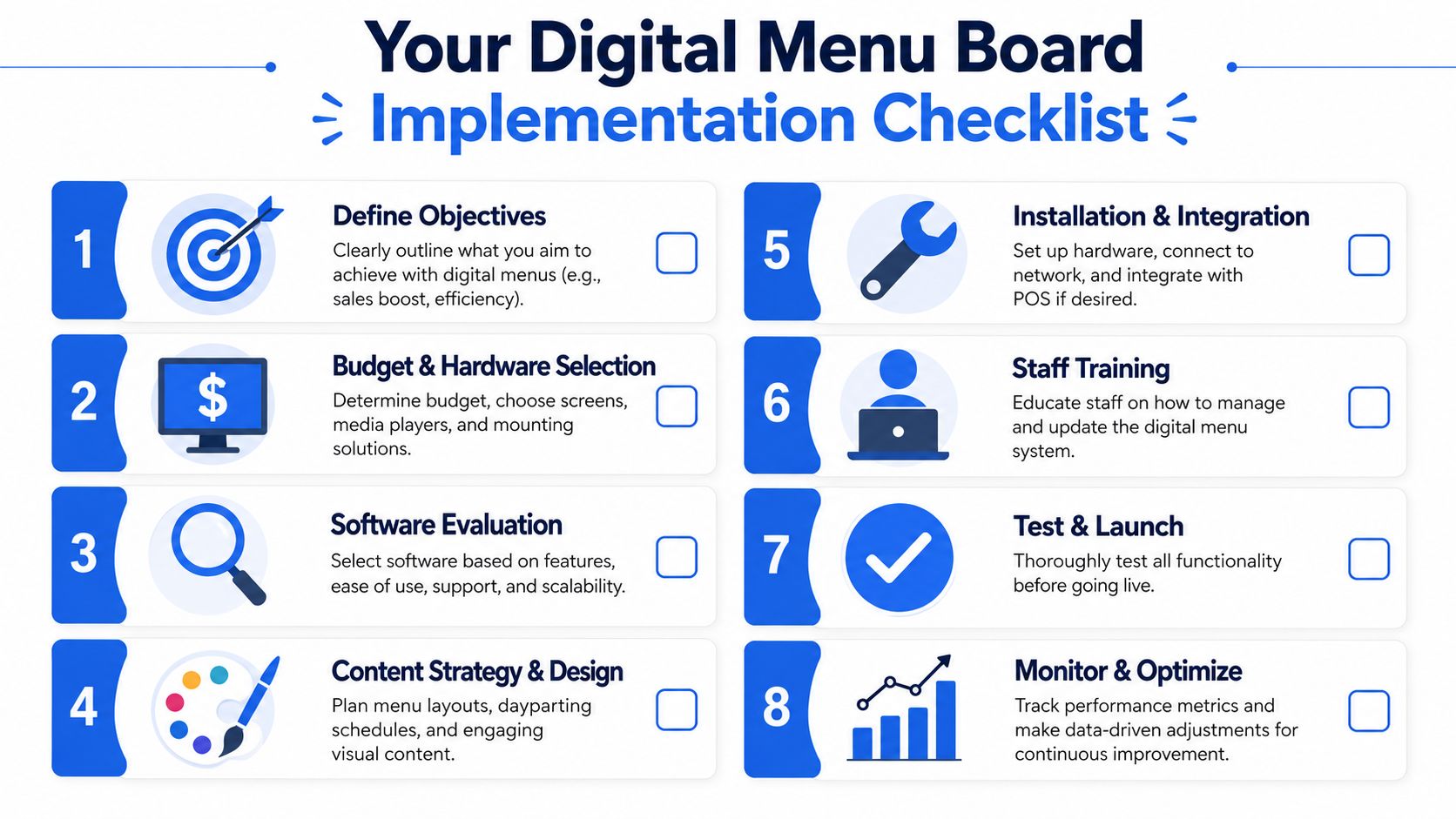
Your Digital Menu Board Implementation Checklist
Most failed digital menu rollouts don't fail because the software is terrible. They fail because the operator treats implementation like a design project instead of a service project.
Before you buy anything
Get clear on the job the system needs to do.
Is the main goal to push upsells? Reduce staff explanation time? Keep multi-location pricing consistent? Improve contactless ordering alongside your in-store experience? If you don't define that first, you'll end up judging the software by surface-level features.
Use this working checklist:
Define the outcome
Pick the operational problem first. Faster updates, better upselling, fewer sold-out mistakes, or tighter brand control.Choose the screen setup
Buy for your environment, not your office wall. Consider brightness, placement, and line-of-sight.Confirm hardware compatibility
Make sure the display, media player, and CMS work well together.Map your menu structure
Build categories, modifiers, combos, and dayparts before launch day.
Build for readability first
This gets ignored all the time. Operators obsess over animation, motion, and fancy transitions. Guests are just trying to read the board before it's their turn.
Independent guidance on common digital menu board mistakes stresses that contrast, font choice, screen height, viewing distance, and glare checks materially affect usability. It also notes there's usually only 5–10 seconds of attention in line. That means readability matters more than visual flair.
The best implementation question isn't “Does this look modern?” It's “Can a guest read this quickly in bright light from where they're standing?”
Check these before go-live:
- Contrast: Dark text on weak backgrounds causes hesitation.
- Font choice: Decorative fonts waste attention.
- Screen height: Mounting too high makes the lower half useless.
- Viewing distance: What looks clear on a laptop may fail from the queue.
- Glare: If the board washes out at lunch, your design doesn't work.
A strong contactless setup should complement the boards, not replace them. If you're also reviewing phone-based ordering, this guide to a contactless menu QR code setup is worth comparing against your in-store flow.
Train the team for live service
Launch day is not the time to discover nobody knows how to update the menu.
Your managers need three live-service skills:
- Remove or hide an unavailable item
- Switch or schedule a promotion
- Fix a simple pricing or text error
Then run a dry test during a quiet period. Force a sold-out scenario. Change a daypart. Push a limited offer. See who can do it fast without calling for help.
Good implementation feels boring on launch day. That's the point.
How to Choose the Right Software Partner
Friday lunch rush. The fryer is backed up, one item just sold out, and the menu still shows it on every screen. If your software partner makes that fix slow, you do not have a menu system. You have a service problem.
This choice gets expensive fast. Crowded vendor lists and polished demos make weak platforms look better than they are. As noted earlier, the category is growing. That means more options, more sales pressure, and more ways to end up with software that looks good in a demo but creates drag in live service.
Pick the vendor that reduces work at the store level.
Questions I'd ask every vendor
Start with the moments that hurt during service. Ask the vendor to show you the workflow live, not talk about it in slides.
- Show me how a manager makes a change during service. Start to finish. Timer on.
- Show me how an item is marked sold out and removed from every relevant screen.
- Show me how pricing and item names stay aligned with my POS.
- Show me how dayparts are scheduled across locations, including exceptions for local promos.
- Show me what a store manager can edit without breaking brand standards.
- Show me the approval flow for multi-unit updates.
- Show me what happens if the internet drops at the store.
- Show me what support looks like after launch. Who answers, how fast, and during what hours?
- Show me the full cost once I add screens, stores, and user roles.
- Show me how guest data is handled if the platform also touches QR ordering, loyalty, or feedback.
If they avoid the demo and go back to promises, cross them off the list.
Digital Menu Software Buying Criteria
| Criteria | What to Look For |
|---|---|
| Speed of edits | A manager can update an item, price, or promo in minutes from a browser or phone |
| POS sync | Clear, proven handling for pricing, item names, modifiers, and availability |
| Multi-location control | Central control for brand standards, with local permissions where stores need flexibility |
| Scheduling | Daypart rules, promo windows, holiday overrides, and location-specific exceptions |
| Workflow fit | Simple steps for common tasks during service, not a back-office process built for corporate only |
| Support | Real onboarding, reachable humans, and launch help during operating hours |
| Reporting | Data you can act on, such as promo timing and item performance, not decorative charts |
| Pricing | Clear costs by screen, store, user, and add-on module |
| Data controls | Defined permissions and privacy settings when guest data is involved |
| System fit | Works with your current stack without forcing a full replacement |
A lot of operators buy on screen design and regret it later. Design matters, but workflow matters more. The software should shorten the time between "86 the soup" and "the guest no longer sees the soup."
Support is another trap. A help center is not support. If you run multiple locations, you need onboarding that covers permissions, templates, approval flow, and who owns updates by daypart and by store.
I also care about whether the platform helps the menu sell better without creating extra work. If the system makes it easy to place bundles, add-ons, and timed offers where guests see them, it will do more for margin than a library of flashy templates. This guide on restaurant upselling techniques that work in live service is a useful gut check when you review a vendor's merchandising tools.
A strong software partner makes daily operations simpler. Faster updates. Fewer pricing mistakes. Less back-and-forth between the counter, kitchen, and manager. That is the standard.
Making Your Digital Menu a Revenue Engine
A digital menu board isn't an IT accessory. It's part of your selling system.
Used properly, digital menu board software helps you do three things better:
- Sell the right items: Push high-margin dishes, bundles, and add-ons at the right time.
- Run tighter operations: Keep availability, pricing, and promotions aligned with what the kitchen can deliver.
- Reduce staff drag: Remove avoidable explanations, corrections, and manual work from the counter.
That only happens when the setup is operationally sound. Fast edits. Real dayparting. Strong readability. Clean integration with the systems you already use. Those are the things that make the board profitable.
If you want the menu to pull more revenue without making the guest experience feel pushy, study your offer structure as closely as your screen layout. This guide to restaurant upselling techniques is a good place to sharpen that side of the equation.
The simple test is this. If your digital menu helps guests decide faster, helps staff serve faster, and helps you promote more profitably, it's doing its job.
If you want a menu system built around revenue, not just display management, take a look at RevMenue. It's designed for operators who want faster updates, smarter upsells, cleaner QR menu experiences, and better visibility into what drives margin.
