
Most restaurants lose sales in the first few minutes after a guest sits down. The table is ready. The guest is ready. But the menu hasn't done any work yet.
That's why a contactless menu qr code matters when it's built properly. Not as a replacement for paper. Not as a pandemic leftover. As a revenue tool that starts selling before a server reaches the table.
Scanning is already normal behavior on phones. In the U.S., smartphone users scanning QR codes rose from 83.4 million in 2022 to a projected 99.5 million in 2025, according to Business Insider's QR code user statistics summary. The opportunity isn't getting people to understand QR codes. The opportunity is giving them a menu experience worth scanning.
Table of Contents
- Build a Mobile Menu That Sells Before the Server Arrives
- Generate a QR Code That Works for Your Brand
- Print and Place Your Codes for Effortless Scanning
- Turn Scans into Higher Average Order Values
- Use Menu Analytics and Ensure Guest Trust
- Your Go-Live Checklist and Quick Troubleshooting
Build a Mobile Menu That Sells Before the Server Arrives
A guest shouldn't need to pinch, zoom, and rotate their phone just to read your starters. Yet that's exactly what happens when a restaurant links its QR code to a PDF.
PDF menus are built for print layout, not handheld decision-making. On a phone, they slow down browsing, hide high-margin items, and make add-ons feel like work. When guests get frustrated, they stop exploring. That's bad for conversion and worse for average check.
Why PDFs kill momentum
The strongest operators treat the menu like a funnel. A practical rollout puts the QR code at the table before the guest arrives, opens a mobile-optimized menu in one tap, and supports fast edits without reprinting. Digital menu systems can make updates more than four times more frequently than printed workflows, according to this QR menu implementation benchmark.
Practical rule: If your menu opens as a static document, you've digitized the paper. You haven't improved the guest journey.
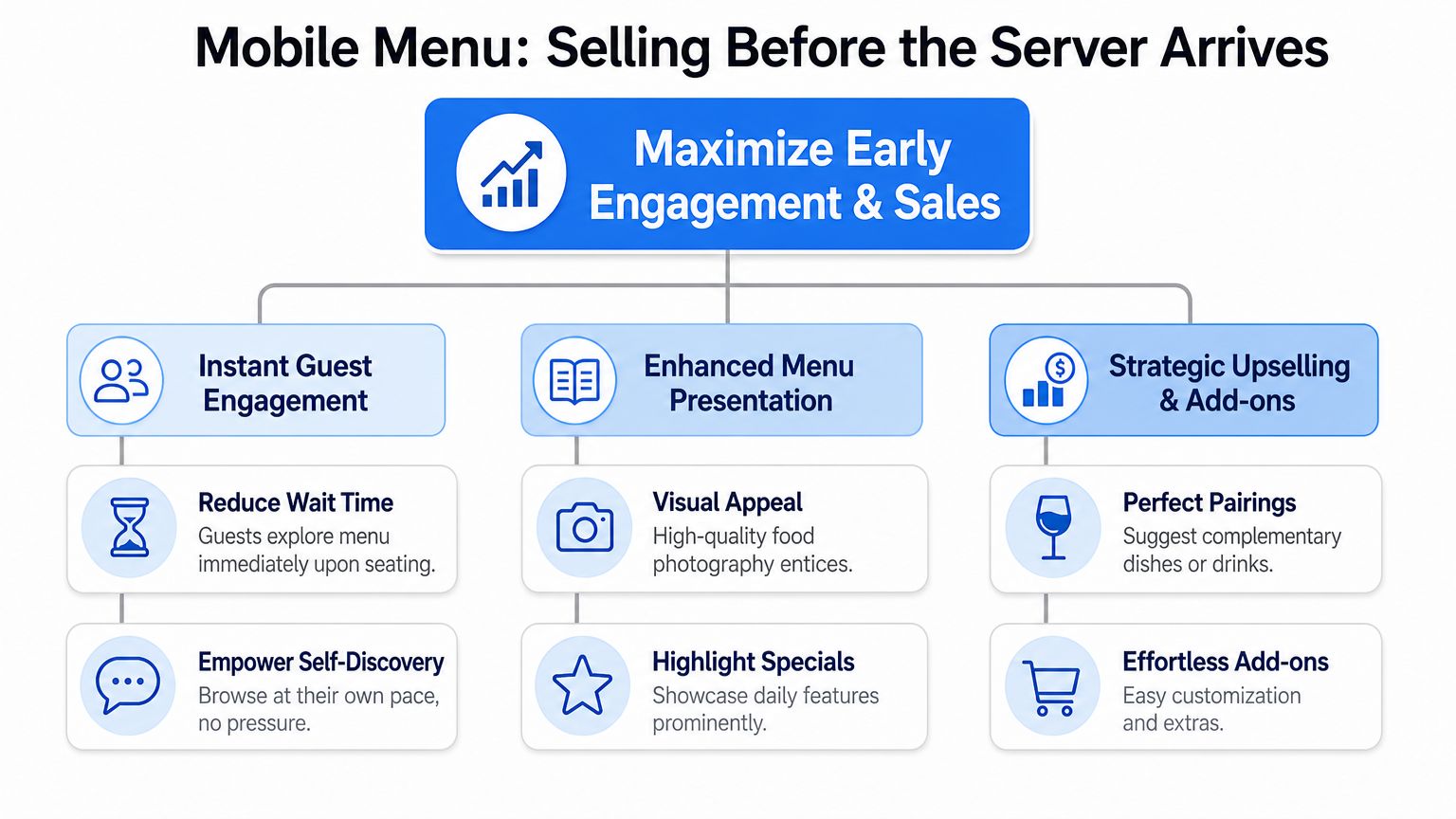
What a high-converting mobile menu includes
A mobile menu that sells well usually has a few common traits:
- Fast first view: Guests land on food or drink categories immediately. No splash page. No app prompt.
- Short categories: Brunch, cocktails, small plates, mains, desserts. Keep the path obvious.
- Strong item hierarchy: Your best sellers and highest-margin items deserve top placement.
- Useful photos: Not every item needs a picture. Signature dishes do.
- Clean descriptions: Lead with what matters. Protein, flavor, key differentiator, dietary cue if relevant.
A simple structure works best:
| Menu area | What the guest needs | What the operator gains |
|---|---|---|
| Top of menu | Fast orientation | Lower drop-off |
| Featured items | Confidence | Better margin mix |
| Add-ons and modifiers | Easy choice | Higher ticket |
| Sold-out handling | Accuracy | Fewer awkward table touches |
The practical mistake I see most often is overbuilding. Restaurants cram too many categories, too many photos, and too much copy into the first screen. Guests don't need your full brand story while deciding on sparkling or still.
Design it like a server who knows how to sell
A good server guides attention. Your mobile menu should do the same.
Use featured blocks for:
- House favorites
- Chef specials
- Best with drinks
- Popular add-ons
- Dessert worth saving room for
Then make sure each screen answers the next likely question. If someone taps a burger, show upgrade options there. If someone taps wine by the glass, surface pairings there. Don't bury profitable decisions three screens later.
The first scan should shorten time to first order, not turn the menu into homework.
Generate a QR Code That Works for Your Brand
Friday dinner service exposes weak QR setups fast. A guest scans, the link opens to an outdated PDF, the cocktail list is wrong, and a server has to explain what changed. That table starts with friction instead of confidence.
Choose the code setup that protects you from that problem. The most important choice is whether the code is static or dynamic.
A static code sends guests to one fixed URL. If that URL changes, every printed card, tent, and plaque has to be replaced. A dynamic code keeps the printed code in place while letting you change the destination behind it. That gives operators room to update pricing, swap seasonal menus, change dayparts, or route each location to the right menu without touching the print order.
For most restaurants I work with, dynamic wins because menus are living sales tools. They change with inventory, promotions, staffing, and service style. A code that cannot keep up becomes an operations problem.
Choose based on how your business runs:
- One menu with rare edits: Dynamic still reduces reprint risk.
- Seasonal or chef-driven concept: Dynamic gives you needed flexibility.
- Multiple locations: Use location-specific destinations so each dining room shows the right menu.
- Breakfast, lunch, dinner, and bar service: Set up menu switching without replacing tabletop materials.
If you are comparing vendors, this guide to best QR code menu software for restaurants covers the tools operators usually weigh before rollout.
Design matters too, but only after reliability is handled. A branded code should look like part of the dining experience and scan on the first try under real service conditions, with dim lighting, scratched tabletops, and smudged acrylic.
Use a short checklist:
- Keep contrast high: Dark code, light background.
- Add a logo carefully: Only if it does not interfere with scanability.
- Tell guests what happens next: “Scan for menu” works better than a bare code.
- Label by context where useful: Drinks, desserts, room service, happy hour.
- Offer a fallback: “Prefer print? Ask your server.”
The best operators also treat the destination URL as part of the brand experience. Use a clean link, match the page styling to the restaurant, and send guests straight to the right menu state. If brunch ends at 2 p.m., the scan should not dump a 7 p.m. guest into brunch with half the items unavailable. The code is not just a doorway. It is the first selling moment after the guest sits down.
Run one simple test before printing at scale. Put the code on a table, stand where a guest would sit, and scan it with two different phones. If the page loads slowly, the instruction is unclear, or the menu opens to the wrong place, fix that now. Problems caught before print save far more than a cleaner design ever will.
Print and Place Your Codes for Effortless Scanning
I've seen excellent digital menus fail because the code was stuck under a condiment caddy, printed with glare-heavy lamination, or placed flat on a dark tabletop. The menu wasn't the problem. The physical setup was.
Good QR placement feels invisible because guests don't have to think about it. They sit down, notice it, scan it, and move on.
What good placement looks like in real service
In a busy full-service dining room, table tents usually work well because they stay upright and visible from multiple seats. In a café, a counter plaque often performs better because the guest is already facing forward while deciding. In bars, a small menu stand near the drink rail can work better than a coaster that gets wet halfway through the shift.
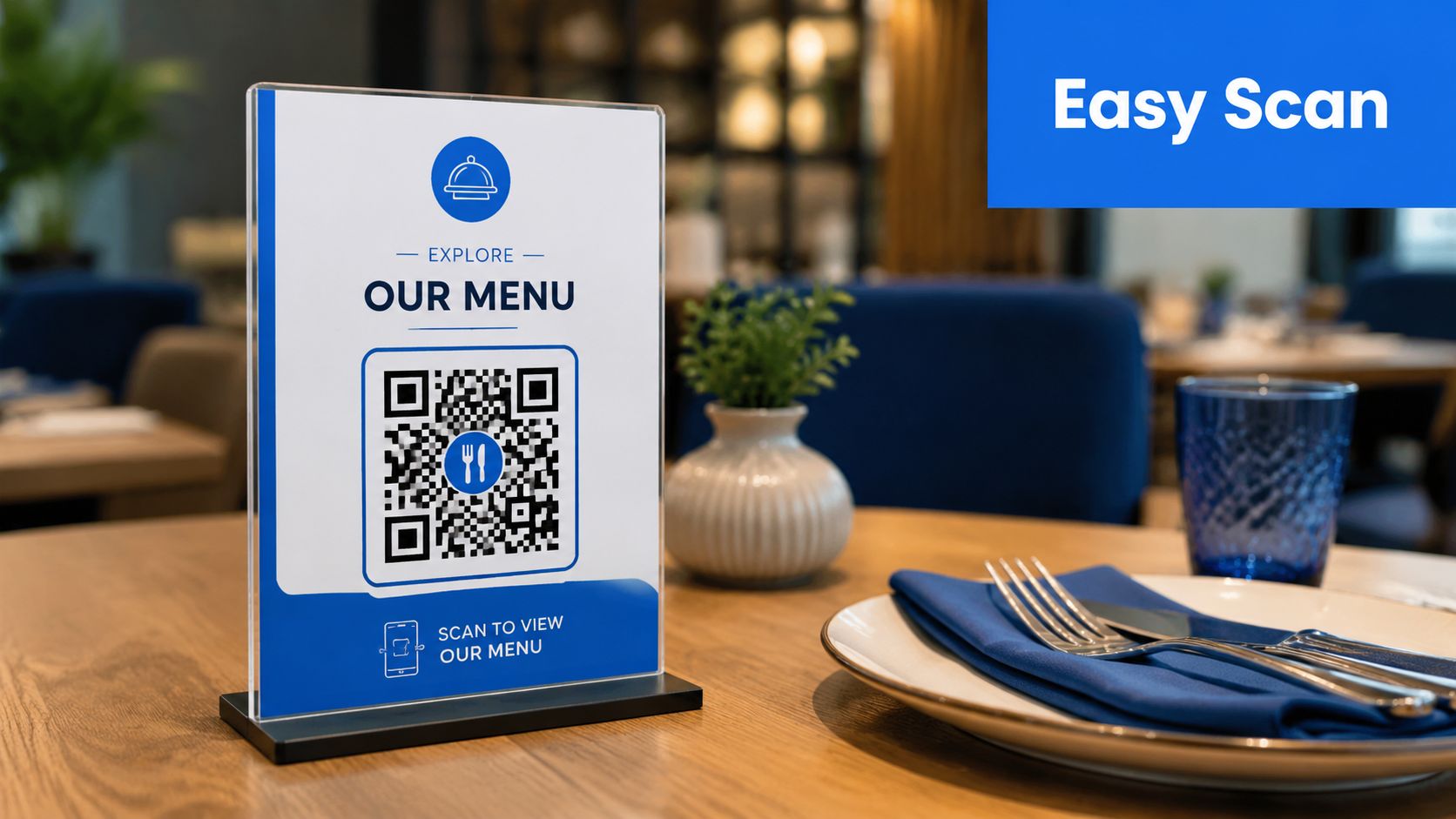
The winning setup usually shares three traits:
- Visible from the seated position
- Easy to clean
- Hard to block with plates, glassware, or personal items
If a guest has to move objects around the table to find the code, placement has already failed.
Do this and avoid this
Here's what works in live service.
- Use sturdy materials: Acrylic stands, sealed cards, metal plaques, and wipeable table tents hold up better than thin paper cards.
- Print at practical size: Tiny codes may look neat, but they often scan poorly under dim lighting.
- Place before arrival: The code should already be there when the host seats the party.
- Train the language: “You can scan here whenever you're ready, and I've got printed menus if you prefer” works better than “Just scan this.”
- Keep backup menus nearby: Don't make staff walk to the back every time someone asks.
Avoid these common misses:
- Glossy glare-heavy finishes
- Codes placed flat under glass reflections
- Multiple different codes on one table with no labels
- Forcing the QR path with no alternative
- Placing codes where one diner can see it but the rest can't
Staff introduction matters more than operators think. Guests resist when QR feels imposed. They're usually fine when it's framed as convenience.
A simple script works:
- For full service: “You can browse the menu right here while I get water started.”
- For fast casual: “Scan if you want to look through everything before you order.”
- For mixed preference tables: “Digital or printed is fine. We've got both.”
That tone removes friction before it starts.
Turn Scans into Higher Average Order Values
The QR code itself doesn't increase revenue. The decision environment after the scan does.
That's the part most restaurants miss. They celebrate that a guest opened the menu, then stop there. But a digital menu can do something paper rarely does well. It can place the right suggestion at the exact moment a guest is ready to choose.
The category is growing because operators and guests both see the convenience. The global restaurant QR ordering market reached USD 2.9 billion in 2024 and is projected to reach USD 11.1 billion by 2033, with 49% of people having used QR codes to check restaurant menus and nearly 40% citing speed and convenience as key reasons for digital ordering and contactless payment, according to these restaurant QR ordering market figures.
Where digital menus actually lift ticket size
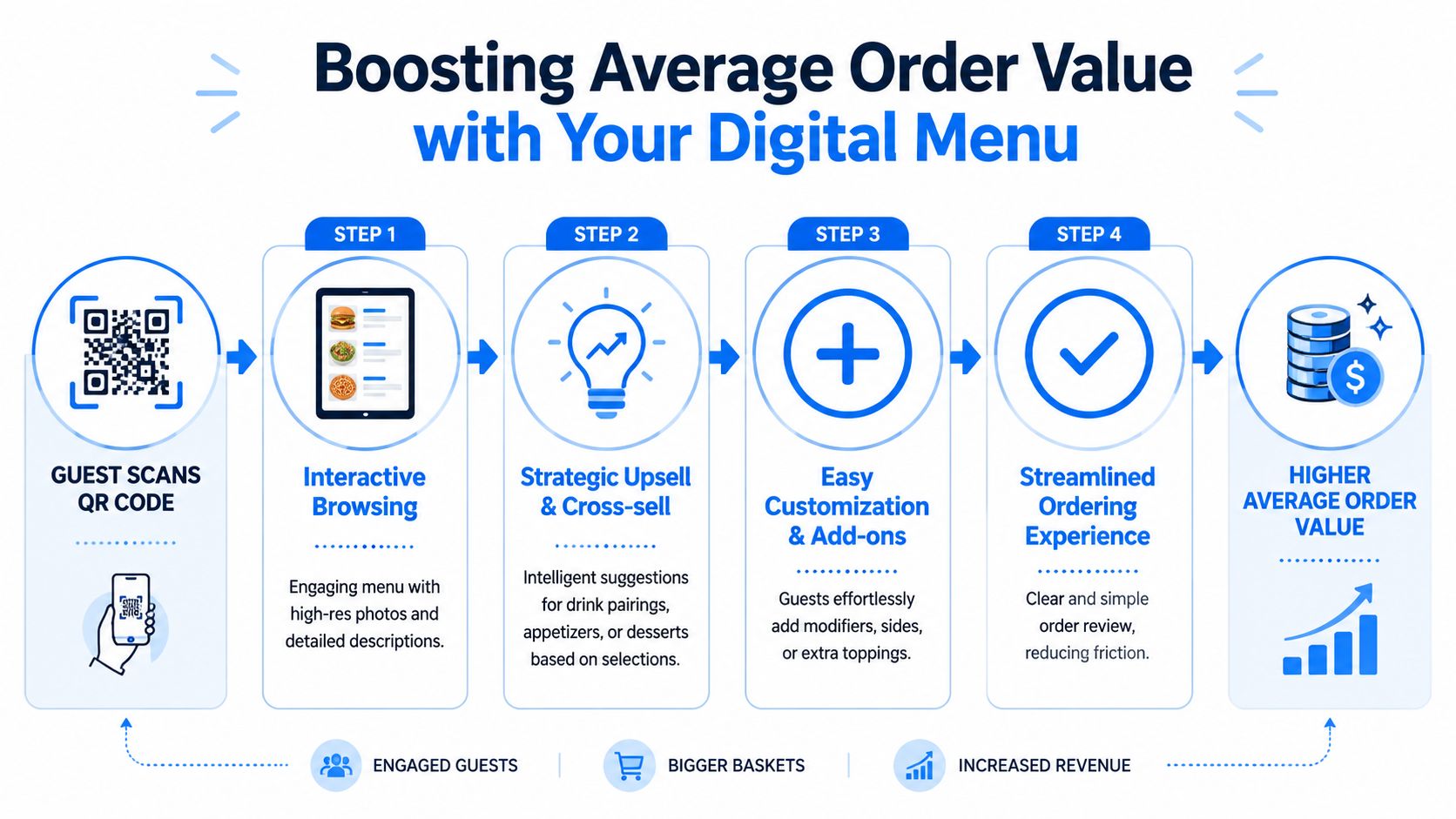
Restaurants usually get the best lift from a few simple prompts:
- Pairings at the item level: Show a wine, beer, or side that logically fits what the guest is already viewing.
- Upgrades before checkout: Extra protein, premium spirit, larger size, side substitution.
- Bundles with clear value: Lunch set, coffee and pastry, burger and beer, date-night pairings.
- Dessert timing: Surface sweets after mains are viewed, not buried at the bottom of a long menu.
This short walkthrough shows the basic flow in action:
Prompts that feel helpful, not pushy
A smart upsell feels like service. A bad upsell feels like a popup ad.
Use the same judgment your best server uses:
| Situation | Better prompt | Worse prompt |
|---|---|---|
| Guest opens steak | Add a wine pairing or side suggestion | Show unrelated dessert immediately |
| Guest views salad | Suggest protein add-on | Push a full combo meal |
| Guest selects coffee | Offer pastry pairing | Offer three unrelated upgrades |
| Guest browses cocktails | Highlight sharable starters | Force account creation |
Guests buy more when the menu reduces decision effort.
Digital menu logic becomes commercially useful in this context. You can make profitable choices easier without asking staff to memorize a hundred pairing scripts. If you want ideas on what those prompts should look like in practice, this guide on restaurant upselling techniques covers the mechanics well.
A few practical examples:
- A brunch menu can prompt avocado or smoked salmon add-ons on egg dishes.
- A pizzeria can place burrata, extra toppings, or wine pairings right under specialty pies.
- A café can surface oat milk upgrades, extra shots, and pastry bundles before checkout.
- A dessert menu can move best-selling after-dinner drinks out of a separate category and into the decision path.
The point isn't to add more prompts. It's to add the right ones.
Use Menu Analytics and Ensure Guest Trust
A printed menu can't tell you what almost sold. A digital one can.
That's the core management advantage. Once the contactless menu qr code is live, the menu stops being static content and starts acting like an operating signal. You can see what guests looked at, where interest stalled, and which offers earned attention but didn't convert.
The menu data worth watching
The most useful signals are usually simple:
- High views, low orders: The item attracts attention but doesn't close. That could be pricing, description, photo quality, or weak placement.
- Strong modifier uptake: Good sign for profitable add-ons. Expand what's already working.
- Category drop-off: Guests open cocktails or desserts but don't engage further. Often a layout or copy issue.
- Time-to-first-order: Helpful for spotting friction in mobile flow.
- Repeated sold-out views: A signal that your live menu governance needs work.
Operators don't need a giant dashboard to get value. They need a short weekly review and the discipline to act on it. That's where tools built around restaurant data analytics become useful, especially for multi-location teams trying to spot menu issues across stores.
Watch what guests do, not just what they buy. The gap between those two tells you where the menu is leaking revenue.
Trust, privacy, and accessibility
Analytics only help when guests trust the experience.
Keep the rules simple:
- Don't hide the menu behind a forced sign-up
- Ask separately for marketing consent
- Make pricing and item availability accurate
- Offer a clear non-digital option
Accessibility matters just as much. One major gap in QR menu design is physical access. Blind and low-vision guests may struggle to locate the QR code itself on the table, which means the barrier starts before scanning. A better setup includes tactile markers or alternative access paths, as explained in this accessibility analysis of QR menu barriers for blind users.
That changes how operators should think about rollout. Accessibility isn't only about font size on the phone. It includes how the code is found, how staff assist, and whether a guest can still browse independently if scanning isn't practical.
Good guest trust is operational. The menu loads quickly, the items are correct, the code is easy to find, and nobody feels trapped into using one channel.
Your Go-Live Checklist and Quick Troubleshooting
Friday at 7:15 p.m., a four-top sits down, scans the table card, and one phone lands on the wrong menu while another stalls on weak guest Wi-Fi. The server now has two jobs. Recover the order and recover confidence. That is why QR menu launches succeed or fail on operating discipline, not on whether the code exists.
One caution belongs in every rollout plan. In a 2024 survey, 81% of U.S. diners said they still prefer physical menus, according to this QR menu ROI review citing the survey. Keep the QR menu as a strong option, not a forced path. Restaurants get better adoption when guests can choose the channel that fits the moment.
Pre-service launch check
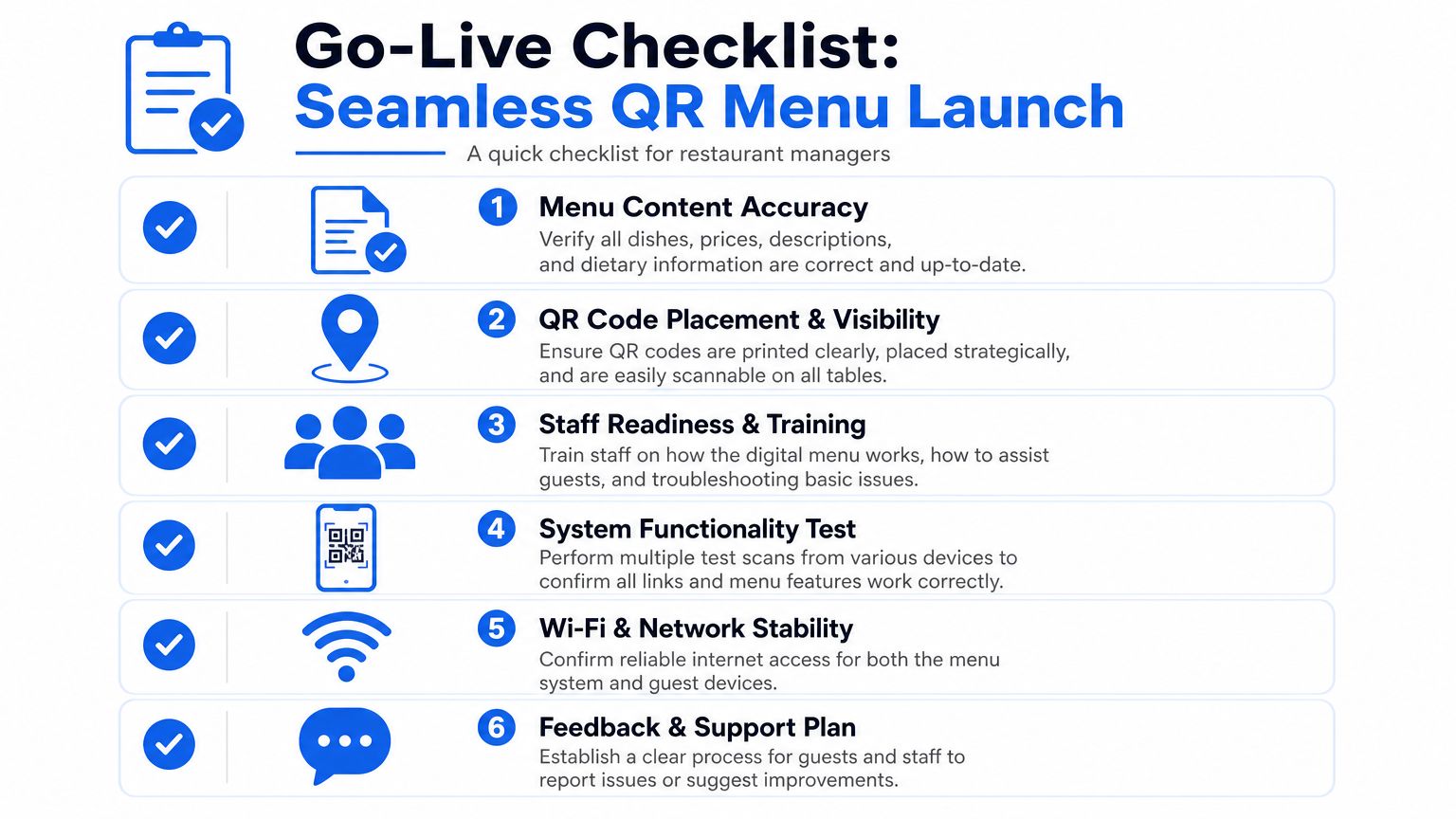
Before doors open, run a floor-level test instead of a desk test. Managers should walk the room, sit where guests sit, and scan from real table positions. That catches the problems that cost orders: glare from overhead lights, cards hidden behind condiments, and daypart settings that switched late.
Use this checklist:
- Scan every code: Test from iPhone and Android if possible.
- Check page speed on guest Wi-Fi: Test in the dining room, patio, bar, and any dead zones.
- Verify live menu details: Prices, modifiers, dietary notes, and sold-out items.
- Walk the floor seated: Check visibility from guest eye level, not standing height.
- Train one sentence for staff: Keep it natural, such as “You can scan here, or I can bring a printed menu right away.”
- Stage printed menus: Host stand, bar, server station, and any outdoor service point.
- Confirm daypart switching: Breakfast should not appear at dinner, and happy hour should not overrun regular service.
- Spot-check upsells: Make sure add-ons, featured drinks, and high-margin pairings appear where guests see them.
That last point gets missed. A QR menu should do more than display items. On launch day, check whether the menu still pushes the products you want to sell.
What to do when something goes wrong
Service problems usually come from five sources: print quality, placement, connectivity, menu governance, or staff handling. Fix the immediate guest issue first. Then fix the root cause before the next rush.
- Code won't scan: Wipe the sign, reduce glare, and replace any print with blur, low contrast, or a warped surface.
- Menu opens slowly: Compress heavy images, test guest Wi-Fi strength, and confirm the menu still loads on mobile data.
- Guest does not want to scan: Hand over a printed menu right away.
- Wrong menu appears: Check the destination URL, location mapping, and any recent daypart or promo update.
- Item is unavailable but still visible: Remove it from the live menu, then tighten the stockout process between kitchen and floor.
- Guests seem confused: Rewrite the table prompt so it explains the payoff, such as faster browsing, photos, or easier modifier selection.
Use a simple launch standard:
| Issue | Immediate fix | Longer-term fix |
|---|---|---|
| Low scan rate | Improve placement and table copy | Redesign signage and test by table type |
| Slow menu load | Check network strength and image size | Rebuild lighter mobile pages |
| Staff resistance | Give exact scripts and backup steps | Add QR handling to pre-shift training |
| Guest preference for print | Provide paper menus without friction | Keep a hybrid service model |
The best operators treat the first week like a menu performance audit. Watch which tables scan, where guests hesitate, and whether featured items get tapped after the scan. That is the true value of a contactless menu qr code. It is part service tool, part selling tool, and part feedback loop for the menu itself.
If your team can test fast, explain the option clearly, and recover smoothly when something breaks, the launch usually stays under control.
If you want a platform built around menu conversion, upsells, and operator-friendly analytics, take a look at RevMenue. It's designed for restaurants that want a contactless menu qr code to do more than display items. It helps turn scans into smarter ordering, cleaner operations, and stronger margins without forcing a disruptive rebuild.