
You're probably dealing with this right now. A lunch rush hits, one staff member is taking orders, someone else is trying to run payments, the cook is shouting for modifiers, and a line starts bending away from the truck. The menu board is static, the signal is shaky, and every extra second costs you a sale.
That's why a food truck ordering system isn't just a tech upgrade. It's a throughput tool, a line-control tool, and a margin-protection tool. The trucks that treat ordering like an operations system, not a card reader, tend to run cleaner service, capture more demand, and make better decisions when the rush gets ugly.
Table of Contents
- Why Long Lines Are Quietly Killing Your Profits
- What Is a Food Truck Ordering System Really
- Must-Have Features for Mobile Operations
- The Business Case for a Modern Ordering System
- Choosing Your System All-in-One vs Specialized Platforms
- Your Food Truck Implementation Checklist
- KPIs to Know if Your System Is Paying Off
Why Long Lines Are Quietly Killing Your Profits
The worst food truck problem usually doesn't look dramatic. It looks like a line that's moving just slowly enough to push people away.
One customer checks the line and leaves. Another stays but orders less because they're in a hurry. A third gets to the window annoyed before the meal even starts. That's not a service problem in theory. That's revenue leaking out in real time.
For the average food truck, the lunch period alone accounts for 50% of daily revenue, and 92% of customers choose food trucks for convenience and quick service according to these food truck industry figures. If your service model creates friction during lunch, you're hurting the most important sales window of the day.
A common lunch rush failure
Here's the pattern I see constantly:
- One bottleneck at the window: One person handles questions, modifiers, payment, and pickup talk.
- A static menu slows decisions: Customers don't know add-ons, combos, or sold-out items until they're already at the front.
- The line becomes your enemy: People waiting in line can't order yet, so demand sits idle.
- Staff get dragged into low-value work: Instead of moving orders, they repeat menu explanations and chase payment issues.
Practical rule: If customers can only order one at a time at the service window, your truck is capped before the grill even gets busy.
Food trucks live on compressed demand. You don't have a dining room to smooth traffic. You don't have deep labor coverage. You don't get many second chances during a short service burst. That's why ordering speed matters more on a truck than in a standard restaurant.
The real fix
A proper food truck ordering system changes the flow. It lets customers browse, order, and pay without turning the pickup window into the only place business happens.
That matters because the line isn't just a customer experience issue. It's a production constraint. Fix the ordering flow and you usually improve three things at once:
- More completed orders
- Less pressure on staff
- Cleaner pickup handoff
Most operators focus on food quality first. They should. But if your ordering flow is clumsy, quality alone won't save the sale.
What Is a Food Truck Ordering System Really
A food truck ordering system isn't an iPad with a card reader. It's a connected set of tools that takes a customer from browsing to payment to prep to pickup without making your team repeat the same work three times.
It's a workflow, not a tablet
In a restaurant, people often talk about POS hardware first. In a truck, that's backwards.
The primary question is this: how does an order move from the customer's phone or the service window into the kitchen, into payment records, and into your reporting without confusion? If that path is messy, the hardware won't save you.
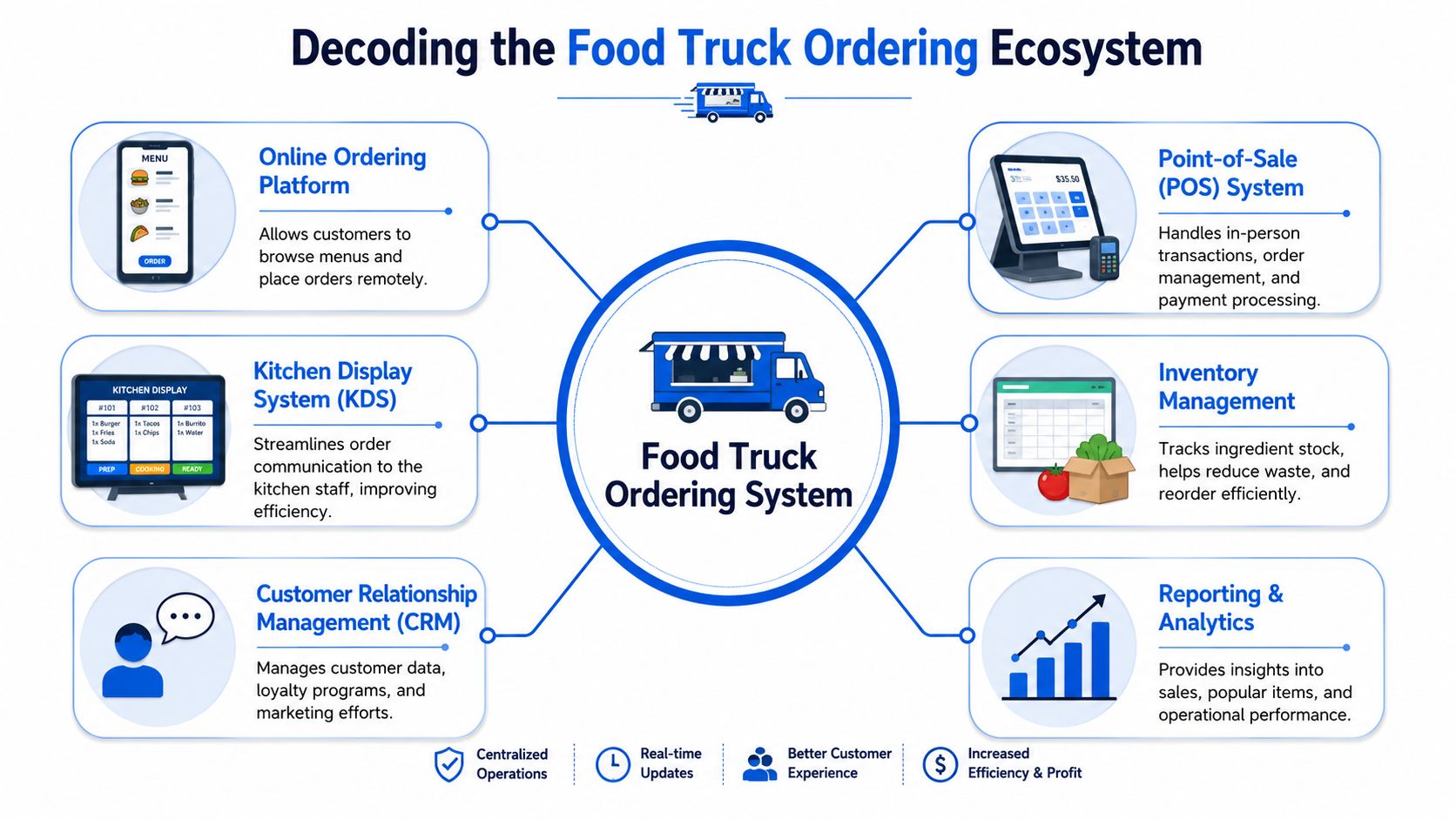
A useful mental model is to treat the system like a relay team. One part takes the order. Another secures payment. Another routes the ticket. Another tracks what sold and what needs attention later.
What sits inside the system
A solid setup usually includes:
- Customer-facing ordering: QR menus, mobile ordering pages, or a simple tablet flow for customers who don't want to queue.
- Payment processing: Fast, clean checkout with minimal taps and no awkward handoff delays.
- Order management: A dashboard that shows incoming orders clearly and keeps timing visible.
- Kitchen display or prep routing: Orders land where the cooks can use them.
- Inventory awareness: If you're out of brisket or low on buns, the system should help you stop selling what you can't fulfill.
- Customer and sales insight: You need to know which items move, which add-ons get accepted, and when sales spike.
If you're tightening packaging, pickup flow, and menu clarity at the same time, Monopack's street food essentials is a useful read because service design in street food isn't just about food. It's about speed, handling, and what customers can understand instantly.
A truck system has to work in motion, in heat, in glare, and in tight space. That's what makes it different from restaurant software built for a fixed counter.
The trucks that get this right don't just “go digital.” They remove friction from every handoff.
Must-Have Features for Mobile Operations
Most advice on restaurant tech is written for fixed locations. Food trucks don't operate like fixed locations. You move, your signal changes, your space is cramped, and your busiest service often happens in the least forgiving conditions.
That's why the feature list for a food truck ordering system should be tougher.
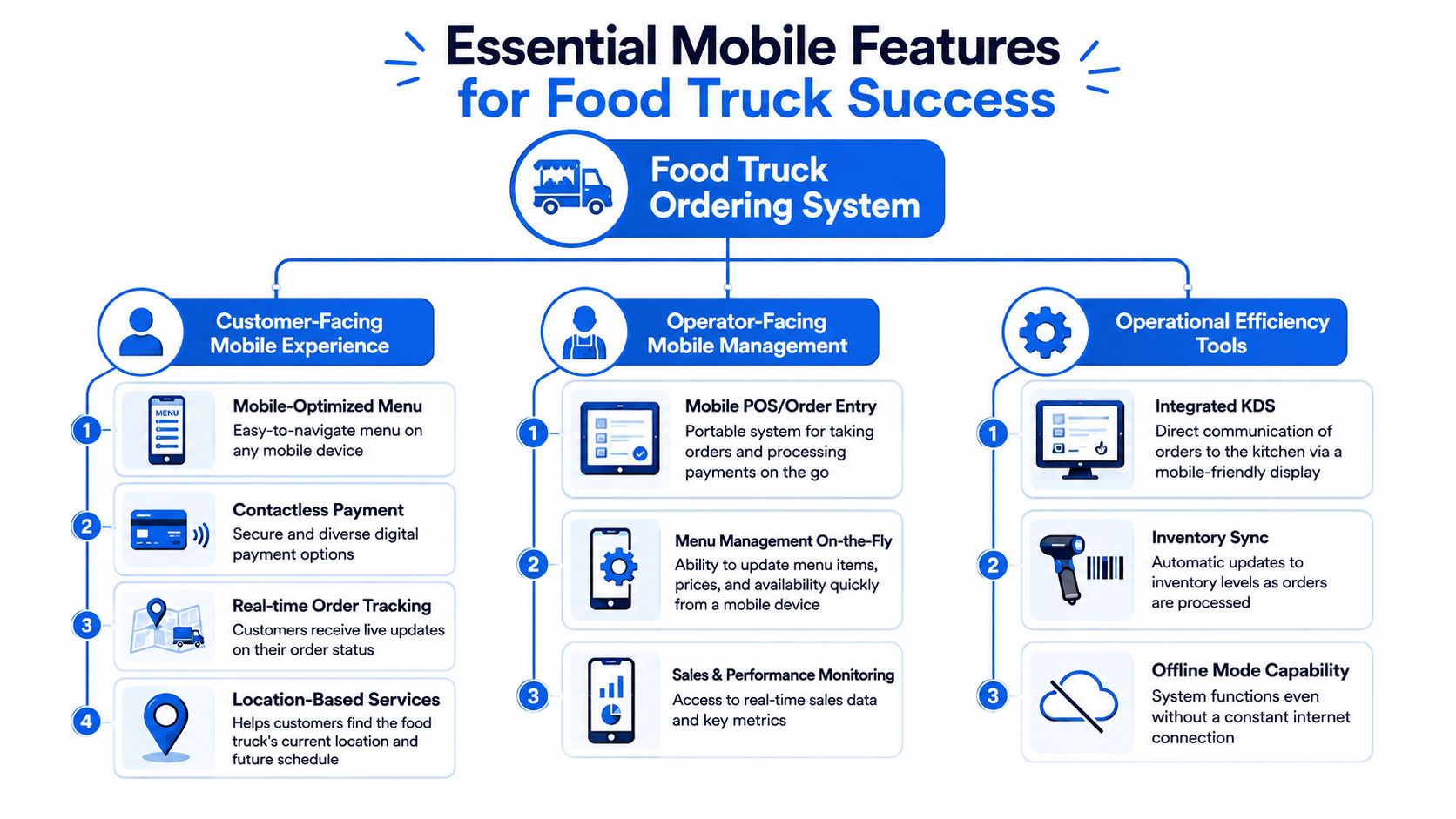
QR menu ordering that actually speeds service
QR ordering only helps if it reduces decisions at the window.
Your mobile menu should load fast, read clearly in bright daylight, and make modifiers obvious. If customers have to pinch, scroll forever, or ask staff basic questions anyway, the QR code becomes decoration.
What works in the field:
- Short category structure: Keep people out of endless taps.
- Clear names and descriptions: Customers decide faster when wording is blunt.
- Strong add-on prompts: Fries, drinks, sauces, combo upgrades, and premium toppings should appear naturally.
- Out-of-stock control: Remove unavailable items immediately instead of forcing apology-based service.
A smart QR menu also helps with menu psychology. Put profitable items where attention naturally lands. Use bundles where they make sense. Keep dead-weight items from cluttering the flow.
For operators looking at mobile-facing display options, this guide to a digital menu board for food truck setups is worth reviewing alongside your ordering flow.
Offline capability that keeps revenue alive
This is the feature most buying guides underplay. It's also the one that saves your day when the event field has terrible reception.
An effective food truck ordering system must include offline capabilities so the truck can keep operating during connectivity disruptions. Without offline mode that buffers data locally, weak signal can cause a complete stop in revenue generation, as explained in this food truck ordering systems breakdown.
That means the system should support:
- Offline menu access
- Offline order capture
- Receipt printing without live internet
- Local data buffering
- Automatic sync when service returns
If your truck works festivals, remote venues, parking lots, or dense urban blocks with weak signal, offline resilience isn't optional. It's basic operating protection.
If the internet drops and your team can't sell, you didn't buy a system. You bought a liability.
Payments and POS that don't create double work
Your payment flow should be simple enough that staff don't have to babysit every transaction.
Bad setups force operators to re-enter items, reconcile mismatched tickets, or explain failed payments while the line keeps building. Good setups pass order details cleanly into the payment and reporting process so nobody's doing duplicate admin after service.
Look for:
- Direct payment capture tied to the order
- Fast modifier handling
- Minimal taps for staff
- Clear distinction between paid, in-prep, and ready orders
If a customer pays on their phone, the team inside the truck should see that order instantly and know exactly what to make.
Kitchen routing that protects ticket accuracy
The service window should not be your kitchen communication method.
Orders need to land in a clear prep queue, whether that's a kitchen display system or a simple digital workflow visible to the cook. This matters even more when your menu has multiple modifiers or when one person is handling both expo and assembly.
A good routing setup helps with:
- Modifier accuracy
- Fewer verbal repeats
- Cleaner pickup sequencing
- Less stress during bursts of demand
Here's a useful video overview of food truck ordering and service flow in action:
Analytics that help you sell smarter
Most truck owners don't need a giant reporting suite. They need a dashboard that answers practical questions fast.
Ask for analytics that help you spot:
- Your best-selling items
- Which modifiers or add-ons get accepted
- When sales peak
- What should be removed from the menu
- Where prep delays start showing up
That's how digital ordering turns into better decisions. You stop guessing. You start shaping the menu around what moves fastest, what earns well, and what slows your team down.
The Business Case for a Modern Ordering System
You don't buy a modern food truck ordering system because it's trendy. You buy it because old ordering methods cap sales.
Throughput is the real revenue lever
The strongest financial argument is simple. Digital ordering lets customers order and pay in parallel instead of forcing one-by-one transactions at the window.
Food trucks that implement digital ordering systems can process up to 3x more orders per hour during peak times, and that higher throughput can lead to 40% to 50% higher revenue per event, based on food truck digital ordering benchmarks. That's the kind of shift that changes how you think about events, lunch rushes, and staffing.
A lot of owners chase savings first. I'd chase capacity. If your truck can't absorb demand during peak service, cost control only goes so far.
A better order flow lifts more than speed
A modern system also improves the parts of the business that usually get ignored:
- Average order value: Digital menus can present add-ons and bundles consistently, without relying on staff to remember the upsell script.
- Staff workload: Fewer repetitive ordering conversations means the team can focus on production and pickup.
- Customer experience: People hate dead time more than they hate waiting. If they can order, pay, and get notified, the wait feels shorter and cleaner.
There's a useful parallel in other high-volume food formats. This article on how bakeries can streamline bakery processes makes the same operational point from a different angle. When demand comes in bursts, the process matters as much as the product.
The best systems don't just make service faster. They make rush periods less fragile.
If your current setup depends on one person staying calm, hearing every modifier, and never losing track, your business is operating on luck. A modern ordering stack replaces luck with structure.
Choosing Your System All-in-One vs Specialized Platforms
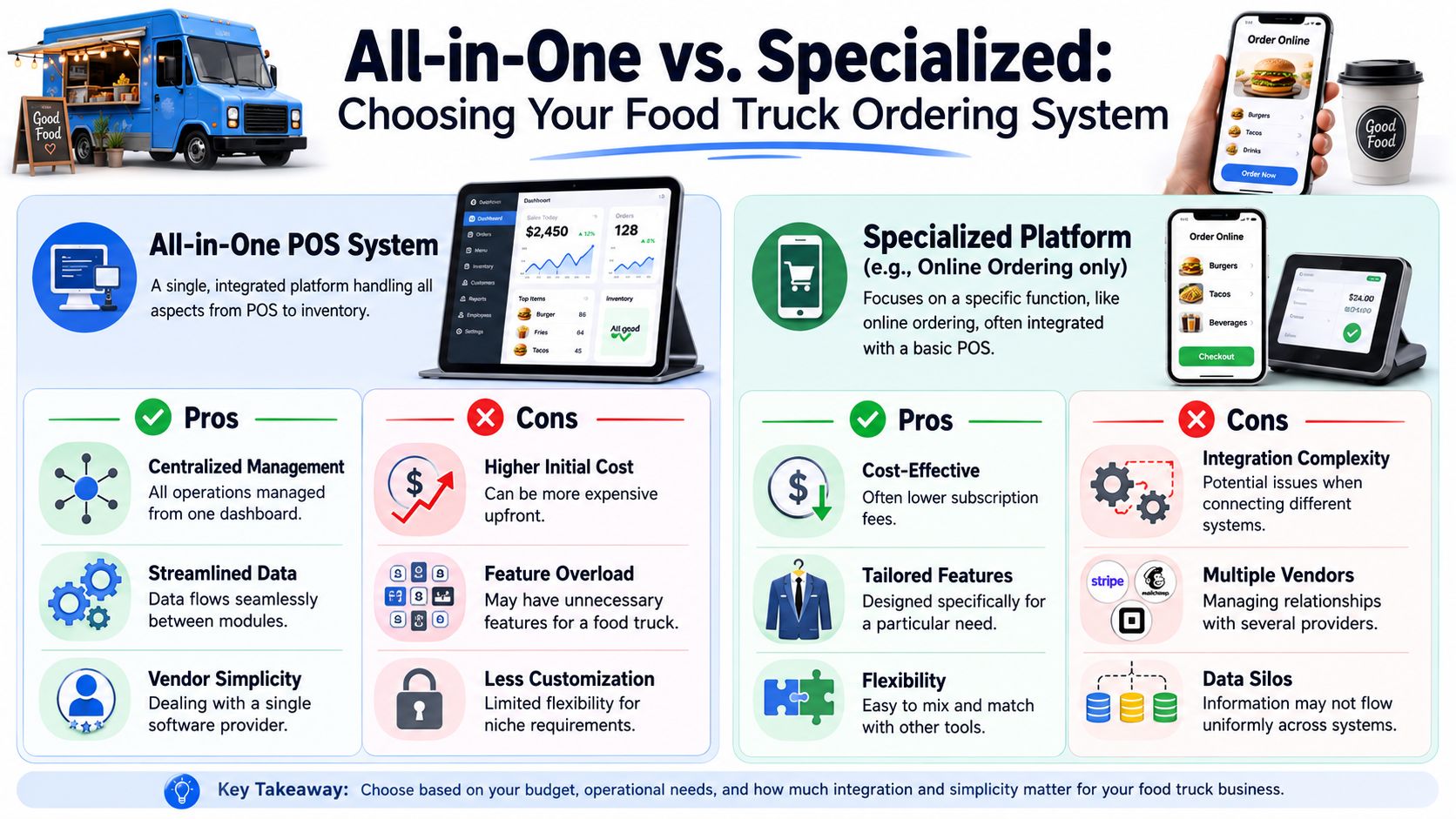
There are two common paths. Buy one all-in-one platform that tries to do everything, or pair your existing tools with a specialized ordering layer that focuses on customer-facing speed and flexibility.
Neither is automatically right. The right answer depends on how your truck operates.
When all-in-one makes sense
All-in-one systems are attractive for one reason. Simplicity.
You get one vendor, one login environment, and one support relationship. For a newer operator starting from scratch, that can reduce setup friction.
They tend to work best when:
- You need one dashboard for everything
- Your menu is straightforward
- You'd rather avoid managing integrations
- You're replacing a weak setup entirely
The downside is usually rigidity. Some all-in-one systems are fine for a small restaurant counter but awkward for mobile-first service, especially if QR ordering, offline reliability, or menu flexibility feel bolted on instead of native.
When specialized platforms win
Specialized ordering platforms make more sense when you already have a payment setup or POS you don't want to rip out.
In that model, you keep the tools that already work and add a stronger customer ordering layer on top. That usually gives you more freedom around QR menus, upselling logic, mobile design, and workflow changes.
This route fits operators who want:
- Better guest ordering without replacing everything
- Less vendor lock-in
- More control over customer experience
- A menu system built for conversion, not just transaction logging
If you're evaluating what a tighter tablet-led setup looks like, this overview of a tablet-based POS is a practical comparison point when weighing flexibility against simplicity.
A simple decision filter
Use this quick test.
| Situation | Better fit |
|---|---|
| You're launching a new truck and want one provider | All-in-one |
| Your current POS works, but ordering is weak | Specialized |
| You need deeper menu control and mobile-first UX | Specialized |
| You want one invoice and one support line | All-in-one |
The mistake is buying for demos instead of service reality. A polished back-office screen means nothing if the system struggles in sunlight, drops sync, or slows staff during a live rush.
Buy for the practical conditions you work in.
Your Food Truck Implementation Checklist
Most rollout problems happen before the first customer scans a code. Operators rush setup, skip real-world testing, and discover basic issues during service.
This checklist keeps that from happening.
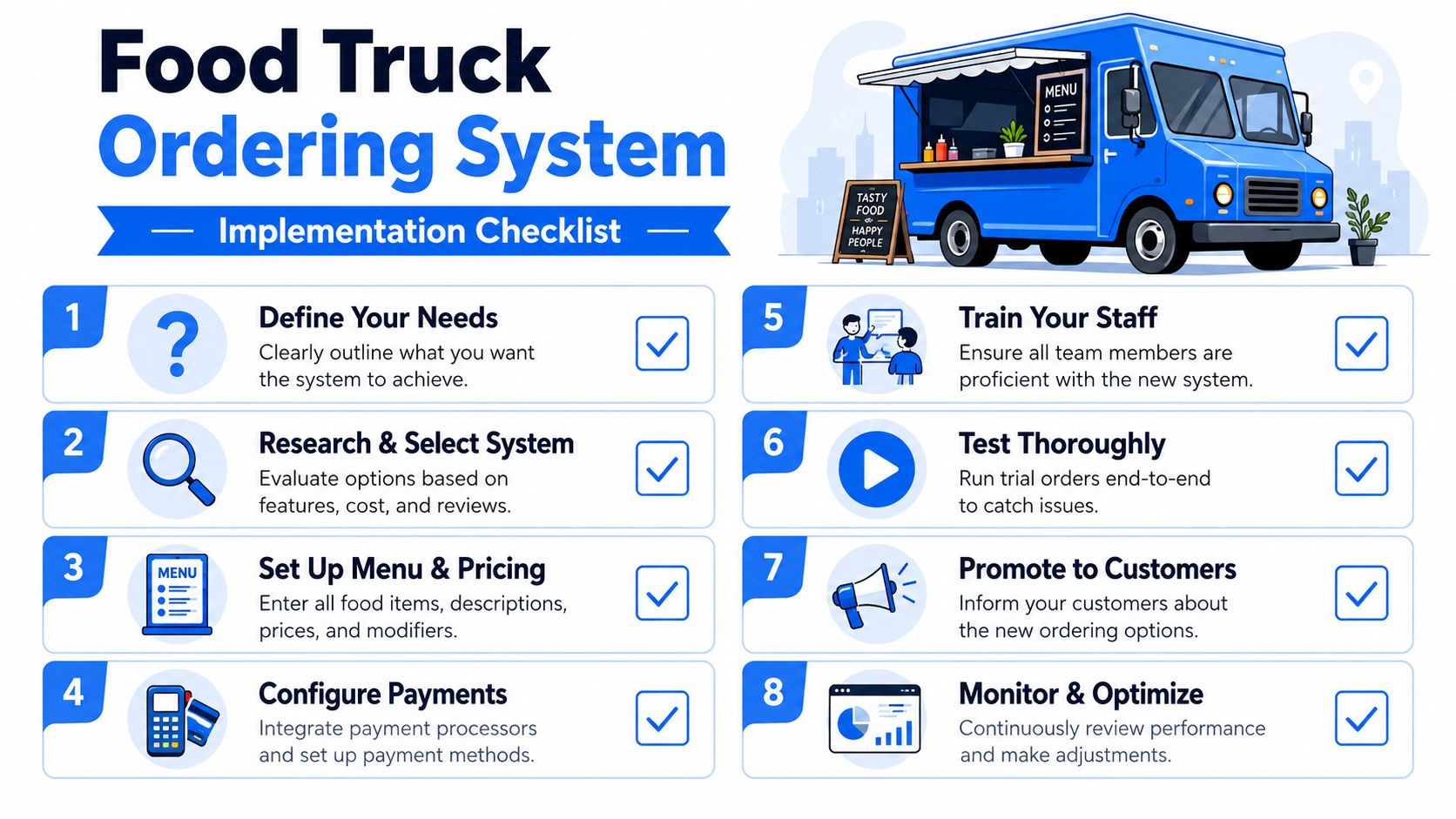
Before launch
Start with the menu. Don't just upload items. Build a menu that's easy to buy from on a phone.
- Cut clutter: Remove anything that creates confusion or slows choice.
- Set modifiers carefully: Make sure options are useful, not endless.
- Write for speed: Short descriptions beat clever copy during a lunch queue.
- Place profitable add-ons well: Drinks, sides, sauces, and combos should appear naturally.
Then test the customer side.
- Check scanability in bright sunlight: A QR code that works indoors may fail on a truck exterior at noon.
- Use durable materials: Weather, grease, and handling matter.
- Test on multiple phones: Don't assume every customer has the latest device.
- Confirm sold-out handling: Make sure staff can remove items quickly.
On launch day
Don't go live cold at a major event. Run your own service simulation first.
Have staff place test orders, pay through the live flow, send tickets into prep, and complete pickup. Do this while standing where customers will stand.
Use this launch-day checklist:
- Verify offline behavior: Disconnect from reliable service and see what still works.
- Run a payment test: Confirm the order and payment records match.
- Watch ticket routing: Make sure modifiers are visible where food is prepared.
- Set a backup plan: Keep a manual order method ready if something goes sideways.
- Assign one staff explainer: During the first service, one person should guide first-time QR users fast.
Field note: The best launch test is boring. If your team can run five clean orders in a row without discussion, you're close.
In the first weeks
The first version of your system won't be the best version. Tight operators tune fast.
Review what happened after each service:
- Which items caused delays
- Where customers hesitated
- What got upsold
- Which modifiers caused kitchen friction
- Whether pickup names or numbers were clear enough
Then make small changes. Reorder categories. Trim dead options. Simplify wording. Move better sellers higher. Remove anything staff keep explaining.
That's how the system starts earning its keep.
KPIs to Know if Your System Is Paying Off
If you only look at daily sales, you'll miss what the system is doing. The right metrics show whether your ordering flow is becoming more profitable, easier to run, and better for guests.
Watch these numbers first
Track these KPIs consistently:
- Average order value: Are digital prompts and bundles increasing what each guest buys?
- Orders per hour: Especially during your busiest service window, this tells you whether throughput is improving.
- Ticket time: Measure the time from order placement to pickup-ready status.
- Item-level performance: Which products sell well, which products drag, and which add-ons deserve more visibility.
- Order channel mix: Are more guests shifting to QR or digital ordering instead of crowding the window?
For operators building a reporting habit, this guide to restaurant KPI tracking is a practical starting point.
What good operators do with the data
Good operators don't stare at dashboards. They act on them.
If order volume is healthy but ticket time is rising, the prep flow needs work. If traffic is strong but average order value is flat, your menu prompts are weak. If guests complete orders but pickup feels chaotic, the issue isn't marketing. It's handoff design.
For a broader hospitality lens, this guide to boosting guest satisfaction is useful because it reinforces the same truth. Operational metrics and customer experience are tied together.
A food truck ordering system should function like a revenue asset. If it's reducing friction, improving order quality, and helping you shape the menu around what sells, it's doing its job.
If you want a cleaner way to turn QR scans into higher-margin orders without replacing your current stack, RevMenue is worth a look. It's built for operators who want faster digital menus, smarter upsells, and better menu analytics without adding operational chaos.