
Friday dinner service is full. A server drops the check, the handheld terminal won't sync, one guest wants Apple Pay, another wants to split the bill, and the manager is already dealing with a void from the bar. Meanwhile, the kitchen has done its job, but the last step of the guest journey is now the slowest part of the night.
That's where many restaurants bleed money without calling it a payment problem. Slow checkout delays table turns. Bad sync between POS, online ordering, and terminals creates comped items, duplicate charges, and angry guests. Staff lose time fixing payment errors instead of selling dessert, drinks, or one more round.
Payment processing integration fixes that, but only if you treat it as an operations decision, not just a software install. The global payment processing industry was valued at US$61.1 billion in 2023 and is projected to grow at a 10.5% CAGR through 2032, which tells you this isn't just about swapping card machines. It's about adapting to the digital commerce habits guests already expect, as noted in Airwallex's payment processing industry overview.
Table of Contents
- Your Payment Process Is Costing You More Than You Think
- Choosing Your Integration Model
- Mapping Your Restaurant Payment Flows
- PCI Compliance Without the Headaches
- Testing Rollout and Daily Reconciliation
- Turn Your Payment System Into a Profit Center
Your Payment Process Is Costing You More Than You Think
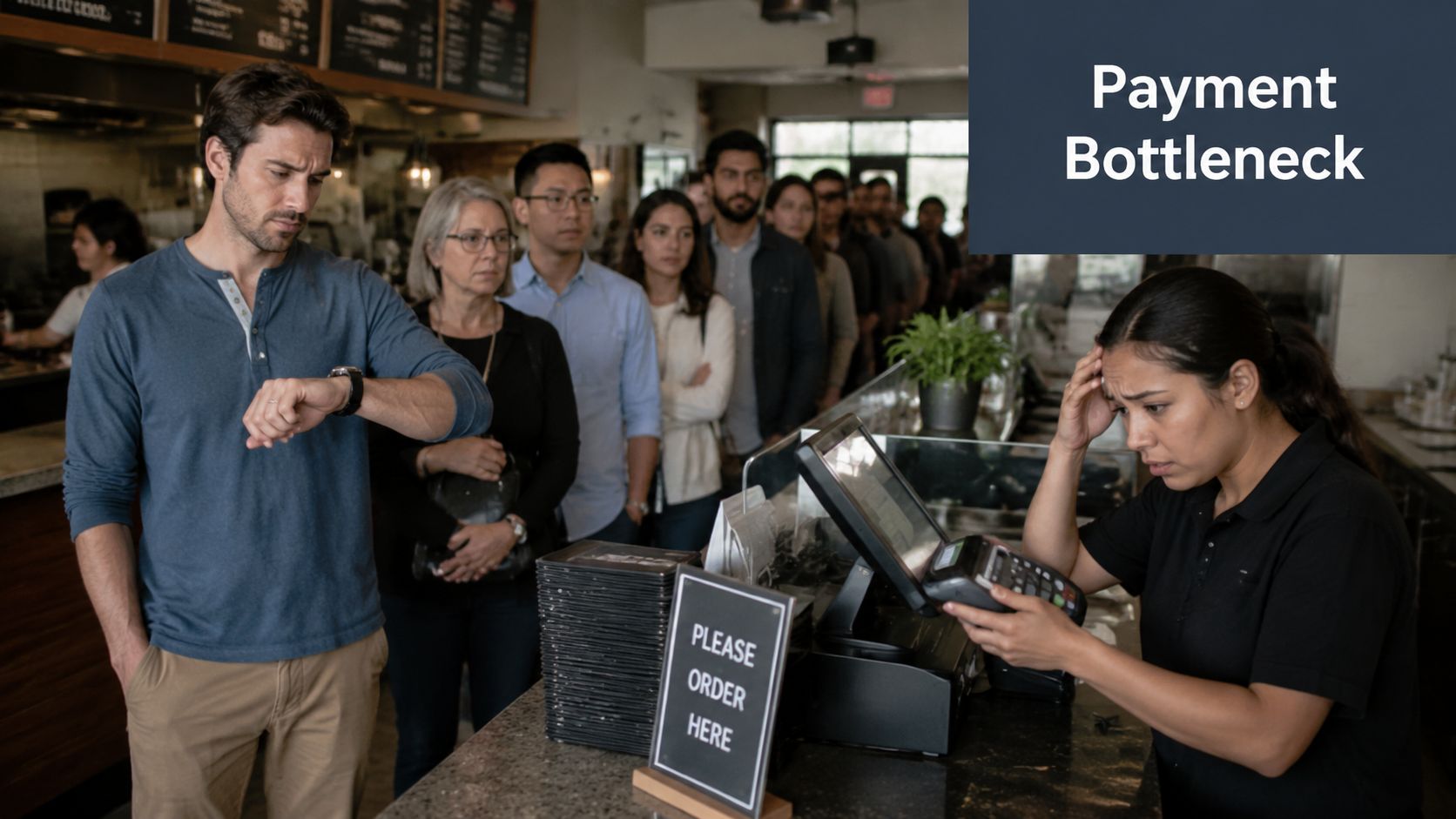
A bad payment flow usually hides inside “normal service friction.” Operators accept it because the kitchen is moving, the dining room is busy, and the terminals mostly work. But the problems stack up fast.
At the counter, a guest waits while the POS freezes before sending the total to the card reader. At the table, a server walks back and forth because split payment doesn't match what's on the terminal. On QR ordering, a guest pays online, but the order status doesn't update cleanly, so the team checks manually before firing the ticket.
Where restaurants lose margin
The biggest losses aren't dramatic. They're repetitive.
- Slower table turns: If payment is the slowest part of service, guests stay seated longer and the next party waits.
- Staff distraction: Managers spend time on refunds, voids, and missing transaction checks instead of coaching service.
- Guest frustration: A great meal ends with a clunky checkout. That's what people remember when they leave a review.
- Messy books: When processor reports, POS sales, and bank deposits don't line up, someone has to chase the gap.
Practical rule: If staff need to “double-check” payment status several times a day, your setup isn't integrated enough.
For hospitality teams, the payment moment isn't just administrative. It affects throughput, labor use, guest trust, and reporting quality. That's why owners who want cleaner numbers should look at the whole flow, not just merchant rates. Good restaurant bookkeeping systems get easier when payment data arrives consistently in the first place.
What a better flow looks like
The fix isn't adding more hardware. It's reducing handoffs.
A strong payment processing integration connects the POS, ordering interface, terminal or online checkout, and reporting layer so the transaction moves once and updates everywhere. Staff shouldn't be re-entering totals. Managers shouldn't be guessing whether a refund settled. Guests shouldn't have to switch devices or repeat steps to complete a simple payment.
Here's the operator test I use. If your team can't answer these questions quickly, your payment setup is costing you:
| Question | Healthy answer |
|---|---|
| Did the payment authorize? | Visible immediately in the POS or ordering dashboard |
| Was the order fired only after confirmed payment when required? | Yes |
| Can the team handle refunds and voids without calling support? | Yes |
| Do daily sales reports match processor activity with minimal cleanup? | Mostly yes |
Restaurants don't need perfect architecture. They need fewer payment surprises during service.
Choosing Your Integration Model
Start with the model, not the sales pitch. The payment setup you choose changes guest experience, compliance burden, support workload, and who owns the ugly parts when something goes wrong.
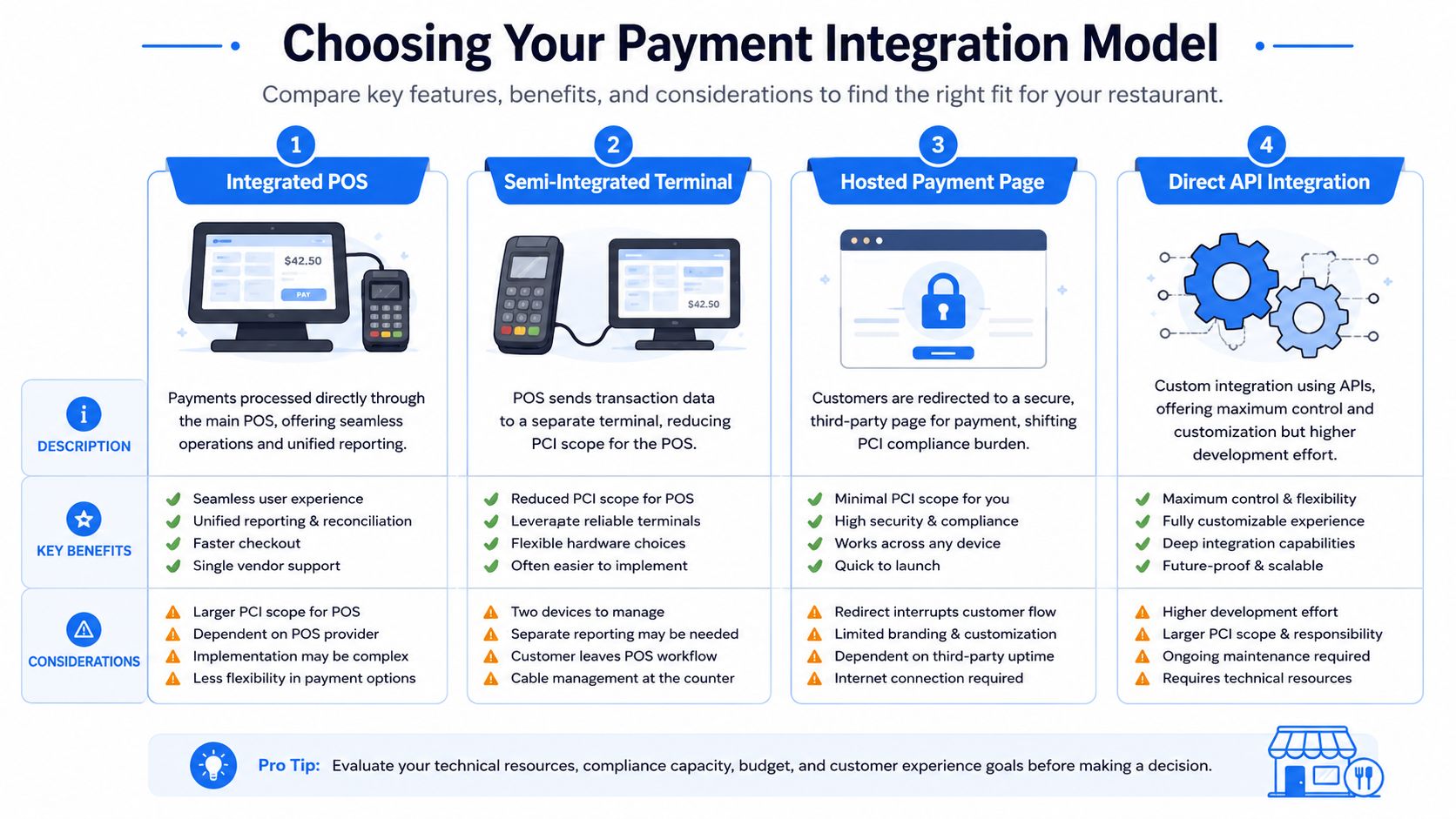
Four models that matter in hospitality
Here's the straight view.
| Model | Best for | Upside | Trade-off |
|---|---|---|---|
| Integrated POS | Full-service and multi-unit operations | Unified reporting and smoother service flow | Less flexibility if the POS ecosystem is closed |
| Semi-integrated terminal | Restaurants that want lower card-data exposure in the POS | Cleaner separation between POS and payment device | Still another device layer to manage |
| Hosted payment page | QR ordering, pre-orders, events, simple online checkout | Easier security posture because payment happens on a third-party page | Guest experience can feel less branded or less seamless |
| Direct API integration | Groups building custom ordering or loyalty experiences | Maximum control over UX and workflows | More setup effort, more testing, more responsibility |
The model isn't just technical architecture. It determines risk and reward. Bain notes that some integrated payment models can capture up to 100% of the payment “plus”, but those models also shift more responsibility for underwriting, KYC, and settlement risk to the operator or platform, as explained in Bain's analysis of integrated payments economics.
That matters for restaurants because a lot of owners hear “embedded payments” and think “better checkout.” The harder question is who eats the operational mess tied to chargebacks, reserves, onboarding, and payout issues.
A quick explainer helps if you're comparing options with your vendor.
What I recommend for most operators
Most restaurants do not need a custom direct API build.
They need one of two things. Either an integrated POS if they want the cleanest in-store workflow, or a hosted payment page for QR and online ordering if they want to reduce complexity and keep the payment step off their own stack. Semi-integrated terminals are often the practical middle ground for operators who want tighter control without expanding their compliance headache.
The right payment model is the one your managers can operate on a bad Saturday night, not the one that looks most impressive in a demo.
Use this filter before you sign anything:
- If you run table service: Prioritize handheld or tableside terminal stability, split checks, tip flow, and refund simplicity.
- If you run counter service: Prioritize speed, receipt clarity, and hardware reliability during rushes.
- If you push QR ordering: Prioritize a clean mobile payment experience and clear order-status sync.
- If you run several locations: Prioritize unified reporting and simpler training across stores.
If you're evaluating front-of-house systems at the same time, compare them with the payment model in mind, not as separate projects. A strong tablet-based POS setup should support the payment flow you need during service.
Mapping Your Restaurant Payment Flows
Most restaurant payment chaos starts because owners don't map the actual payment journey. They assume money goes from guest to bank and the rest will sort itself out. It won't.
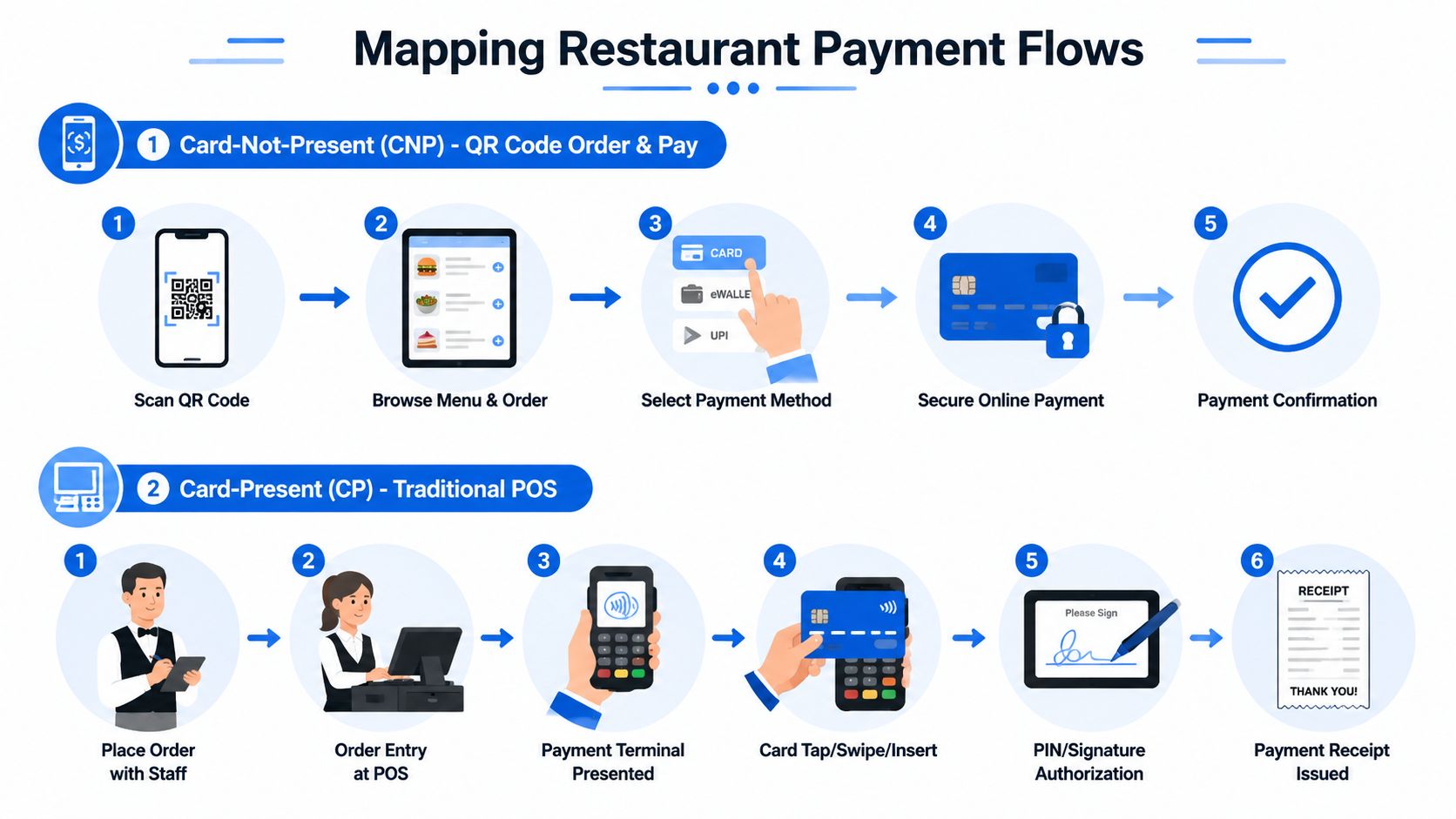
Two flows run most restaurants
In simple terms, you're usually dealing with card-present or card-not-present payments.
Card-present is the traditional flow. A guest orders with staff, the total lands in the POS, the terminal prompts for tap, insert, or swipe, and the payment is authorized before the receipt or order closeout. This is the core flow at counters, bars, and tableside devices.
Card-not-present is what powers QR ordering, pre-orders, and pay-by-link checkout. The guest scans, orders on their phone, enters payment details or uses a wallet, and the payment gateway returns an approval or decline. That response then needs to update the ordering system immediately.
Modern payment processing is heavily API-driven. 85.97% of businesses use a payment API, while 10.73% use eCommerce integrations and 3.30% use accounting integrations, according to Helcim's payment trend data. The same source notes that the virtual terminal accounts for 62.55% of transactions online, with recurring payments at 14.83%. For restaurants, that matters because the same embedded API logic behind online payment acceptance also supports QR pay flows and recurring billing models like subscriptions or meal plans.
Why webhooks matter more than owners think
Webhooks sound technical. They're not complicated. Think of them as automatic status messages.
When a payment event happens, approved, declined, refunded, voided, challenged, the payment system sends a message to your other tools. If your ordering platform, POS, loyalty system, or kitchen workflow doesn't receive that message properly, the team starts working blind.
That's how operational mistakes happen:
- Paid but not marked paid: Staff hold an order because they can't see confirmation.
- Declined but fired to kitchen: The kitchen makes food for an order that never really cleared.
- Refund issued but not synced: Finance sees one story in the processor and another in the POS.
- Duplicate event received: Staff think the guest was charged twice and panic starts.
In restaurants, a webhook failure rarely looks like a “tech issue.” It looks like a missing order, an awkward guest conversation, or a manager doing detective work at close.
If you run both counter and QR channels, map each handoff on paper. Order created. Payment authorized. Order released. Refund issued. Deposit received. If any one of those steps depends on a person manually checking another system, that's the weak point.
PCI Compliance Without the Headaches
Most owners either ignore PCI until renewal paperwork arrives or overcomplicate it and freeze. Neither helps.
PCI DSS is just the card-data rulebook. The practical issue for restaurants is scope. In plain English, scope means how much sensitive payment responsibility sits inside your business systems and daily operations.
Reduce your PCI scope on purpose
You don't win by being brave here. You win by reducing exposure.
If your restaurant stores, transmits, or touches more card data than necessary, you create more work for your team and more downside when something breaks. That includes old terminals nobody documented, online ordering plugins installed years ago, and “temporary” workflows where staff key in card details over the phone.
Use this decision filter:
- Keep card data away from the POS when possible: Semi-integrated terminals and hosted payment pages can reduce your burden.
- Avoid manual card handling: Phone orders and handwritten card details create avoidable risk.
- Limit system sprawl: The more vendors touching payment flow, the harder it is to know who owns what.
- Get clear vendor answers: Ask where card data is captured, where it's tokenized, and what your staff can see.
Operator warning: If a vendor explains security with glossy language but can't clearly tell you what touches card data, keep shopping.
Tokenization is the practical answer
For most hospitality businesses, tokenization is the cleanest compromise between convenience and control.
A tokenized setup replaces sensitive card details with a non-sensitive stand-in. Your system can still reference the payment method for refunds, reorders, tabs, or loyalty-linked purchases, but the raw card details don't need to live inside your restaurant's own environment.
That matters in real operations. It lets you preserve a smoother guest experience while keeping your staff and systems further away from the riskiest data. It also makes future workflow improvements easier, like guest profiles, stored payment methods for repeat catering clients, or simpler refund handling.
The wrong mindset is “How much PCI do we have to do?” The right mindset is “How do we stop unnecessary card-data exposure from entering the business in the first place?”
Testing Rollout and Daily Reconciliation
Friday dinner service is the worst time to discover your new payment flow can approve a card, lose the order, and leave your manager sorting out refunds at the host stand. That is how bad launches happen. The processor works. The restaurant operation does not.
Treat rollout like an opening-week operating procedure, not a tech milestone. Your real risk starts once guests split checks, servers void mistakes, online orders fail halfway through, and the deposit that hits the bank does not match what the POS showed the night before. If you do not test those moments before launch, you are choosing preventable revenue loss.
What to test before guests touch it
A single approved test payment proves almost nothing. I want operators to test the transactions that create write-offs, chargebacks, and staff confusion.
WebtWizz recommends testing declines, refunds, authentication flows, and controlled rollout with daily reconciliation because settlement delays can create timing gaps between sales activity and deposits, as explained in WebtWizz's payment integration testing advice.
Use a short, disciplined test pack:
- Approved payment: Confirm the order, payment status, and receipt all match across the POS, ordering channel, and processor.
- Declined payment: Make sure a failed charge does not release the order to the kitchen or mark the ticket as paid.
- Void versus refund: Check that staff know when to void before settlement and when they must issue a refund after settlement. This matters for fees, guest disputes, and close reports.
- Authentication flow: Test 3-D Secure or any added cardholder verification your channel requires.
- Saved cards, tabs, or house accounts: If you store tokens for repeat guests, catering clients, or bar tabs, test those workflows separately.
- Duplicate or delayed status updates: Confirm your team knows what to do when the processor says paid but the POS says open, or the reverse.
Run these tests with the people who will use the system. Cashiers, servers, shift leads, and whoever handles end-of-day close should all touch it. A launch fails fast when training lives only with the vendor and one manager.
How to roll out without creating service chaos
Start with one channel, one shift, or one location. Do not switch dine-in, online ordering, phone payments, and catering invoices all at once unless you enjoy hunting errors across four workflows.
For the first few days, put one person in charge of payment exceptions during service. That person should know how to identify stuck tickets, duplicate charges, missing captures, and failed refunds. Speed matters here. If a guest gets charged twice and your team takes two days to notice, you have already paid for the mistake in goodwill.
Keep a written issue log for the first week. Note the time, order number, payment status, staff action, and final resolution. Patterns show up quickly. One terminal may be dropping connections. One ordering channel may be creating duplicate authorizations. One location may be training staff incorrectly.
How to reconcile without wasting management time
Daily reconciliation is where owners find out whether the integration is helping the business or subtly draining margin.
You need three records every day:
- POS sales
- Processor transactions
- Bank deposits
They will not line up perfectly by calendar day, and that is normal. What matters is whether every difference has a clear reason: pending settlement, a same-day void, a next-day deposit, a refund, a tip adjustment, or a chargeback.
Build a close routine that your managers can follow in minutes:
- Assign one owner: Usually the GM, finance lead, or bookkeeper.
- Review exceptions first: Focus on duplicate charges, missing captures, unmatched refunds, open authorizations, and unusual settlement delays.
- Track unresolved items daily: Do not let pending transactions disappear into yesterday's close packet.
- Separate payment errors from service comps: If you mix them together, you lose visibility into what is hurting margin.
- Escalate same day: If order status and payment status disagree, fix it before the next shift inherits the problem.
For multi-unit operators, recurring payment exceptions should sit inside the same reporting rhythm as labor, sales, and voids. Good restaurant KPI software for real-time performance helps managers spot the location that keeps producing mismatched refunds or delayed settlements before those issues turn into chargebacks and angry guest calls.
A payment integration is live only after your first week of clean closes, explainable deposit gaps, and staff who know exactly what to do when a payment goes sideways.
Turn Your Payment System Into a Profit Center
Friday night. A guest scans the QR code, starts an order, adds cocktails, then hits a payment screen that stalls, rejects Apple Pay, or forces them to start over. Some guests quit. Some flag the charge later. Your staff gets pulled into a payment problem instead of selling dessert or turning the next table. That is not a tech annoyance. It is lost revenue, higher labor cost, and more chargeback exposure.
Owners who treat payments like a utility miss the bigger point. Your payment setup shapes average check, speed of service, refund volume, dispute risk, and how cleanly cash lands in the bank.
A good payment processing integration should do four things at once. It should make it easier for guests to pay, easier for staff to recover when something fails, easier for managers to trace money across channels, and harder for preventable disputes to slip through.
Judge your payment stack by margin, not by features
Fancy checkout features do not matter if your team cannot explain a missing capture, a duplicate charge, or a delayed catering deposit.
The right questions are commercial:
- Does this reduce dropped orders at the moment of payment?
- Does this support faster checkouts and higher add-on sales?
- Does this lower refund mistakes and dispute volume?
- Does this give finance and operators a clean trail from sale to settlement to deposit?
- Does this assign liability clearly when a charge goes wrong?
Those questions matter more in restaurants than in most businesses because payment problems hit three places at once. They hurt guest experience, they create end-of-shift confusion, and they distort your revenue reporting.
Where the profit actually shows up
The upside is not limited to card acceptance.
A well-run payment flow helps you capture more impulse purchases through QR ordering, reduce abandoned mobile orders, shorten the time servers spend fixing terminal issues, and cut the admin time spent chasing mismatched refunds or open tabs. It also gives you a cleaner record when a guest disputes a charge. If your system ties order details, timestamps, tip adjustments, and customer confirmations together, you have a better chance of defending revenue instead of writing it off.
Operators frequently choose poorly. They prioritize launch speed, later spending months grappling with actual costs. Manual exception handling, unclear processor responsibility, poor dispute evidence, and weak reporting will erase any savings from a cheap rate card.
A short operator checklist
If you are making a payment integration decision this quarter, use this filter:
- Map every payment channel: Counter, tableside, QR, delivery, catering, events.
- Choose the model based on operating fit: One clean workflow beats a pile of disconnected features.
- Confirm who owns failures: Gateway, POS, processor, ordering platform, or your team.
- Ask how chargebacks are handled: Evidence, response timelines, and who does the legwork.
- Reduce PCI scope deliberately: Keep sensitive card data out of your systems where possible.
- Check the close process: Your managers should be able to trace sales, refunds, tips, and deposits without spreadsheet gymnastics.
- Measure post-launch results: Look at abandoned payments, refund rates, dispute rates, labor interruptions, and deposit clarity.
If the integration makes it easier to collect money but harder to control it, do not call it an upgrade.
If you want the revenue upside after the payment layer is fixed, RevMenue is worth a look. It works alongside your existing POS and payment provider, helping restaurants turn QR menus, digital ordering, upsells, and menu analytics into a more profitable guest journey without adding more front-of-house friction.