
Your menu board is a sales system. If it is not built to guide profitable orders and match what the kitchen can execute fast, it drags down revenue all shift.
Since menu labeling rules changed how many operators have to present item information, the board now carries more than branding and price. It has to help guests decide quickly, stay accurate, and support a line that can deliver what was sold.
The operators who win treat the menu board kitchen as one connected system. The guest-facing board should push high-margin choices, smart add-ons, and simple decisions. The kitchen side should support those choices with clear routing, clean prep priorities, and fewer production slowdowns.
That connection matters because every mismatch costs money.
A board that promotes items the line struggles to produce creates longer ticket times, more mistakes, and frustrated staff. A board that is easy for the kitchen but weak at selling leaves money on the counter. The right setup does both. It raises average check, protects speed of service, and cuts waste caused by poor ordering patterns and bad communication.
Table of Contents
- Your Menu Board Is Costing You Money
- Designing Customer Menu Boards That Sell
- Choosing and Installing Your Board Hardware
- Connecting Sales to Service with a Kitchen Display System
- Integrating QR and Digital Menus with Your POS
- Using Menu Analytics to Drive Growth
Your Menu Board Is Costing You Money
A bad menu board does more than look messy. It pushes guests toward low-margin items, slows ordering, creates questions for staff, and feeds the kitchen orders that are harder to execute than they should be.
That's why I tell operators to stop talking about “the menu board” like it's one thing. It's a menu board system. It has two jobs that must work together:
- Front of house sells: It steers attention, frames value, and shapes what guests buy.
- Back of house executes: It turns those choices into clean production with fewer mistakes and less verbal chaos.
- Management controls margin: It keeps pricing, availability, and promotions aligned with what the kitchen can deliver.
When one side is off, the other side pays for it.
A common example. The front board pushes a premium combo at peak lunch. Great idea in theory. But if the kitchen line isn't set up for that build, ticket flow jams, staff start calling substitutions across stations, and guests wait longer. The promotion looked smart. Operationally, it was dumb.
Practical rule: If your board increases questions, substitutions, or line hesitation, it isn't helping sales. It's creating friction.
In a well-run menu board kitchen, the board doesn't just advertise. It channels demand into items the team can produce consistently and profitably.
That means you should judge every menu-board decision against three outcomes:
| Decision area | Good result | Bad result |
|---|---|---|
| Layout | Guests order faster | Guests scan too long and ask basic questions |
| Pricing | Higher-value choices feel obvious | Cheap items become the default |
| Item promotion | Kitchen can absorb demand | Line bottlenecks and remake risk increase |
Most restaurants don't need more menu items. They need a tighter system that connects selling to production. That's where the gains usually are.
Designing Customer Menu Boards That Sell
A customer menu board should close the order fast and push guests toward items your kitchen can produce well. If it slows the line, invites too many modifications, or buries your profitable items, it is hurting both sales and execution.
Start with one rule. Design for the order you want more often, not for every possible choice.
The board should steer attention to a short set of high-margin, operationally clean items. That usually means your signature products, your best bundles, and add-ons that increase ticket size without creating extra line friction. A board that sells the wrong item mix can wreck throughput just as fast as a bad prep plan.
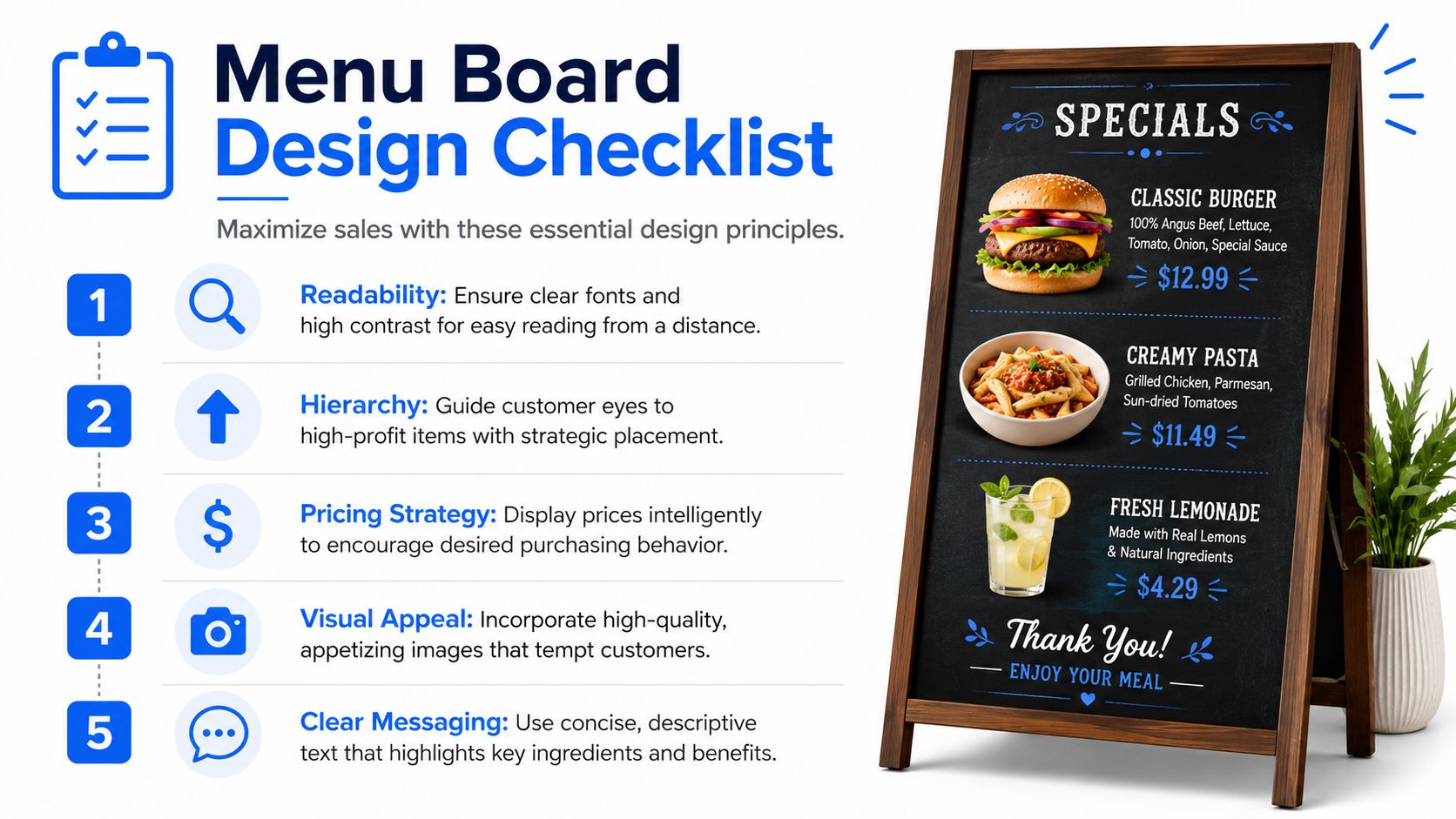
Use these standards when you redesign:
- Lead with your money makers: Put core profit drivers in the easiest-to-see positions.
- Trim category sprawl: Too many sections force guests to scan longer and ask more questions.
- Name items clearly: Specific item names sell faster than vague headings and cut cashier explanation.
- Test from the order point: If guests cannot read it while standing in line, fix the board.
- Use photos with discipline: One or two strong visuals can lift demand. A wall of images kills clarity.
For practical examples, study these restaurant menu board layout examples that stay clear under pressure.
Pricing deserves the same discipline. Strong boards do not just display prices. They frame value and move guests into better buying patterns. Your combo, upgrade, or add-on should feel like the obvious next step, especially when it uses ingredients and builds the kitchen already handles smoothly.
Use tactics that protect both margin and speed:
- Bundle items the line can produce fast: A combo should raise average check and keep builds predictable.
- Place a premium anchor on purpose: A higher-priced option can make your target item look like the smart pick.
- Keep modifiers tight: Long customization trees slow the cashier, slow the kitchen, and increase remakes.
- Write upgrade prompts in plain language: "Add fries and a drink" beats vague promotional copy.
A good board turns profitable behavior into default behavior.
Here is what that looks like in a real shop. A café features drip coffee, a house latte, and a breakfast combo near the visual center. Guests choose faster. Cashiers ask fewer follow-up questions. The kitchen sees more repeatable tickets instead of scattered one-off builds. That lifts ticket size and cuts production drag at the same time.
Compliance matters too, but it should not wreck the sale. If your business falls under menu labeling rules, handle the required nutrition information cleanly and consistently, as noted earlier in this article. Do not let legal copy swallow the board or compete with the items you need to sell.
Keep it under control:
- Place calorie information consistently: Random placement makes the board harder to scan.
- Separate selling from legal copy: Promotions should catch the eye. Required disclosures should stay readable and contained.
- Train staff on nutrition requests: A smooth handoff protects guest trust and keeps the line moving.
The best customer boards work as a sales tool and an operating tool at the same time. They increase average check, reduce ordering hesitation, and feed the kitchen an item mix the team can execute without waste or chaos.
Choosing and Installing Your Board Hardware
Bad hardware kills good menu strategy. If the screen is hard to read, slow to update, or mounted like an afterthought, you lose sales at the counter and create extra work in the kitchen.
Choose the board format based on operating reality, not what looked good in another restaurant. Static boards fit shops with a short core menu, stable pricing, and very few promo changes. Digital boards earn their keep when you run dayparts, limited-time offers, location-specific pricing, or frequent item availability changes.
That choice affects more than marketing. A front board that changes quickly only helps if the operation behind it can keep up. The smart move is to treat the menu board kitchen as one system. The guest sees the selling message. The line feels the consequences. If your board pushes breakfast sandwiches until 10:59, your hardware, update process, and kitchen setup need to switch cleanly at 11:00 without confusion, remakes, or staff questions.
Use this quick comparison:
| Board type | Best for | Watch-outs |
|---|---|---|
| Static | Stable menus, tight budgets, low promo activity | Slow to update, costly to reprint, weak for daypart changes |
| Digital | Frequent updates, multi-location control, active promotion strategy | Needs proper install, content discipline, and maintenance ownership |
Digital fails for predictable reasons. Operators overspend on displays, then cut corners on mounting, cabling, ventilation, or network reliability. That is how you end up with black screens during lunch, crooked panels over the register, and managers climbing ladders to fix problems during service.
Key requirements for a digital install
Set the physical install up for uptime and easy service. Practical installation guidance from CrownTV recommends a few basics that prevent expensive headaches later (production menu board installation guidance):
- Match the mount to the panel: Use a flush wall mount that fits the screen's VESA pattern.
- Leave service slack in the cabling: Plan for about a 6-inch service loop for power and HDMI.
- Keep network access close to each screen: Place a network drop within 10 feet of each panel.
- Use wired Ethernet: It is more stable than Wi-Fi for live menu updates.
- Protect multi-panel layouts from heat issues: Leave at least a 9 mm bezel-to-bezel gap for ventilation.
Heat and service access get ignored constantly. Then screens age early, panels fail unevenly, and every repair turns into a wall job instead of a quick swap.
Use this rule in the field. If an installer talks about screen size and resolution but skips service clearance, cable routing, ventilation, and wired networking, hire someone else.
Ownership matters too. Decide who changes pricing, daypart menus, sold-out items, and promos before launch day. If nobody owns updates, the board starts lying to guests, the POS gets corrected at the register, and the kitchen absorbs the mess through voids, substitutions, and wasted prep.
Connecting Sales to Service with a Kitchen Display System
A front board that sells aggressively without kitchen control creates service problems. It is at this point that the menu board kitchen becomes a real system instead of two disconnected screens.
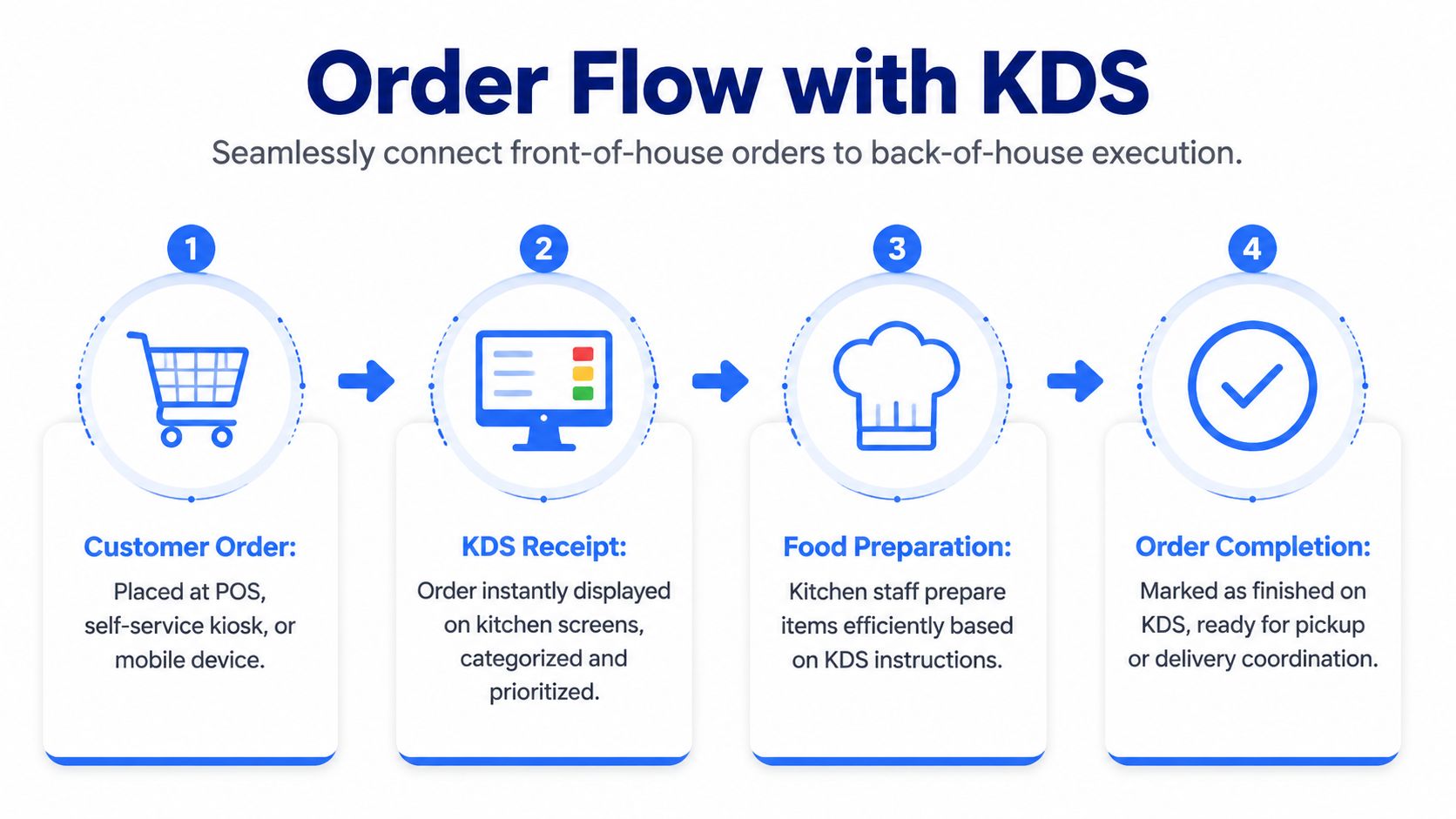
A Kitchen Display System, or KDS, replaces the messy handoff between sale and production with a cleaner workflow. Orders from the POS, kiosk, or digital channel route straight to kitchen screens so stations can work from the same live view.
Early in the process, this flow is easier to understand visually.
What a KDS changes on a live shift
In a healthy setup, the order doesn't sit at one choke point. It moves to the right production stations immediately.
For example:
- Grill sees proteins first: Burgers, chicken, or hot sandwiches land where cook time starts.
- Fry sees side volume clearly: Fries, tenders, and fried add-ons queue separately.
- Expo gets the final picture: The finishing station can see what's still open and what's ready to plate or bag.
- Staff mark completion in real time: That keeps handoffs cleaner than paper tickets hanging all over the line.
Speed isn't just a front-counter issue; it's a routing issue. If the menu board drives guests toward combos and modifiers, the kitchen needs a production view that can absorb that complexity without shouting across the line.
Here's a simple look at the difference:
| Workflow | Typical result |
|---|---|
| Paper tickets and verbal clarifications | More confusion, more missed modifiers, slower handoff |
| POS and KDS routed by station | Cleaner prep flow, better visibility, fewer avoidable touchpoints |
You can see a general example of digital menu flow in action here:
Where menu boards break down without kitchen alignment
Digital menu boards are often sold on flexibility, and that part is true. The problem is that flexibility creates maintenance work. Operators run into labor demands for content changes, pricing sync issues with the POS, and brand consistency problems across locations. The practical failure modes also matter: bad screens, glare, and guest confusion when promos change too often (operational risks of digital menu boards).
Those aren't side issues. They hit service directly.
A few examples I've seen repeatedly:
- Promo mismatch: Front board sells an item the kitchen is low on.
- Price mismatch: POS changes first, board changes later, staff end up apologizing.
- Visual overload: Rotating promos distract from the core menu and slow first-time guests.
- Station overload: A promoted item creates too much assembly work for one part of the line.
The fix isn't “don't promote.” The fix is to promote with production in mind.
Run menu changes through one question before launch. Can the kitchen absorb the demand cleanly at peak?
When FOH selling and BOH execution work as one system, service gets calmer. Staff spend less time translating the order and more time making it.
Integrating QR and Digital Menus with Your POS
Overhead boards attract attention. Table menus close the sale.
That's why a modern menu board kitchen shouldn't stop at the wall. QR and digital menus extend the selling job to the moment when guests are deciding on extras, comparing options, and ordering another round.
The table is where margin gets won
Paper menus are passive. A well-built digital menu can do more useful work without adding pressure to staff.
It can:
- Suggest natural add-ons: Extra cheese, a side, dessert, another drink.
- Present bundles clearly: Guests often choose the better-value option when it's easier to understand.
- Reduce repetitive questions: Ingredients, modifiers, and availability can be clearer on a phone than in a rushed table conversation.
- Cut update friction: No waiting on reprints when prices or items change.
Operators often overcomplicate things. They assume digital means ripping out their current systems. It doesn't have to.
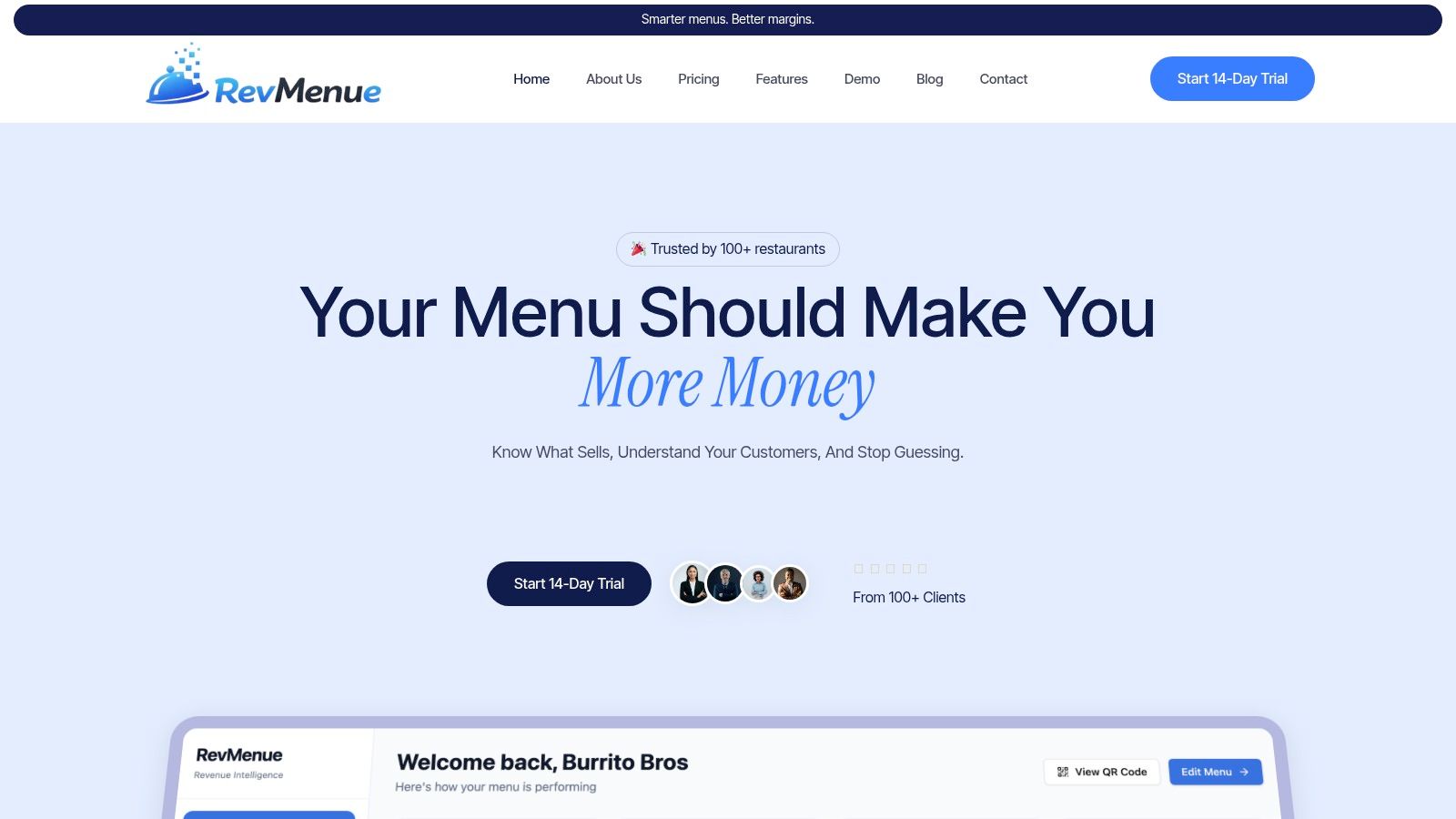
A platform like RevMenue's QR digital menu system works alongside an existing POS so operators can update menus faster, present add-ons and bundles on mobile, and reduce print dependence without rebuilding the whole stack.
Keep the tech stack simple
The right setup is the one your team will maintain. If managers need five tools and three logins to change a price, the board will drift out of sync.
Use these filters when choosing a QR or digital menu tool:
- POS compatibility matters first: If menu changes don't stay aligned, staff will be stuck fixing preventable mistakes.
- Phone speed matters more than flashy design: Guests won't wait for bloated pages.
- Local control matters: A store manager should be able to handle sold-out items and daily specials without opening a support ticket.
- Upsell logic should feel natural: Relevant suggestions work. Random prompts annoy guests.
A café example makes this easy. The wall board gets the guest to coffee. The QR menu at the table or pickup area nudges pastry, second drink, or seasonal add-on. That's how you increase ticket size without forcing staff into awkward selling.
The best digital menu setups reduce staff workload because the menu does more of the explaining and suggesting on its own.
Using Menu Analytics to Drive Growth
If you're not measuring what the menu changes, you're guessing. That's where most restaurants stay stuck.
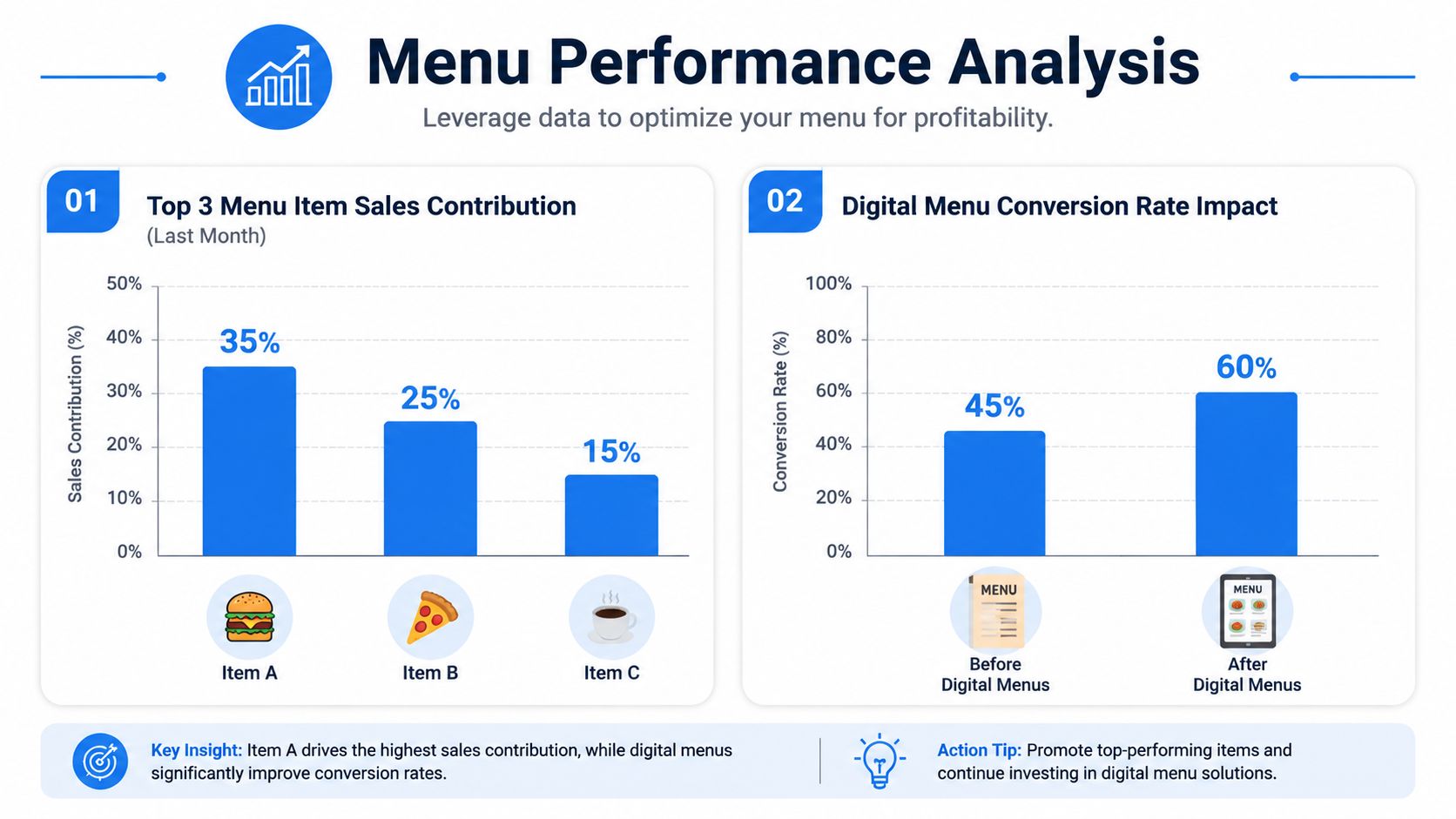
The reason digital menu boards keep growing as a technology category is simple. Operators want real-time updates, upselling tools, and analytics. One industry summary says the global digital menu boards market was valued at more than $2.6 billion in 2022 and is expected to reach almost $3.9 billion by 2028, with a projected 7.8% compound annual growth rate from 2025 to 2034 (digital menu board analytics trend data). The point isn't just market size. The point is why operators are buying in. They want better control.
Track what changes decisions
You don't need a giant dashboard full of vanity metrics. You need a short list tied to money and labor.
Focus on signals like these:
- Item mix: Which items guests choose most often after menu changes.
- Bundle uptake: Whether featured combos are selling.
- Add-on behavior: Which extras guests accept and which they ignore.
- Time-of-day ordering shifts: What sells at lunch may drag at dinner.
- Modifier patterns: Repeated changes often reveal menu wording problems or product gaps.
If you want a baseline for what to monitor in a modern stack, this overview of restaurant menu analytics workflows is useful.
Turn menu data into operating decisions
Data only matters if it changes the way you run the store.
Use it like this:
| What you see | What it usually means | What to do next |
|---|---|---|
| A promoted item gets attention but weak ordering | The offer looks good but the value isn't clear | Rewrite the headline, simplify the bundle, or move it |
| Add-ons underperform | Suggestion timing or relevance is off | Tie upsells to the item, not generic prompts |
| One category dominates at peak | Kitchen load may be uneven | Rework placement or push easier alternatives |
| Certain items get frequent modifiers | The default build isn't landing | Adjust the standard recipe or rewrite the menu copy |
A smart operator also checks kitchen friction against menu performance. If an item sells well but creates production headaches, it may still be a weak item for the business. Sales volume alone can hide labor cost, ticket drag, and inconsistency.
Good menu analytics don't just tell you what sold. They tell you what you should stop pushing.
A practical review rhythm
Don't wait for a quarterly deep dive. Review the menu as an operating tool.
A workable cadence looks like this:
Daily check
- Pricing accuracy
- Sold-out item handling
- Promo alignment with inventory
Weekly review
- Best-moving bundles
- Low-response promos
- Peak-hour product mix
- Staff feedback on confusing orders
Monthly decisions
- Remove weak visual clutter
- Rewrite slow sellers with potential
- Promote items the kitchen executes cleanly
- Pull back offers that create service friction
This is how you get compounding value from a menu board kitchen. The board sells. The POS and digital menu capture behavior. The kitchen system shows where execution gets messy. Then you adjust.
Most restaurants already have enough demand signals. They just don't turn them into menu decisions fast enough.
If you want a cleaner way to connect QR menus, upsell prompts, and menu performance tracking without replacing your current POS, RevMenue is one practical option to evaluate. It fits best for operators who want faster menu updates, clearer revenue signals, and a menu system that supports both guest experience and day-to-day execution.
