
Saturday dinner rush exposes weak systems fast.
A server takes an order on paper, heads to the only fixed terminal, waits behind two coworkers, re-enters the ticket, fixes a modifier mistake, then runs back to the floor. Meanwhile, a guest wants to pay, another wants a dessert recommendation, and the kitchen is asking whether that burger was medium or medium-well. That's not a staffing problem. It's a workflow problem.
A tablet based POS fixes that bottleneck because it moves order entry and payment to where service happens. Beyond that, it becomes the operating hub for digital menus, faster payments, cleaner reporting, and better upsells. If you're still treating your POS like a cash register, you're leaving money on the table.
Table of Contents
- Are Your POS Terminals Slowing Down Service?
- Understanding the Modern Restaurant POS
- Tablet POS vs Traditional Systems A Head-to-Head Comparison
- How a Tablet POS Drives Profit and Efficiency
- How to Select and Implement a Tablet POS
- Integrating Your POS with QR Menus and Revenue Tools
Are Your POS Terminals Slowing Down Service?
Saturday night. Full book. Bar is three deep. Your strongest server is waiting to enter orders because one terminal is tied up with split checks.
That delay doesn't stay at the terminal. It hits the kitchen late, drags ticket timing, slows drink pacing, and makes guests feel ignored. By the time the food lands, the table already thinks service is off.
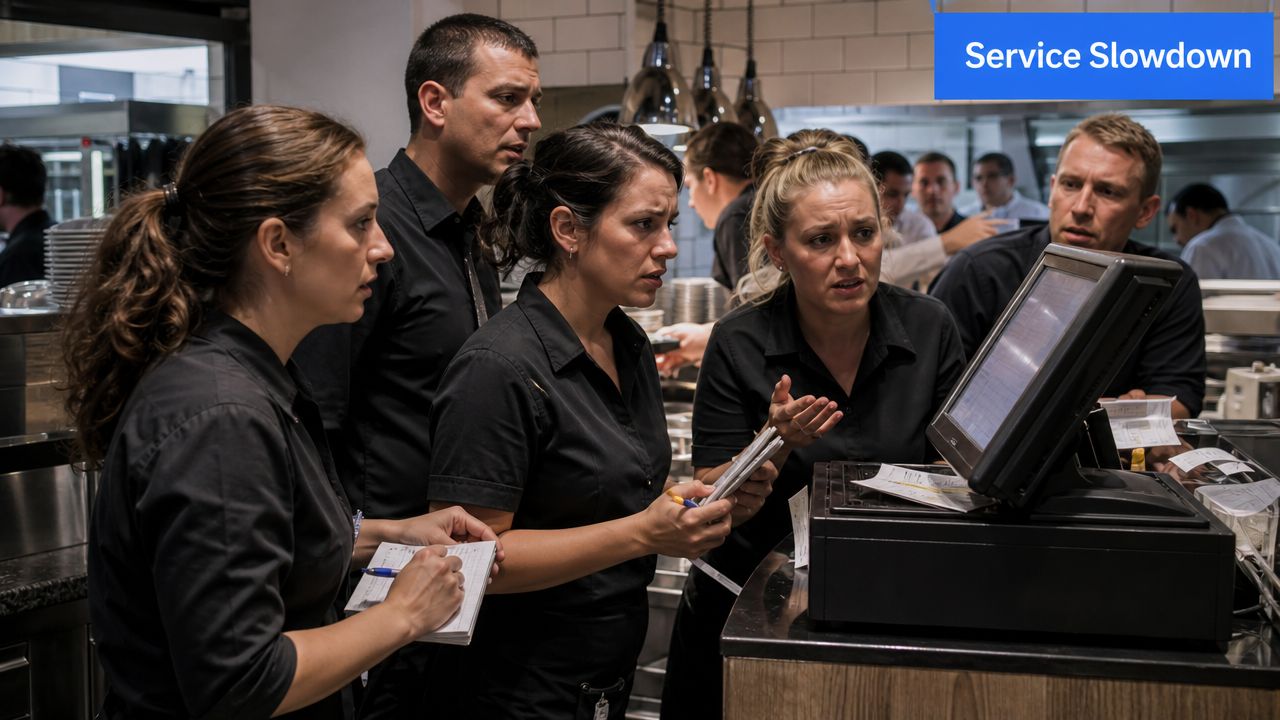
I've seen this in full-service dining, cafés with line pressure, and multi-unit groups trying to standardize operations. The common issue isn't effort. It's that staff are forced to walk back to a machine to do work they should finish in front of the guest.
A tablet based POS removes that choke point. Orders go in at the table. Modifiers get captured while the guest is still speaking. Payments happen without the awkward disappear-and-return card routine. Service feels smoother because the team isn't bouncing between the dining room and a box on the wall.
What the bottleneck really costs
The cost isn't just slower service.
- Lost sales: If ordering takes longer, add-ons get skipped because staff are rushing.
- More comps: Handwritten notes and delayed re-entry create mistakes.
- Weaker guest experience: Guests don't care why service stalled. They just feel the stall.
- Staff fatigue: Extra steps pile up over a shift and drain good people.
Practical rule: If your team queues at a terminal during peak periods, your POS is part of the problem.
This isn't some fringe technology trend, either. The global tablet POS systems market was valued at USD 8.5 billion in 2024 and is projected to reach about USD 30 billion by 2034, with a 13.4% CAGR, while North America accounted for more than 35.7% of 2024 revenue. That tells you tablet POS is already a mainstream operating model in hospitality, not an experiment.
A simple real-world shift
Think about a four-top ordering cocktails, starters, and mains.
With a fixed terminal:
- server writes it down
- server walks away
- server waits for terminal access
- server re-enters the order
- kitchen receives it later
With a tablet:
- server enters the order on the spot
- kitchen gets it immediately
- fewer details get lost
- the server stays present and can upsell dessert or another round later
That's the point. Faster input isn't just convenience. It's cleaner execution and more chances to sell.
Understanding the Modern Restaurant POS
Most owners overcomplicate this. A modern restaurant POS isn't mysterious. It's just a simpler setup built around mobility.
At the practical level, a tablet based POS usually runs on three core components: a tablet, a card reader, and a POS app. That's the setup described in this breakdown of POS tablet architecture. The tablet handles the interface, the reader handles payment capture, and the app runs the transaction logic.
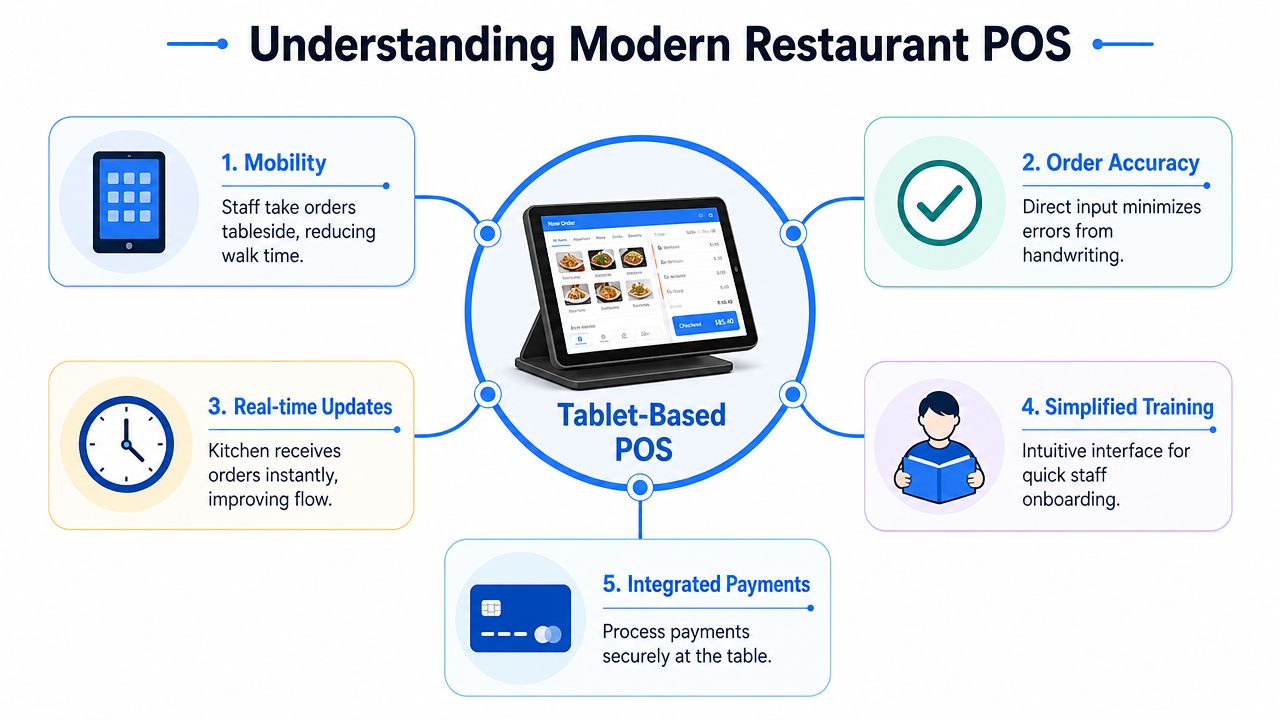
What it actually includes
In plain terms, the critical points are.
- Tablet hardware: This is what staff touch all shift. Some operators use consumer tablets. Others choose ruggedized devices for higher-traffic environments where drops, spills, and nonstop handling are normal.
- Card reader: This separates payment acceptance from the screen staff use to work the floor.
- POS software: This is the brain. It manages menus, modifiers, checks, routing, permissions, and reporting.
That separation matters more than most owners realize. If one tablet gets damaged, you replace the device without redesigning your whole payment flow. If you need another order station for patio season, you can redeploy faster. If you want to update the interface, you don't need to rip out every counter unit.
The best POS setup is the one your staff can use correctly when the room is full, not the one that looked impressive in a demo.
Why the setup matters operationally
Many tablet POS platforms use a subscription model rather than a heavy upfront hardware purchase. For operators managing cash flow, that usually makes expansion easier and budgeting cleaner. It also means updates arrive through software instead of forcing a full replacement cycle every time you outgrow old equipment.
If you're evaluating systems for an owner-led operation, look closely at how the software handles service flow, not just payment processing. Table mapping, item modifiers, split checks, void permissions, kitchen routing, and menu changes matter more than glossy hardware.
A useful benchmark for busy operators is whether the POS can support the rest of your management stack, including scheduling, menu control, and reporting. That's where a broader restaurant management software setup for busy owners starts to matter.
For a quick visual overview, this short video is worth a look before you start vendor calls.
Tablet POS vs Traditional Systems A Head-to-Head Comparison
Here's the blunt version. Traditional systems were built for fixed stations and fixed workflows. Restaurants aren't fixed anymore.
You have tableside service, curbside handoff, outdoor seating, pop-up bars, event ordering, QR menu browsing, and guests who expect payment to happen fast. A static terminal can still process a transaction. It can't support a modern service model nearly as well.
Where the old model breaks
The financial case is hard to ignore. One industry analysis says traditional POS setups can cost 10 times more than tablet POS, while tablet-based systems typically use a single device on a SaaS model with lower upfront investment. That's a major reason mobile POS alternatives have gained traction.
That same analysis notes fixed POS still held an 81% share of the broader POS market. That's important context. Legacy systems are still common. Common doesn't mean optimal.
If you're running a high-volume counter service operation with one simple ordering point, an old-school terminal may still function well enough. But if your service model depends on speed, flexibility, and guest-facing convenience, "good enough" starts getting expensive.
Traditional POS vs. Tablet POS
| Feature | Traditional POS | Tablet Based POS |
|---|---|---|
| Upfront cost | Higher hardware commitment | Lower upfront entry, often software subscription based |
| Mobility | Fixed to counter or service station | Mobile across dining room, patio, curbside, or queue |
| Order entry | Often re-entered at terminal | Entered where the guest orders |
| Payment flow | Guest usually waits for terminal process | Payment can happen tableside |
| Hardware footprint | Bulkier and more permanent | Smaller and easier to redeploy |
| Training feel | Can feel dated or rigid | Usually easier for newer staff to learn |
| Expansion | Adding stations can be cumbersome | Easier to add devices as service needs change |
| Tech stack role | Often treated as isolated register | Better fit as a connected operations hub |
A lot of owners make the wrong comparison. They compare device to device. You should compare workflow to workflow.
Ask yourself:
- Where do my staff lose time? At the terminal, in the walk back, or during payment?
- Where do mistakes happen? On handwritten tickets, verbal modifications, or delayed entry?
- Where do guests feel friction? Waiting to order, waiting to pay, or waiting for someone to return with the card?
If the dining room moves but your POS doesn't, your team is doing extra labor every shift.
That's why I push operators to think beyond checkout. The better question isn't "Should I get tablets?" It's "Do I want my service model built around a queue at a machine?"
How a Tablet POS Drives Profit and Efficiency
A tablet POS only matters if it improves the P&L. Good news. It usually does, when the workflow is set up properly.
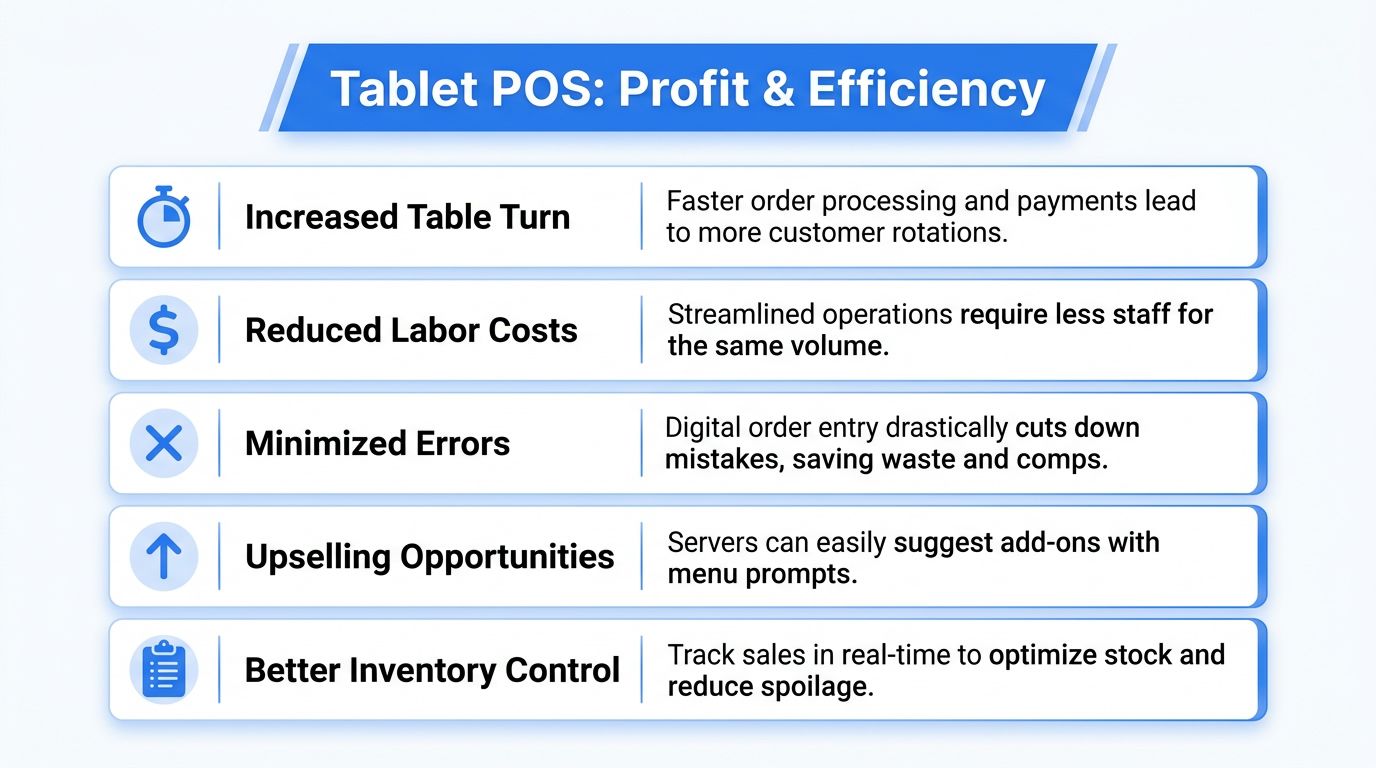
The biggest win is speed with accuracy. Tablet POS systems reduce order latency and transcription errors by letting staff enter orders directly at the table and transmit them to the kitchen. In plain restaurant terms, that means fewer mistakes, faster firing, and less backtracking.
Where the money shows up
A tablet based POS helps revenue in ways owners can feel quickly.
- More complete orders: Servers capture modifiers, sides, and add-ons while talking to the guest instead of trying to remember them later.
- Better upsells: It's easier to prompt another round, premium side, dessert, or add-on when the device keeps the order moving.
- Faster table progression: Guests order sooner, kitchen sees tickets sooner, and payment wraps up faster.
- Cleaner menu control: When pricing, item availability, or menu structure changes, digital systems make execution tighter.
Here's a simple example. A café at lunch doesn't need staff walking back and forth just to ring in sandwiches and coffees. A tablet lets the cashier float, handle queue spikes, and keep the line moving. In a full-service dining room, tableside ordering keeps the server with the guest longer and the ticket out of limbo.
Where the labor savings show up
The labor impact is just as important.
- Less duplicate work: No scribble, then retype routine.
- Less running: Staff spend more time serving and less time commuting to hardware.
- Shorter onboarding: New hires usually adapt faster to touch-based systems than to clunky legacy screens.
- More usable reporting: Managers can spot menu issues, check sales mix, and react faster during service.
If inventory visibility matters to you, your POS decision shouldn't happen in a silo. Tight order capture is much more useful when it connects with an inventory management app built for restaurant operations.
Good operators don't buy tech for the feature list. They buy it to remove friction from labor, service, and sales.
One caution. Tablet hardware won't magically create profit. If your menu structure is messy, your modifier logic is sloppy, or your staff prompts are weak, a new POS just digitizes bad habits. Clean the workflow, then let the system accelerate it.
How to Select and Implement a Tablet POS
Don't buy a tablet POS because the demo looked slick. Buy one because it fits your service model, your menu complexity, and your management discipline.
A bad POS decision locks in frustration for years. A good one makes daily service noticeably easier within days.
What to ask before you sign
Start with operating reality, not vendor promises.
Can it handle your actual service style?
Fine dining, fast casual, café counter service, bar tabs, and multi-room hospitality all need different workflows. Test table management, coursing, seat positions, split checks, open tabs, and modifier depth.How hard is menu management?
If changing an item, price, or availability takes too many steps, your managers won't keep it current. That leads to awkward guest conversations and avoidable comps.Does it integrate cleanly with the rest of your stack?
You want the POS to work with inventory, online ordering, kitchen display workflows, loyalty tools, and digital menus. If it walls itself off, you'll spend more time patching around it.What does payment look like on the floor?
Ask how tableside payment works in real conditions, not just in a showroom. Slow pairing, battery issues, or awkward handoff steps kill adoption.What is the total cost of ownership?
Look beyond the monthly fee. Include hardware, readers, accessories, support, payment processing, replacement devices, and implementation help.How does it handle permissions and mistakes?
You need clear controls for voids, discounts, refunds, and manager approvals. Restaurants don't run on perfect transactions.
Buy for peak-hour behavior. If the system only feels good when the room is quiet, it's the wrong system.
A useful vendor meeting should include live scenarios:
- six-way split check
- out-of-stock item replacement
- kitchen modifier change mid-service
- tableside payment
- reopening a closed check
- moving a bar tab to a dining table
If they can't show that smoothly, keep looking.
How to roll it out without chaos
Implementation is where most operators create their own headaches.
Use this sequence instead:
- Clean your menu first: Fix item names, modifier groups, duplicate buttons, and pricing logic before migration.
- Map service workflows: Decide who enters orders, who can comp items, who closes checks, and how exceptions get handled.
- Start with one zone or daypart: Pilot on lunch service, patio service, or one unit before a full rollout.
- Train with real tickets: Don't train in abstract. Run common orders, common mistakes, and common payment situations.
- Keep one fallback plan: Have a temporary backup process for outages, dead batteries, or user confusion in the first week.
- Assign floor champions: One manager and one strong frontline employee should own adoption during launch.
I also recommend setting clear expectations in week one:
- every order entered directly into the device
- no side notebooks unless absolutely necessary
- payment closed through the new workflow
- issues documented immediately, not discussed vaguely after shift
That discipline matters. If you let staff drift back to old habits, they'll turn a better system into the same old mess with a nicer screen.
Integrating Your POS with QR Menus and Revenue Tools
A tablet POS becomes much more valuable when it stops acting like a standalone register and starts acting like the center of your restaurant's revenue system.
That's the unique advantage most operators miss. The ultimate payoff isn't just mobile order entry. It's what the POS enables when it's connected to digital ordering, QR menus, item availability, and menu performance data.
Your POS should feed the whole revenue system
Think about how guests buy now.
They scan a menu before a server arrives. They compare items on their phone. They look for photos, modifiers, combos, or allergy details. Then they order, pay, and sometimes reorder without ever wanting a long explanation from staff.
If your QR menu, in-house ordering flow, and POS aren't aligned, you create friction:
- item names don't match
- unavailable dishes still show
- upsell prompts are inconsistent
- managers waste time updating multiple systems
- staff answer avoidable questions because digital information is outdated
A connected setup solves that. The menu seen by the guest should reflect what the POS can sell right now. That includes item availability, pricing, and sensible add-on logic.
What a strong integration setup looks like
A modern setup should let you do a few things well.
- Update menus fast: Price changes, sold-out items, and seasonal items should change without reprinting.
- Support better menu psychology: Place profitable items where guests notice them, with clear add-ons and bundles.
- Improve QR ordering flow: Guests shouldn't hit dead ends, confusing modifiers, or mismatched naming.
- Track what people choose: You need visibility into what sells, what gets ignored, and which add-ons deserve more prominence.
- Reduce staff load: The better the digital menu experience, the fewer repetitive explanations your team gives.
For operators building that stack, a strong contactless menu QR code system should work alongside the POS rather than forcing you to replace everything.
The POS closes the transaction. The digital menu shapes the transaction before it happens.
That's why I call the tablet POS a hub, not a terminal. It supports service speed on the floor, but it also gives the rest of your revenue tools a live operating backbone. When your menu system, ordering flow, and payment flow all point in the same direction, the guest experience feels simpler and the business gets smarter.
If you're tightening service, modernizing your menu flow, or trying to turn more scans into higher-margin orders, RevMenue is worth a look. It works alongside your existing POS and payment setup, helps you run fast QR menus without app friction, and gives you better control over upsells, menu updates, and revenue visibility without making your team rebuild operations from scratch.
