
Most restaurants obsess over food cost, labor, and delivery fees while ignoring the tool that shapes every order. That's backwards. Your menu decides what guests notice, what they add, what they skip, and how hard your kitchen has to work.
This matters even more now because restaurant menu optimization is no longer a niche tactic. The market for AI-driven menu optimization reached USD 1.18 billion in 2024 and is projected to reach USD 5.89 billion by 2033, growing at 19.7% annually, according to Milagro's market analysis. Operators are moving away from guesswork and treating menus like live revenue systems.
A static menu is expensive. It hides weak items, buries profitable ones, slows ordering, and creates avoidable staff friction. A smart menu does the opposite. It raises average order value, protects margins, reduces decision fatigue, and makes service easier.
Table of Contents
- Your Menu Is Leaking Profit Every Day
- Conduct a Ruthless Menu Audit
- Apply Menu Engineering and Price Psychology
- Increase Average Order Value with Smart Upsells
- Use Digital Menus to Test and Scale Your Strategy
- Launch, Train Your Team, and Measure Results
Your Menu Is Leaking Profit Every Day
Most menus underperform for one simple reason. They were built once, then left alone.
Operators keep items because “people know them,” price dishes based on habit, and cram too many choices onto one page. That creates dead weight. Guests get slower to decide, staff default to taking orders instead of guiding them, and the kitchen keeps supporting items that don't earn their space.
Restaurant menu optimization fixes that by forcing one hard question. Does each item help you sell more profitably, or does it just exist?
A bad menu hurts in four places at once:
- Margin: Low-value items eat space that should go to stronger sellers.
- AOV: Weak pairings and generic layouts leave add-ons on the table.
- Operations: Too many underperformers create prep complexity and stock headaches.
- Guest experience: Long, cluttered menus make ordering harder than it should be.
A menu isn't a brochure. It's a sales system.
Owners often treat menu changes like branding work. They focus on fonts, colors, and whether the layout looks polished. The essential task is commercial. You need to push attention toward the right dishes, remove friction, and make profitable choices feel easy.
The restaurants that win don't necessarily have better recipes. They often have better menu control. They know which items deserve prime placement, which dishes should be bundled, and which ones should be cut without apology.
If your menu hasn't changed meaningfully in months, you're probably carrying passengers. And if you're running multiple locations with inconsistent menus, pricing, or promos, the leak gets bigger fast.
Conduct a Ruthless Menu Audit
Before you rewrite descriptions or touch design, pull the numbers. Your opinion doesn't matter here. Your POS does.
Industry data shows that 80% of restaurant sales often come from just 16% of menu items, according to Lavu's analysis of customer data and menu design. That should change how you look at your menu immediately. Most of your menu is not doing the heavy lifting.
Start with what your POS already knows
Run a clean sales export and look at each item through two lenses:
Popularity
How often does the item sell compared with others in its category?Contribution margin
What's left after food cost?
Use a consistent review window. Long enough to capture normal demand, short enough to reflect today's menu reality. Then compare items within categories, not across the whole menu. A breakfast sandwich should compete with breakfast sandwiches, not cocktails.
Create a simple working sheet with:
| Menu item | Sales volume | Food cost | Selling price | Contribution margin | Popularity rank |
|---|---|---|---|---|---|
| Item A | |||||
| Item B | |||||
| Item C |
You don't need a fancy dashboard to do the first pass. You need discipline.
Sort every item into four buckets
Once the numbers are clear, label every item.
Stars
These are high-profit, high-popularity items. Protect them. Feature them. Train staff to recommend them first.Puzzles
These make money but don't sell enough. Usually the problem is visibility, naming, placement, or perceived value.Plowhorses
Guests order them a lot, but the margin is weak. These often need portion control, ingredient swaps, smarter add-ons, or a better bundle.Dogs
Low profit and low popularity. Cut them unless they serve a clear strategic purpose.
Practical rule: If an item needs a long emotional defense, it usually needs to leave the menu.
A few realistic examples:
- A café's turkey pesto panini sells all day but leaves little margin. That's a Plowhorse. Keep it, tighten the build, and attach a drink or pastry.
- A full-service restaurant has a braised short rib with strong margin but low volume. That's a Puzzle. Rename it, move it, and give servers a better way to sell it.
- A dessert that barely sells and requires separate prep is a Dog. Remove it and free the station.
Use the audit to cut complexity, not just chase revenue. When you remove weak items, you also reduce prep waste, staff confusion, and inventory drag. That usually matters more than owners think.
Apply Menu Engineering and Price Psychology
Once you know what deserves attention, stop treating your menu like a neutral list. It should steer decisions.
Design the menu around attention
Guests don't read every line. They scan. Your layout should respect that.
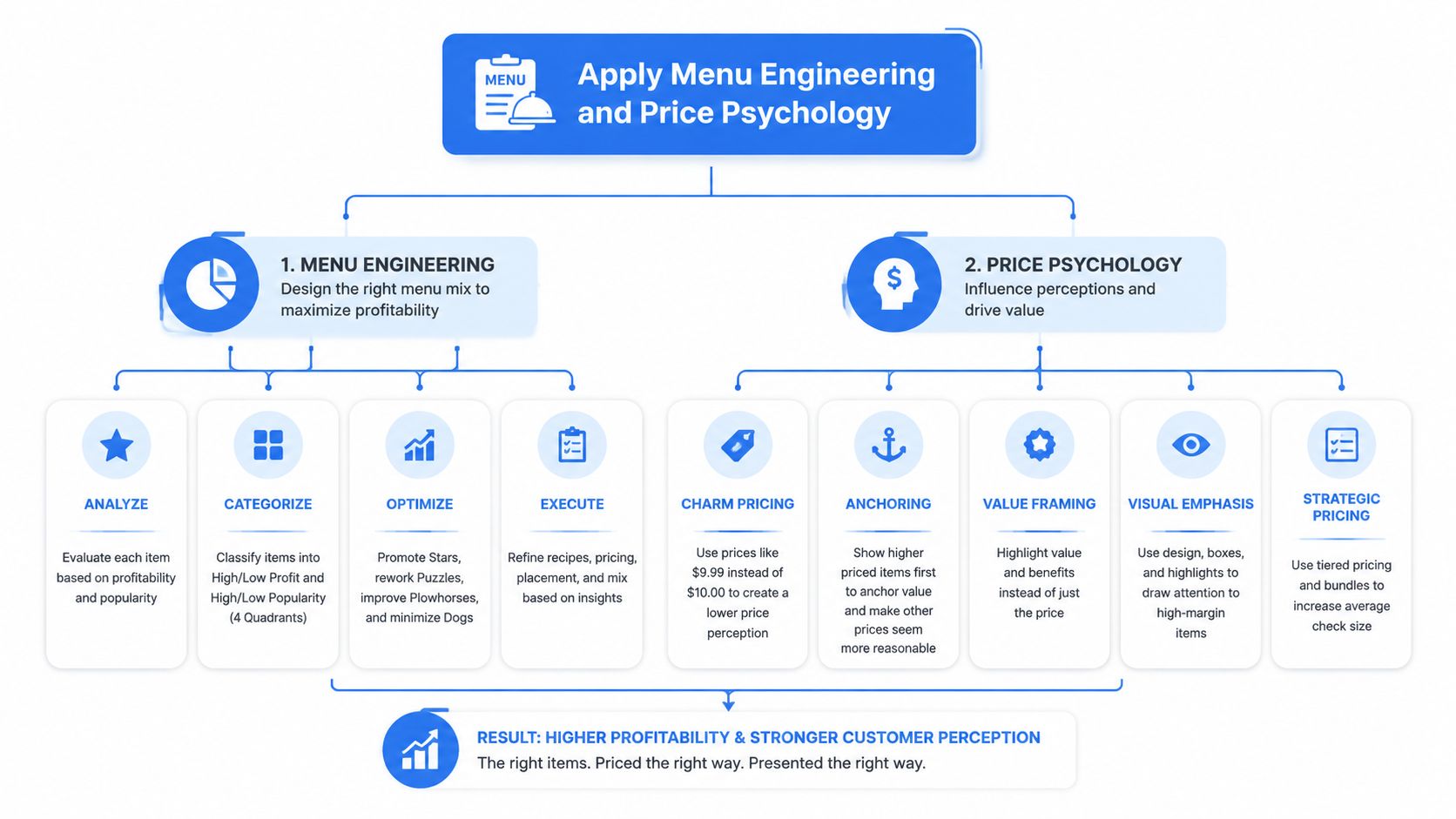
Using eye-tracking data, NetSuite's menu engineering resource notes that placing high-margin Star items in the top-right area of the menu, part of the Golden Triangle, can increase their selection rate by up to 60%. The same source notes that boxes or icons can lift an item's selection by another 18%.
That means placement isn't decoration. It changes orders.
Use that insight like this:
Put Stars where eyes land first
Top-right, center, and other high-visibility positions should go to your strongest items, not your longest category list.Use visual cues sparingly
A box, icon, or “house favorite” marker works when it's selective. If everything is highlighted, nothing stands out.Keep categories tight
Don't force guests to scroll or scan through clutter before they hit your best margin drivers.
For operators working on mobile-first concepts, especially trucks and compact menus, this matters even more. Smaller screens punish messy layouts. This guide on food truck menus, pricing, and portions is a useful reference for thinking through short-form menu structure.
Use wording and pricing to guide choices
Menu psychology works best when it feels helpful, not manipulative.
A bland item name kills curiosity. Compare these:
- Fried Chicken
- Crispy Buttermilk-Brined Chicken
Or:
- Tomato Soup
- Roasted Tomato Soup with Basil Cream
The second version gives the guest something to picture. That matters. If you have a high-margin item that isn't moving, weak wording is often the first thing to fix.
A few no-nonsense rules:
Lead with appetite, not mechanics
“Charred,” “slow-braised,” “crispy,” and “house-made” usually beat flat labels.Anchor with a premium option
A higher-priced dish can make nearby items feel more reasonable. That's useful when you need a mid-tier item to look like the smart choice.Don't over-explain
One strong line beats a paragraph of ingredients.
Your best dish can still lose if the menu makes it look ordinary.
Price presentation matters too. Don't let the menu feel like a spreadsheet. Clean prices, tidy spacing, and confident descriptions keep the focus on the meal instead of turning every choice into a price comparison exercise.
The point isn't to trick anyone. It's to reduce hesitation and make the right choices easier.
Increase Average Order Value with Smart Upsells
Average order value usually grows through small, relevant adds. Not hard selling. Not robotic prompts. Just better timing and better combinations.
Build upsells that feel useful
A generic “add fries?” script gets ignored because it doesn't sound helpful. A good upsell feels like part of the meal.
Think in moments:
A morning café order comes in for a flat white. The smarter suggestion isn't every pastry in the case. It's one clean pairing. Almond croissant. Banana bread. Breakfast pot. The offer should fit the time of day and the original order.
A pub guest orders a burger. Don't bury them in five side options. Offer a simple upgrade path:
- House fries
- Loaded fries
- Side salad
That structure does two things. It speeds the choice and makes the higher-value option easy to understand.
Train prompts around real ordering moments
The best upsells happen when they solve a guest need.
Use practical pairings like these:
Coffee shop breakfast rush
Pair hot drinks with one bakery item and one protein add-on.Fast-casual lunch
Bundle mains with a drink or side that's easy for the kitchen to execute.Bar service
Suggest a snack board or premium side with first-round drinks, especially before the second order window closes.Family dinner takeout
Add a shareable, dessert, or drinks pack near checkout.
A useful framework:
| Base order | Better upsell | Why it works |
|---|---|---|
| Coffee | Bakery pairing | Feels natural in the moment |
| Burger | Premium side swap | Improves value without pressure |
| Salad | Protein add-on | Matches intent and appetite |
| Pizza | Dessert or drinks | Extends the order logically |
If the upsell creates friction, staff won't use it and guests won't want it.
Build upsells around what your kitchen can repeat cleanly. Don't create bundles that look clever on paper but jam service. The best AOV wins are operationally boring. Easy to explain, easy to prep, easy to ring in.
That's also why digital prompts outperform inconsistent verbal selling. Staff forget. Systems don't. But even with digital ordering, the logic has to be sharp. Relevant add-ons beat random extras every time.
Use Digital Menus to Test and Scale Your Strategy
If you're still relying on static print menus for active decision-making, you're moving too slowly.
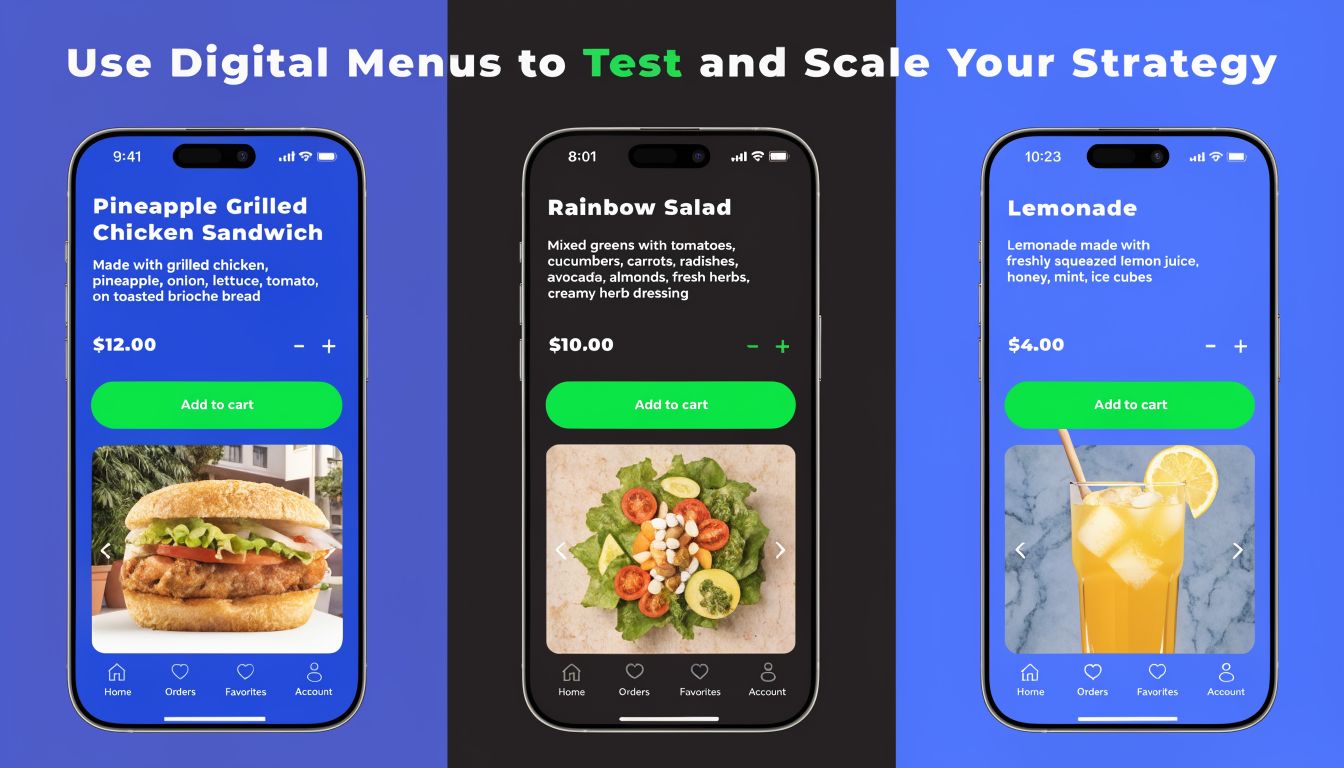
Print menus slow down good decisions
Printed menus lock you into delays. If an item underperforms, if ingredient costs shift, or if a bundle needs adjusting, you wait. Most operators already know what they want to change. The format is what holds them back.
Digital menus fix that immediately.
You can:
Swap item placement fast
Move a Star higher without waiting for the next print run.Test descriptions
If one name doesn't sell, rewrite it and watch what happens.Adjust availability in real time
Hide 86'd items, push profitable specials, or simplify the menu during peak pressure.Keep channels aligned
In-store, QR, pickup, and delivery should reflect the same menu logic.
Restaurant menu optimization becomes operational rather than theoretical at this stage. You stop debating and start testing.
Multi-location operators need one source of truth
Chains and groups have a different problem. It's not just whether a menu works. It's whether every site is working from the same playbook.
A 2024 report highlighted that 68% of multi-unit operators struggle with inconsistent menu performance across locations, and centralized digital menu platforms help solve that by enabling instant chain-wide updates. The same analysis notes margins can improve by 12% through standardized core offerings, according to Gordon Food Service's discussion of restaurant operating gaps.
That is the actual value of digital control. You can standardize the core menu while still making sensible local adjustments.
A practical model looks like this:
Core menu stays fixed
Best sellers, pricing logic, and major bundles remain consistent.Local layer stays flexible
A site can feature a regional special, local drink, or seasonal add-on without breaking reporting.Head office sees one dashboard view
That makes it easier to spot weak execution, menu drift, or a location that needs support.
For operators comparing platforms, this overview of QR code menu software for restaurants is a helpful place to benchmark what matters.
Personalization needs consent, not creepiness
Digital menus also open the door to smarter recommendations. That's useful. It can also get clumsy fast.
Don't chase personalization just because the tech exists. Use it when it improves the order.
Good examples:
- Returning lunch guests see familiar combos first.
- Morning traffic gets breakfast add-ons, not dessert pushes.
- Frequent bar visitors get relevant snack pairings during peak evening hours.
Bad examples:
- Overloading the screen with pop-ups.
- Making irrelevant suggestions.
- Using customer data without clear notice and consent.
Privacy-first ordering is the only sustainable path. Guests will accept useful recommendations. They won't accept feeling watched. If you're collecting data through digital ordering, be clear about it and give people control.
Launch, Train Your Team, and Measure Results
A smarter menu fails fast if the team doesn't understand it.
Most restaurants roll out menu changes like a design refresh. New layout. New wording. Then they hand it to staff and hope for the best. That's lazy execution.
Roll out changes like an operator, not a designer
Your front-of-house team needs to know three things:
- Which items matter most
- Why those items matter
- How to guide guests toward them naturally
Don't train with generic upselling language. Train with live examples from your actual menu.
Use a pre-shift checklist like this:
Pick the featured item
Give every server one Star and one Puzzle to talk about that shift.Give one sentence, not a speech
“The braised beef is our richest winter dish” works better than a long ingredient list.Pair the recommendation
If a main dish is the focus, attach a side, drink, or dessert that makes sense.Flag operational changes
If portions changed, ingredients shifted, or a weak seller was removed, explain it clearly.
Back-of-house alignment matters just as much. If the menu pushes an item the kitchen can't execute consistently, you've built your own problem.
Staff training should answer one commercial question. What should we sell more of today, and how do we do it well?
If your team needs a stronger foundation, this guide to restaurant staff training covers the basics of building more consistent execution.
What to measure after launch
Once the menu is live, don't move on. Watch what changes.
Track:
Item mix
Are the dishes you featured gaining traction?Average order value
Are bundles and add-ons showing up more often?Contribution margin by item
Did the changes improve what each order leaves behind?Server behavior
Are staff recommending the right items, or defaulting to old habits?Guest friction
Are there questions, bottlenecks, or confusing choices you didn't catch?
Review the results quickly, then adjust. A menu is never finished. Strong operators keep tuning placement, wording, and offers until the menu sells the way the business needs it to sell.
If you want a faster way to turn restaurant menu optimization into a repeatable system, RevMenue is built for that job. It helps restaurants, cafés, and multi-location operators run QR menus that update instantly, push relevant add-ons, support privacy-friendly personalization, and show what is driving revenue so you can improve margins without adding more manual work.
