
Most restaurants still treat the menu like a printed handout. That's a mistake. The menu is one of the few tools that touches every guest, shapes every order, and can change margin without changing rent, labor, or food cost.
The shift to QR menus proves operators already know print is too slow. In the U.S., 45% of adults had used QR codes to access restaurant menus in the previous 12 months as of June 2023, while another 45% had not used them at all, showing a market in transition at that point, according to Statista's U.S. restaurant QR menu survey. The important part isn't hygiene anymore. It's that a digital menu lets you change pricing, hide sold-out items, push better add-ons, and stop letting stale menu design drag down sales.
If your contactless menu QR setup is just a PDF stuck behind a code, you've digitized the wrong thing. You kept the limitations and added friction.
Table of Contents
- Your Menu Is Costing You Money Here's How to Fix It
- Beyond the Scan Static PDF vs Dynamic Digital Menu
- How Smart QR Menus Drive Profit Not Just Cut Costs
- Menu Engineering for the Small Screen
- Why Some QR Menus Fail and How to Avoid It
- Beyond Scans What Your Menu Data Is Telling You
- How to Choose and Launch Your Contactless Menu System
Your Menu Is Costing You Money Here's How to Fix It
Printed menus don't just cost money when you send them to the printer. They cost money every time they stay wrong for too long.
When a guest orders something you've already sold out of, service takes a hit. The server apologizes, the guest resets, the kitchen loses rhythm, and the table starts with friction instead of confidence. When your prices need adjusting, static menus force you to choose between margin leakage and another reprint. Neither option is good.
A menu should work like a live sales tool. Most don't.
Where static menus leak revenue
- Sold-out items stay visible: Guests keep reaching for dishes the kitchen can't deliver.
- High-margin items get buried: Your best-profit plates often sit in the same dead layout for weeks.
- Specials go underused: If staff forget to mention them, they don't move.
- Price changes get delayed: Small changes pile up because nobody wants to reprint for every tweak.
- Multi-location consistency breaks: One site updates. Another forgets. Now the brand experience is uneven.
A menu isn't just a list of dishes. It's a pricing tool, a merchandising tool, and a service tool.
That's why a good contactless menu QR setup matters. Not because it's modern-looking. Because it lets operators manage the menu like inventory, not artwork.
The operators who get value from QR don't ask, “How do we replace paper?” They ask better questions:
- Which items should appear first on mobile?
- Which add-ons should show at the moment of decision?
- Which categories need to disappear when the kitchen gets slammed?
- Which descriptions are helping sales, and which are just taking up space?
That's the right frame. Your menu is either helping margin or hurting it. There isn't much middle ground.
Beyond the Scan Static PDF vs Dynamic Digital Menu
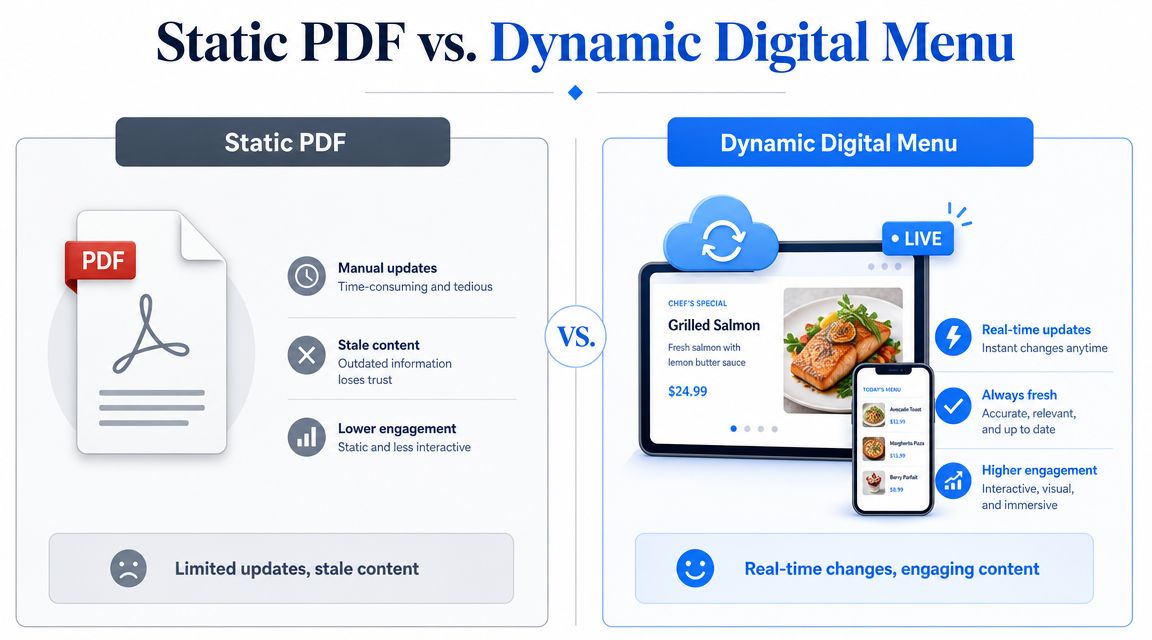
Most QR menu rollouts fail at the first decision. The operator puts a QR code on the table, links it to a PDF, and assumes they've gone digital.
They haven't. They've created a smaller paper menu on a phone screen.
A static PDF is the digital version of a folded street map. A dynamic menu is Google Maps. One forces the guest to pinch, zoom, and hunt. The other adapts in real time and gets them where they want to go faster.
What a static PDF gets wrong
PDF menus look easy because they're familiar. They're also clumsy on phones.
The guest usually has to zoom in, scroll sideways, lose their place, and work harder than they should. That friction matters at the exact moment you want confidence and momentum.
Static PDFs also create operational drag:
| Format | What happens in service |
|---|---|
| Static PDF | Staff keep apologizing for stale prices, unavailable items, or outdated specials |
| Dynamic menu | Guests see current items, current pricing, and current availability as soon as they scan |
Why dynamic URLs matter
A proper contactless menu QR system works best when the code points to a dynamic URL, not a fixed PDF. That means the printed code stays the same while the menu behind it changes instantly. Menu data, prices, and item availability can update in the browser without reprinting the code, as explained in MenuSifu's guide to QR code restaurant menu systems.
That setup fixes a basic restaurant problem. The physical object on the table doesn't need to change every time the menu does.
Practical rule: If your team has to reprint a QR code because the menu changed, the setup was wrong from the start.
The guest benefit is just as important. People scan with the phone's native camera and open the menu in Safari or Chrome. No app install. No account creation. No unnecessary step between interest and order.
What to insist on instead
If you're evaluating platforms, insist on these basics:
- Mobile-first layout: Built for thumbs, not desktop screens shrunk down.
- Instant updates: Prices, specials, and item availability should change immediately.
- Fast browser load: The menu should open directly from the scan.
- Simple editing: Managers should be able to update the menu without calling a developer.
A QR code is just the doorway. Its value sits behind it.
How Smart QR Menus Drive Profit Not Just Cut Costs
Saving on printing is nice. It's also the least interesting reason to invest in a QR menu.
Its value is that the menu becomes an active selling surface. It can recommend add-ons, guide guests into bundles, suppress weak choices, and reduce the service friction that slows down both staff and spend.
Industry coverage notes that restaurants are increasingly treating menus as a live merchandising channel, and with menu prices up 3.8% year over year in March 2026, instant updates matter operationally. The bigger opportunity is using the menu to test which bundles, modifiers, and add-ons guests accept, as outlined in this contactless menu QR code system analysis.
Where the profit actually comes from
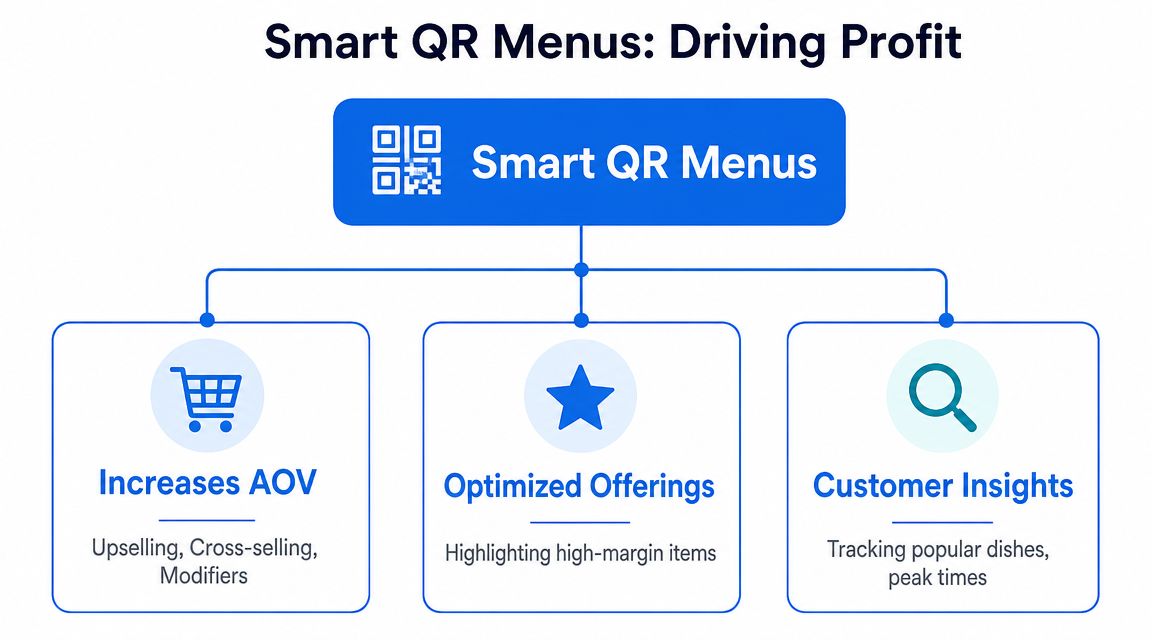
A smart QR menu can help in three places at once.
First, it can increase average order value. If a guest taps a burger, that's the right moment to suggest bacon, avocado, or a premium side. Not after the server has rushed to another table. Right then.
Second, it can protect the guest experience. If the salmon is gone, hide it. If brunch ends, remove brunch. Don't make your team clean up avoidable disappointment.
Third, it can reduce staff drag. Servers shouldn't spend half the shift repeating the same side options, allergy basics, and modifier choices if the menu can handle that cleanly.
Good upsells feel helpful
Bad digital upselling is pushy. Good digital upselling feels like guidance.
Use prompts that fit the order:
- Relevant add-ons: Add cheese to a burger, not a random dessert.
- Bundles with logic: Lunch combo, coffee-and-pastry pairings, pre-fixe upgrades.
- Premium swaps: Truffle fries, double protein, house cocktail pairing.
- Modifier prompts: Dressing choice, spice level, side selection.
If you want a stronger framework for this, review these restaurant upselling techniques for smarter menu prompts.
The best upsell doesn't interrupt the guest. It reduces decision effort and raises the check at the same time.
Efficiency still matters because it supports revenue
Teams often separate “operations” from “sales.” That's a mistake. Better operations create more selling opportunities.
When guests can browse immediately, they settle faster. When staff don't have to explain every menu detail manually, they have more time for actual hospitality. When sold-out items disappear in real time, tables move with less friction and less frustration.
A contactless menu QR system should do both jobs. It should help guests order better and help staff serve better. If it only saves paper, you bought a scanner accessory, not a revenue tool.
Menu Engineering for the Small Screen
Mobile menu design is where most operators leave money on the table. They obsess over the QR code itself and ignore the screen guests interact with.
That's backward. The scan gets attention. The menu layout gets the sale.
Make the first screen do the selling
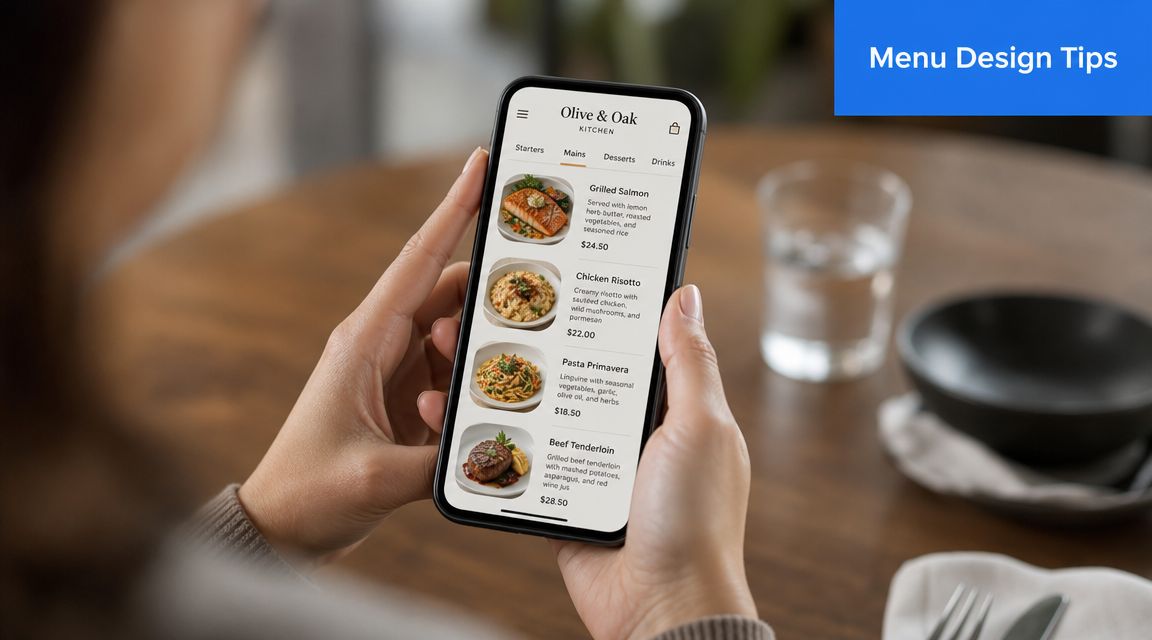
The first screen has one job. Help the guest decide where to start.
If the opening view is cluttered, slow, or packed with low-value categories, the guest hesitates. Hesitation kills add-ons and drags out ordering.
Use a mobile-first structure:
- Lead with strong categories: Bestsellers, signatures, lunch picks, house favorites.
- Keep category names obvious: “Burgers” beats “Between the Buns.”
- Show the right items first: Start with what sells well and supports margin.
- Use photos selectively: Put them on dishes that benefit from visual selling.
- Limit scrolling fatigue: If guests have to dig too far, they stop exploring.
A strong menu on mobile feels obvious. That's the point.
Here's a useful breakdown of what effective digital menu optimization looks like in practice: restaurant menu optimization strategies for better conversion.
Write like a menu merchant not a chef's notebook
Menu copy on mobile has to earn its space.
Long, poetic descriptions don't help if they bury the reason to order. You need clean language that tells the guest what it is, why it's appealing, and what makes it worth the price.
Use this checklist:
- Name the item clearly: Don't make guests decode clever branding.
- Lead with the main draw: Crispy, wood-fired, house-made, slow-braised.
- Cut filler ingredients: Nobody needs a paragraph to understand fries.
- Make premium elements visible: Aged cheddar, brioche bun, chili crisp, espresso glaze.
- Use dietary tags cleanly: Vegan, gluten-free, spicy, dairy-free.
Small-screen copy should answer the guest's next question before they ask it.
Guests don't reward creativity that makes ordering harder. They reward clarity.
Use bundles and filters to reduce hesitation
Bundles work on mobile because they simplify choice. A guest often wants a complete meal, not a long decision tree.
Good bundle design can include:
| Bundle type | Why it works |
|---|---|
| Lunch combo | Speeds up midday decisions |
| Coffee plus pastry | Lifts quick-service tickets without friction |
| Burger meal upgrade | Increases attachment of sides and drinks |
| Tasting add-on | Helps premium guests trade up without feeling sold to |
Filters matter too. If a guest needs vegan, gluten-free, or spicy options, don't make them hunt. Give them fast sorting. That lowers anxiety, cuts questions for staff, and keeps the order moving.
This is also where speed matters. Your contactless menu QR experience should load fast, scroll smoothly, and keep tap targets large enough for real hands at real tables. If it feels fiddly, guests bail mentally even if they stay seated.
A short video like this is useful when training managers on what a better digital menu experience should feel like in service:
A practical mobile menu standard
Before launch, test the menu in the dining room on different phones and under normal service pressure. Don't test it from a laptop in the office.
Check these points:
- Can a guest find starters, mains, and drinks instantly?
- Can they understand modifiers without asking staff?
- Can they identify signature and high-margin items quickly?
- Can they move from browsing to ordering without confusion?
- Can older guests read it comfortably?
If any answer is no, the design needs work.
Why Some QR Menus Fail and How to Avoid It
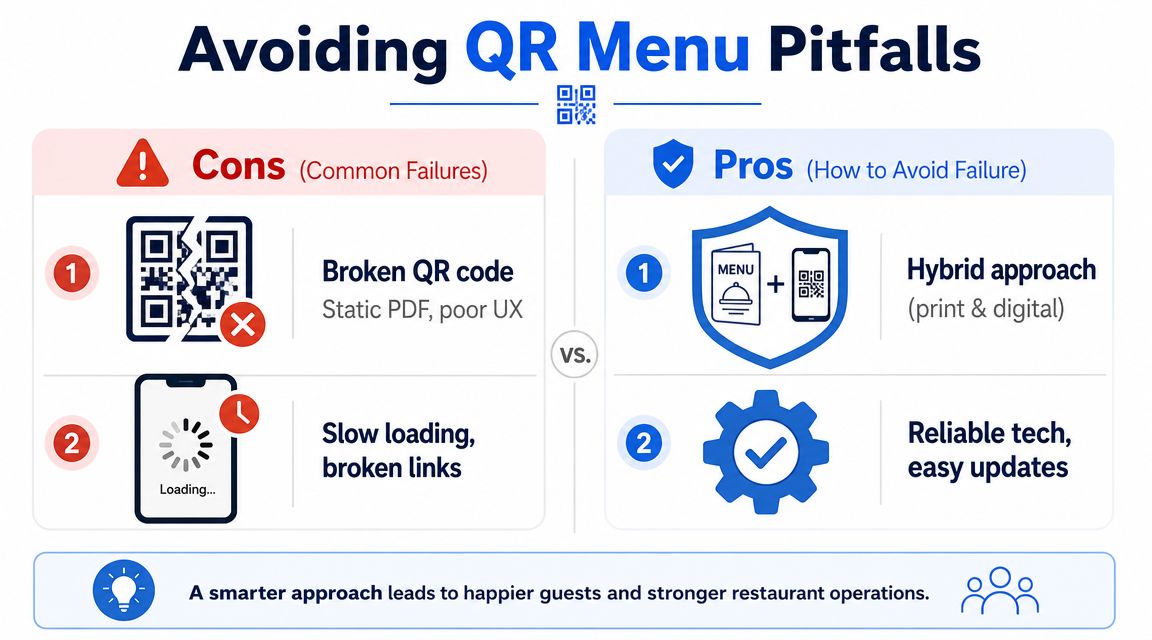
QR menus don't fail because guests hate technology. They fail because operators force bad technology into a hospitality setting and call it innovation.
The problem usually isn't the code. It's the experience around it.
The biggest mistake is going QR only
A lot of owners assume digital means paper should disappear completely. That's lazy operations.
Consumer comfort with QR menus is mixed. One survey discussed by Restaurant Dive found 47% of consumers were uncomfortable using QR codes for ordering and paying, and among consumers over 60, 65% were uncomfortable, which is why a hybrid approach matters, according to Restaurant Dive's reporting on QR code discomfort in restaurants.
If your dining room has older guests, tourists, low-battery phones, accessibility needs, or people who don't want to order from a screen, you need a backup.
Keep physical menus available on request. Make sure staff can switch smoothly from digital to traditional service without making the guest feel difficult.
Bad tech kills trust fast
Guests forgive a lot in restaurants. They don't forgive friction at the start.
Common failure points include:
- Slow loading pages: If the menu stalls, the first interaction already feels broken.
- Forcing an app download: That's unnecessary friction for dine-in guests.
- Unreadable design: Tiny text and oversized PDFs signal you didn't test on real phones.
- Broken QR placements: Glare, scratches, bad print quality, or awkward table placement all reduce scans.
- No staff script: If staff can't explain the process clearly, the room gets awkward fast.
If the guest has to work harder to see your menu than to order from your competitor, your tech is costing you business.
Hospitality still has to feel human
A QR menu should remove repetitive steps, not remove service.
Use it to handle browsing, item discovery, modifiers, and routine upsells. Then let staff focus on timing, warmth, recovery, recommendations, and table presence. That's the balance that works.
For accessible service, also think beyond the average smartphone user. Some guests need staff assistance, larger text, an alternate way to access the menu, or a physical copy without needing to ask twice. Build that into training, not as an afterthought.
The best QR rollouts don't replace hospitality. They protect it from the boring stuff.
Beyond Scans What Your Menu Data Is Telling You
A scan count is nice to look at. It won't tell you why one item moves and another stalls.
A key value of a digital menu is behavioral data. A smart QR menu isn't just a digital replica. It can embed ordering, upsells, and payment flows, influence average check size, hide sold-out items, and even identify table numbers automatically to streamline service, as described in Nonius Solutions' breakdown of restaurant contactless menu and QR ordering.
Scan counts don't pay the bills
You need to know what guests do after the scan.
Look for patterns like these:
- Viewed often, ordered rarely: The item is attracting attention but not converting.
- High add-on acceptance: Guests consistently accept a modifier or premium extra.
- Strong pairings: Certain drinks, sides, or desserts repeatedly attach to certain mains.
- Category drop-off: Guests stop browsing after a specific point.
- Device-level friction signs: Some pages or item groups may create hesitation through clutter or weak copy.
The menu is giving you clues every day. Teams often just don't read them.
Turn menu behavior into decisions
If a chicken sandwich gets lots of views but weak orders, fix the sales pitch. Change the photo. Tighten the description. Reposition it higher in the category. Test a stronger side pairing.
If guests regularly add cheese to burgers, feature that option more prominently. If they rarely choose a premium side buried low on the page, move it up or rename it more clearly.
If one dessert gets attention but poor conversion, the issue might not be the dessert. It might be timing, price framing, or the fact that the menu makes guests scroll too far after mains.
Use data to answer practical questions:
| Signal | Likely action |
|---|---|
| High item views, low orders | Test photo, copy, placement, or price framing |
| Strong modifier uptake | Make the add-on more prominent |
| Weak bundle acceptance | Rework the offer so it feels simpler or more relevant |
| Category abandonment | Reduce clutter and shorten the path to decision |
For operators trying to get more disciplined about this, these restaurant data analytics practices for menu performance are worth applying to your reporting routine.
Don't ask whether guests scanned the menu. Ask where they hesitated, what they ignored, and what they accepted gladly.
That's where margin lives.
How to Choose and Launch Your Contactless Menu System
A bad QR menu system does more than frustrate guests. It slows ordering, hides high-margin items, creates staff workarounds, and leaves money on the table every shift.
Treat this purchase like a sales system decision, not a hygiene upgrade.
Choose the platform that helps you change the menu fast, push profitable modifiers, and spot weak conversion points without making managers fight the software. Operators get burned when they buy the cheapest tool, upload a PDF, and call the job done. That setup rarely improves revenue. It just digitizes old menu problems.
What to look for before you sign
- A true mobile menu: Guests should read it easily on a phone, with clear categories, clean item cards, and short paths to order.
- Fast editing: Managers need to 86 items, change prices, swap photos, and adjust descriptions in minutes.
- No-app access: Scan, open, decide. Every extra step costs orders.
- Sales-focused analytics: You need item views, modifier acceptance, bundle performance, and drop-off points.
- Strong merchandising controls: The system should make it easy to feature add-ons, combos, seasonal items, and premium placements.
- POS and payment compatibility: If the setup creates manual re-entry or messy reconciliation, it will hurt service.
- Printed backup options: Some guests will still want paper, and your team needs a fallback when phones die or Wi-Fi fails.
How to launch without creating chaos
Do not roll it out across every service and every location on day one. Start with one dining period or one unit. Watch real guest behavior. Pay attention to where scanning stalls, where guests stop scrolling, and which questions keep hitting the staff.
Then fix the problems fast.
Train hosts and servers to explain the menu in one sentence. Put backup menus at the host stand and on the floor. Test every table code in the room, not just the sample print from the office. Check lighting, sticker placement, and table wear. A code that scans poorly during dinner rush is an operations failure, not a guest problem.
Set a two-week review window after launch. Look at what sells, what gets ignored, and where guests abandon the menu. Rewrite weak item names. Move profitable items higher. Simplify modifiers that slow decisions. If the system cannot support quick changes, you bought the wrong system.
The operators who get real ROI from a contactless menu QR setup treat launch as the start of menu optimization, not the end of a tech project.
If your current menu still acts like a static printout with a QR sticker on top, it's time for an audit. RevMenue is built for operators who want fast-loading digital menus, smarter upsells, instant updates, and clearer revenue signals without ripping out the rest of their stack. If you want your menu to pull more margin, not just look more modern, it's worth a closer look.
