
Most bakery owners don't have a software problem first. They have a 5 AM decision problem.
How many croissants do you bake today? Do you push more sourdough because yesterday sold through early? Do you hold back because rain usually kills foot traffic? If you're still piecing that answer together from spreadsheets, memory, and a quick look at last week's sales, you're making expensive decisions with slow tools.
That usually creates the same two outcomes. You sell out too early on the items customers came for, or you close with trays of product you already paid to make. Add labor gaps, custom orders, ingredient shortages, and online orders coming in from different channels, and the day gets hard before the doors even open.
Good bakery management software doesn't fix weak demand. It fixes the operating blind spots that turn normal demand swings into lost margin.
Table of Contents
- Stop Guessing How Many Croissants to Bake
- What Bakery Software Actually Does for Your Bottom Line
- Core Features That Directly Impact Profit
- A Practical Checklist for Choosing Your System
- Implementation Without Disrupting Your Bakery
- KPIs That Prove Your Software Is Working
- Common Pitfalls, Privacy Rules, and Your Next Steps
Stop Guessing How Many Croissants to Bake
A familiar bakery morning looks like this. One baker is asking whether to start another laminated batch. Front of house is already texting about a large pickup. Someone notices butter stock is tighter than expected. Meanwhile, yesterday's sheet says one thing, the POS says another, and nobody trusts either one enough to make a clean call.
That is where most bakeries leak profit. Not in one dramatic mistake, but in dozens of small guesses.
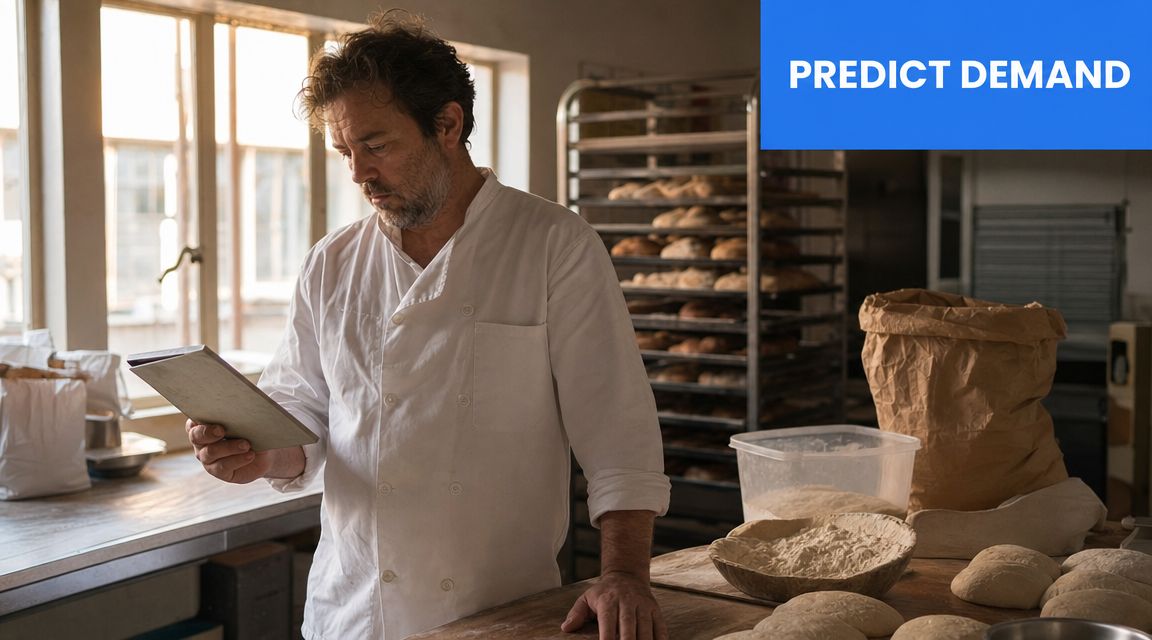
The operators who get ahead treat bakery management software as the link between demand and production. It isn't just a reporting layer. It gives the kitchen a working view of what sold, what is on order, what ingredients are left, and what should be baked next.
What guesswork usually costs
A spreadsheet can tell you what happened last week. It can't manage today's moving target when:
- Walk-in demand shifts early and your best sellers disappear before peak traffic.
- Custom orders crowd the bench and standard items get delayed.
- Inventory counts are stale so the team overcommits product they can't finish.
- Managers make labor calls late because production volume wasn't visible soon enough.
For multi-unit teams, this gets worse fast. If each location forecasts differently, one shop runs out while another overproduces. That's why many growing operators pair bakery systems with stronger multi-location restaurant forecasting tools instead of relying on backward-looking sales exports.
Why adoption is rising
This category is growing because the pain is real. The global bakery management software market is projected to grow from $2.1 billion in 2025 to $5.3 billion by 2034, and North America currently leads the market, according to DataIntelo's bakery management software market report.
Bakery software earns its keep when it helps the team answer one question faster: what do we need to make, right now, to protect margin?
If your current process still depends on one experienced manager holding the whole day in their head, you're not running a system. You're relying on memory.
What Bakery Software Actually Does for Your Bottom Line
Most owners hear "bakery management software" and think of a nicer POS. That's too small.
A POS records the sale. Good bakery management software follows the consequence of that sale across the business. Sell one almond croissant, and the system should connect that order to recipe usage, ingredient depletion, production reporting, and the margin on that item.
One sale should trigger multiple updates
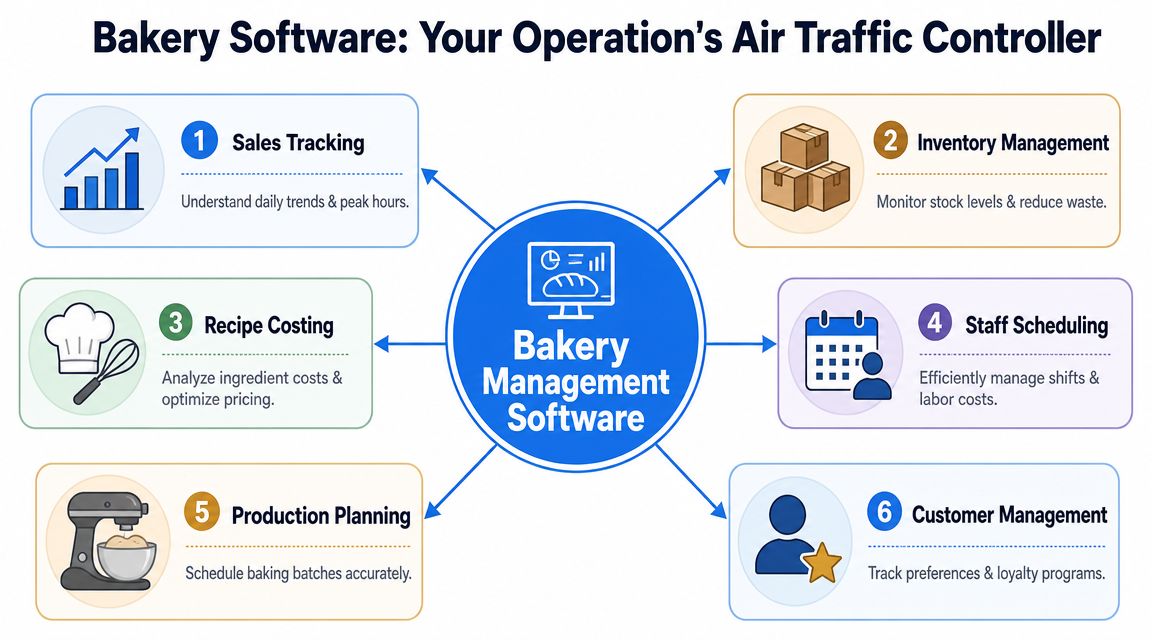
Think of the software as air traffic control for your operation. It coordinates moving parts that usually sit in separate tools or on separate bits of paper.
Here's what that looks like in practice:
- Sales feed production so the team can adjust bake lists while the day is still salvageable.
- Recipes feed inventory so flour, butter, yeast, fillings, and packaging move down as items sell.
- Purchasing feeds availability so managers spot shortages before prep starts.
- Accounting and invoicing sync so admins stop re-entering the same numbers twice.
Without that flow, teams create workarounds. Someone updates inventory at close. Someone else changes a recipe cost once a month. Another person keeps custom order notes in messages. None of that scales cleanly.
A useful system also shows operators the few metrics that drive behavioral change. Effective bakery software provides live visibility into sell-through rate, waste by reason, ingredient stockouts, and on-time custom order rates, as noted in this bakery operations guide from Bakers Machinery.
What it should replace
If you're evaluating a system, ask whether it replaces these weak points:
| Current habit | Better software behavior |
|---|---|
| End-of-day manual counts | Live or near-live ingredient visibility |
| Printed production sheets | Dynamic bake lists tied to real demand |
| Separate files for recipes and costing | One recipe source tied to margin |
| Sticky notes for cake pickups | Order tracking with status visibility |
A quick walkthrough makes the difference clearer. This video gives a useful visual of how bakery workflows can be centralized.
What software doesn't do
It won't rescue bad menu mix. It won't fix sloppy prep discipline. It won't make a low-volume SKU profitable just because it's in the system.
Practical rule: If the tool adds reporting but doesn't improve daily decisions in production, inventory, or labor, it will become an expensive reference library.
The point isn't more data. The point is faster, cleaner operating decisions.
Core Features That Directly Impact Profit
Feature lists are where buyers get distracted. Vendors love long checklists. Operators need to know which tools protect margin.
The cleanest way to judge bakery management software is by profit leak, not by feature count.
Control food cost at the item level
Recipe management and costing should sit near the top of your list. If the system can't tell you what an item costs to produce, the rest of the reporting gets shaky fast.
A strong setup should let you:
- Build recipes by ingredient with current purchase costs tied back to each SKU.
- Track yield realistically so trim loss, bake loss, and portion assumptions aren't hidden.
- See margin by product before a popular item slips into being a weak earner.
- Update pricing intelligently when ingredient costs move.
This matters most in bakeries with broad assortments. The signature pastry everyone loves can also be the one that ties up labor, uses premium ingredients, and sells at a price set two seasons ago.
Reduce waste at the production line
A lot of software claims to manage production. Fewer tools help the team make the right daily call on quantity.
The most useful production features are often the least glamorous:
- Daily bake-list generation based on open orders, expected demand, and current stock
- Prep lists that translate plan into kitchen action
- Batch scaling when demand shifts up or down
- Yield capture so the team records what came out
- Reason codes for waste so "waste" stops being one vague bucket
That last point matters. If product is wasted because of overproduction, late pickup, finishing damage, or staling, those are different problems. They need different fixes.
This is also why simple systems can beat bloated ones. The biggest value for many bakeries isn't a full ERP but tighter production-line decision support with tools like daily bake lists, yield capture, and waste coding, as outlined in SG Systems Global's guide for small bakery management software.
Treat labor like an operating input
Labor is where many bakery software articles go soft. They talk about inventory, traceability, and orders, then leave scheduling in a separate box.
That doesn't reflect bakery reality.
In a bakery, labor and production are linked all day. If one decorator is out, custom orders back up. If the opening baker is late, the retail case isn't ready. If coverage changes after the roster is posted, managers waste time chasing replacements instead of managing service.
The U.S. food service sector saw 32.9% average annual turnover in 2024, which is why scheduling, shift swaps, time tracking, and payroll sync matter operationally, not just administratively, according to Homebase's bakery software guide.
That makes these labor tools more valuable than many owners expect:
- Role-based scheduling for bakers, decorators, baristas, and counter staff
- Shift replacement workflows that reduce frantic manager texting
- Clock-in records tied to payroll so timesheet cleanup doesn't eat evenings
- Visibility by daypart so labor follows demand, not habit
If labor control is a weak spot, a focused inventory manager app for restaurants and food operations can also help connect stock movement and staffing decisions more cleanly.
When labor is treated as separate from production, bakeries usually overschedule the slow hours and understaff the expensive ones.
Connect sales channels without chaos
This matters more for custom orders, preorders, and multi-channel sales than for a simple counter-only shop.
Useful integrations include:
- POS and e-commerce sync so online sales don't surprise the kitchen
- Order tracking with product-specific lead times
- Invoicing support for wholesale or account customers
- Reporting that reconciles channels instead of forcing staff to merge orders by hand
The wrong setup creates duplicate work. Staff confirm one order in the POS, another in email, another from a marketplace tablet, then try to rebuild the production picture manually. That costs time and introduces avoidable errors.
A Practical Checklist for Choosing Your System
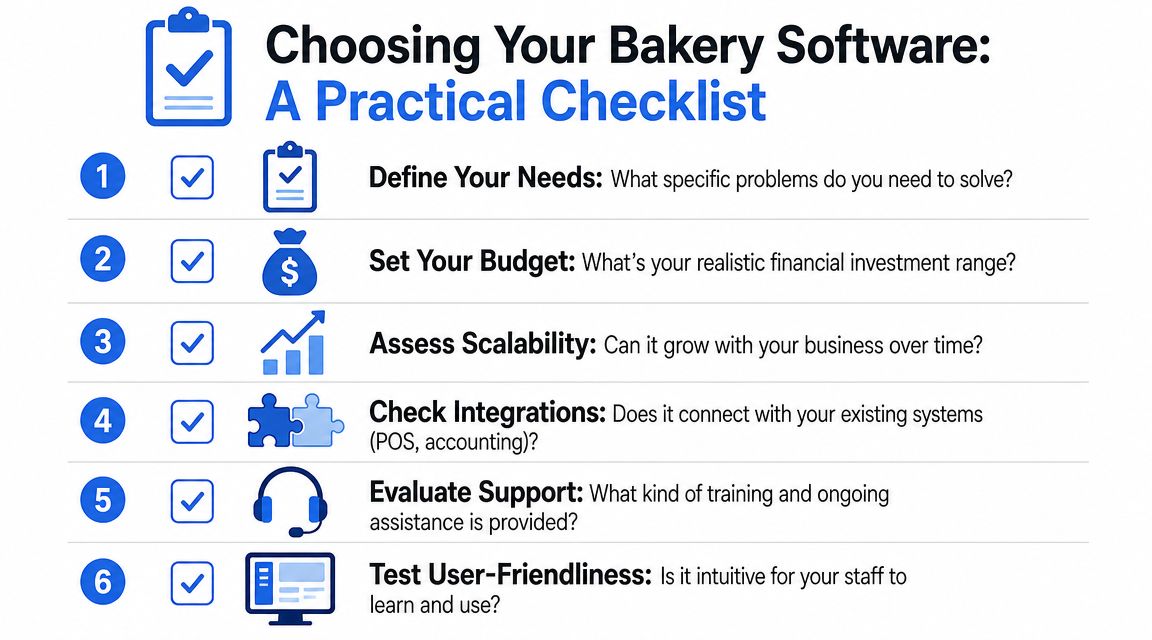
A good demo should feel like an operating review, not a software tour. If the vendor only shows dashboards and pretty charts, push the conversation back to real bakery work.
Questions to ask in every demo
Ask these in plain language. If the answer gets vague, keep digging.
How does the system build today's bake list?
Ask what inputs it uses. Sales history alone isn't enough if you also run preorders, wholesale, and custom cakes.Can it handle different lead times by product?
A cookie tray, wedding cake, and same-day croissant refill shouldn't sit in one generic order flow.What does the kitchen see on a tablet or screen?
If the production view is clumsy, staff will go back to paper.How are waste reasons captured?
You want overproduction, damage, spoilage, and missed pickups separated, not grouped into one loss number.Can staff swap shifts without management rebuilding the whole schedule?
That's a practical labor question, not an HR nice-to-have.Does it integrate with the tools you already use?
Especially POS, accounting, online ordering, and payroll.
What a good answer sounds like
Vendors don't need to say yes to everything. They do need to answer clearly.
Look for signs of operational fit:
Specific workflow language
Good vendors talk about decorators, pickups, production batches, route orders, or opening shifts. Weak vendors talk only about "users" and "tasks."Visible exception handling
Ask what happens when butter is out of stock, a customer changes a cake order late, or a location sells through early. Real systems handle exceptions. Demo-only systems handle happy paths.Fast learning curve
If your team needs heavy training to clock in, mark waste, or check order status, adoption will stall.
A short comparison table helps during selection:
| Buying question | Strong fit | Weak fit |
|---|---|---|
| Production planning | Adjusts daily from orders and demand | Static templates only |
| Custom orders | Lead times and status tracking built in | Manual notes required |
| Labor | Scheduling and time tracking are practical | Labor handled outside the workflow |
| Integration | Works with current stack | Requires full replacement |
Buy for the bottleneck you have now. Don't buy an enterprise-style suite because you might need it later.
Also ask who supports you during the first busy week. Morning bakery issues don't wait for a ticket queue. If support is slow or only available in a way your team won't use, that matters more than a fancy reporting module.
Implementation Without Disrupting Your Bakery
Most implementation problems come from trying to switch everything at once.
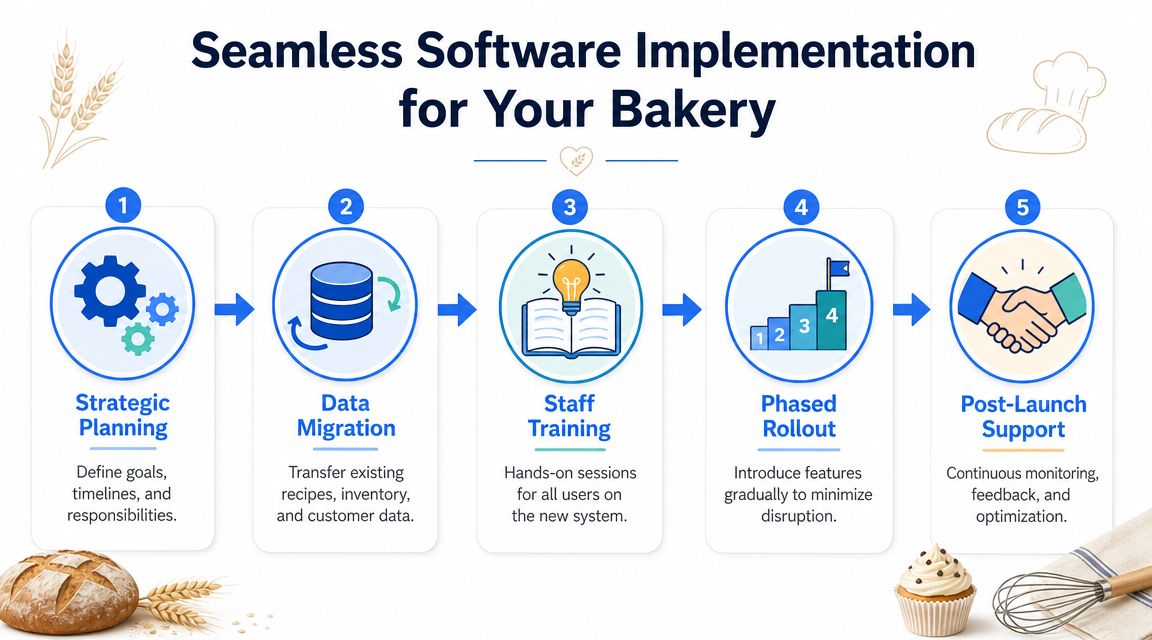
A bakery doesn't need a dramatic go-live weekend. It needs a controlled rollout that protects service, production, and payroll. The best setups start narrow, get one workflow right, then expand.
Start with the data that matters
You don't need perfect historical data to begin. You do need clean operating basics.
Start with:
- Core recipes for your high-volume products
- Ingredient list and supplier details
- Current inventory units so counts make sense
- Open custom and wholesale orders
- Staff roles and standard shifts
Don't begin with every seasonal item you've ever sold. Begin with the products that drive the most volume, labor, or waste. That gives the team something useful on day one.
Roll out by workflow, not by panic
A phased approach works better than a full cutover.
Try this order:
Recipe and inventory setup first
If the item master is wrong, the rest of the system gets noisy.Production planning next
Once recipes and stock are reliable enough, bake lists become useful.Order tracking after that
Especially if custom work and pickups create confusion.Labor tools once the team trusts the system
Scheduling adoption improves when staff already see value elsewhere.
For bakeries with broader needs, the mature end state is one workflow connecting production planning, order tracking, invoicing, POS or e-commerce, and accounting, with automated production reporting and real-time sync across sales channels, as described in BakeMag's coverage of an integrated bakery software platform.
That doesn't mean you need all of it immediately.
Run the new process alongside the old one briefly for critical workflows. A short overlap is cheaper than discovering a setup issue during the morning rush.
Role-based training helps too. Bakers need batch and yield workflows. Counter staff need order status and pickups. Managers need reporting, scheduling, and exception handling. Don't train everyone on everything.
KPIs That Prove Your Software Is Working
If you can't tell whether the software changed the business, then you bought reporting, not improvement.
The strongest proof usually shows up first in the daily operating metrics, not in a polished monthly summary.
Track the right before and after metrics
Start by capturing a clean baseline before rollout. Then review the same measures weekly.
Useful KPIs include:
Sell-through by item
This shows whether you're baking too much, too little, or getting the mix wrong.Waste by reason
Separate overproduction from spoilage, handling damage, and abandoned orders.Ingredient stockouts
Stockouts usually point to poor visibility, weak ordering, or a production plan that doesn't reflect demand.On-time custom order rate
If cakes and special orders still miss promised pickup windows, the system isn't controlling the workflow.Yield accuracy
Compare expected output to actual output. That exposes recipe, process, and training issues.Labor hours versus production reality
Not in isolation. Look at whether staffing fits volume and complexity.
The practical value often comes from production-line tools, not broad platform sprawl. Daily bake-list generation, yield capture, and waste reason codes are some of the clearest indicators that the system is helping operators cut spoilage pressure, as discussed in this restaurant KPI guide.
Do a simple payback check
You don't need a finance degree for this. Use a back-of-the-napkin review each month.
Ask:
- Did waste come down enough to notice in ordering and end-of-day leftovers?
- Did managers spend less time building schedules, fixing timesheets, or chasing orders?
- Did custom orders create fewer remakes, credits, or service recoveries?
- Did stock accuracy improve enough to reduce emergency buying?
If the answers are mostly no, don't blame the software immediately. Check whether the team is using the production, waste, and labor workflows the system was bought for.
A tool only proves itself when the team changes the way it works.
Common Pitfalls, Privacy Rules, and Your Next Steps
The most common mistake is buying too much system for your current bakery. A small shop with a narrow range and a short team usually doesn't need a heavy platform built for manufacturing-style complexity.
The second mistake is weaker than that but more common. Owners buy software, migrate data, then keep making decisions from habit. If nobody reviews waste reasons, sell-through, labor gaps, and stockouts, the system becomes a digital filing cabinet.
A few cautions matter:
- Don't skip staff training. If the opening team can't use it quickly, they won't use it at all.
- Don't replace stable tools without a reason. Good integrations often beat full rip-and-replace projects.
- Don't ignore customer data handling. If your setup stores online order data, loyalty activity, or marketing consent, make sure the platform supports clear privacy notices and consent handling. That matters for GDPR and for basic customer trust.
- Don't judge too early. Early friction is normal. Repeated confusion around one workflow usually means setup or process design needs work.
The simplest next move is practical:
- Audit your biggest leak first. Waste, labor, custom-order errors, or inventory.
- Demo two or three systems against that exact problem.
- Start with the workflow that gives the fastest operating win.
If you want a low-disruption way to improve menu performance, digital ordering, and customer insight alongside your existing stack, RevMenue is worth a look. It helps restaurants, cafés, and bakeries turn QR menus into higher-margin ordering moments, cleaner analytics, and faster menu updates without forcing a POS replacement.
