
Saturday dinner service is full. Your top-selling chicken dish is flying out. Then the kitchen calls it. You're out of the marinade base, the prep sheet was wrong, and the walk-in has three half-open cases of produce nobody rotated properly.
That's not an inventory problem. That's a profit problem, a guest experience problem, and a management problem.
Most restaurants don't need more counting. They need control. A good inventory manager app should tell you what you have, what you're burning through, what's sitting too long, and which menu items are eroding margin. If it can't do that, it's just a nicer spreadsheet.
For hospitality operators, the value goes beyond stock levels. Inventory has to connect to menu pricing, supplier ordering, recipe costing, prep discipline, digital ordering, and what your guests see on a QR menu. That's where modern systems earn their place.
Table of Contents
- The Hidden Costs of Good Enough Inventory
- How an Inventory App Drives Real Profitability
- Your Must-Have Features Selection Checklist
- Connecting Your POS, Suppliers, and Digital Menu
- A Realistic Roadmap for Implementation and Migration
- KPIs to Track for Smarter Business Decisions
The Hidden Costs of Good Enough Inventory
“Good enough” inventory is usually a clipboard, a spreadsheet, and one manager who keeps the whole thing in their head. That works right up until it doesn't.
A café owner notices oat milk is missing during the morning rush. A restaurant manager finds six portions of short rib left on paper, but only two in the fridge. A bar realizes too late that weekend demand wiped out a key spirit and the team starts pushing substitutions they never planned for. Guests don't care why it happened. They just hear, “Sorry, we're out.”
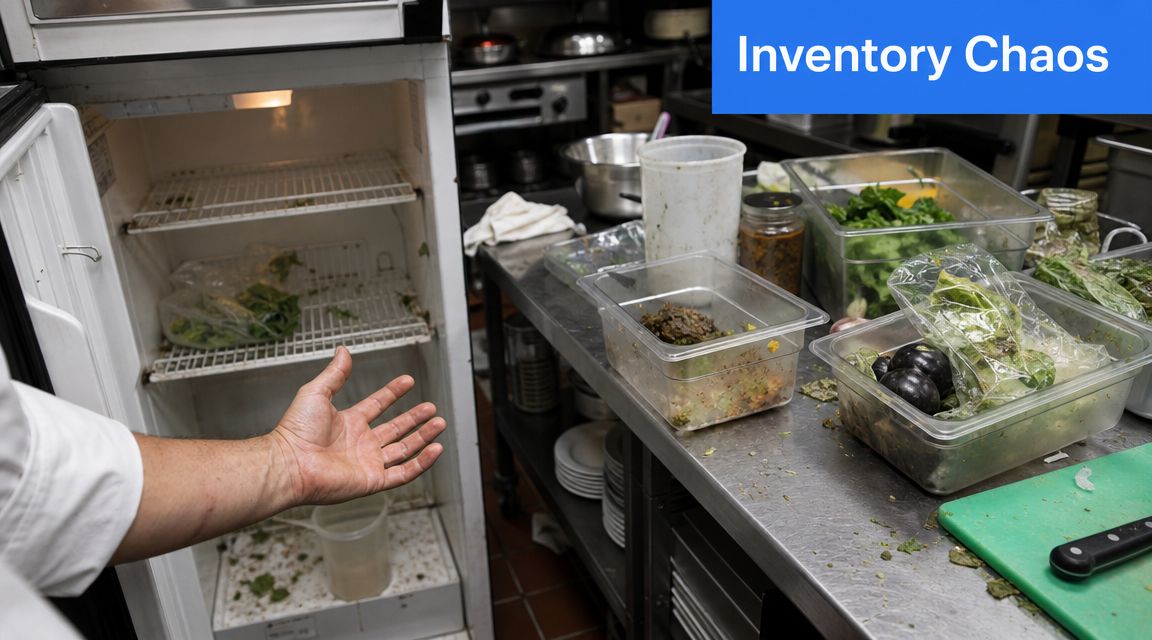
The obvious damage is waste and stockouts. The hidden damage is worse.
What poor control really costs you
- Margin erosion: You over-order to stay safe, then throw product away or discount dishes to move ingredients before they turn.
- Guest frustration: When a signature item is unavailable, the table doesn't just switch happily. Some downgrade. Some leave annoyed. Some don't come back.
- Staff drag: Chefs stop trusting the count. Managers double-check deliveries by hand. Front-of-house keeps running to the kitchen to confirm what's available.
- Bad purchasing decisions: Without reliable usage data, ordering turns into habit instead of decision-making.
Good inventory doesn't just prevent running out. It stops operators from buying fear stock they never should've purchased.
Why manual systems break in busy restaurants
Restaurants move too fast for delayed information. Deliveries come in. Prep transforms raw product into components. Service burns through stock in waves. Waste happens. Transfers happen. Staff make substitutions. If your numbers update daily or once a week, they're already wrong.
That's why app-based inventory tools became mainstream as operators moved from manual counts to mobile and cloud-based systems. Sortly's iPhone app says it is trusted by over 20,000 businesses and supports real-time inventory management from any device, along with barcoding, QR coding, low-stock alerts, and customizable reporting on its Sortly app listing.
For restaurant operators, that shift matters because the operational problem isn't recording stock. It's acting on stock while service is moving.
How an Inventory App Drives Real Profitability
If you think an inventory manager app is a digital shelf count, you're underselling it.
In a restaurant, it should function as a control layer for food cost, waste, purchasing, and menu performance. It's not there to impress your team with dashboards. It's there to stop dumb losses.
The business case is simple. Average inventory accuracy across businesses is only 83%, and 58% of businesses operate below 80% accuracy. The same roundup says real-time inventory tracking can improve stock accuracy by 35%, while AI-powered forecasting can reduce stockouts by 15% and cut excess inventory carrying costs by 20%, according to Anchor Group's inventory statistics roundup.
That should get every operator's attention.
Inventory mistakes hit three places fast
First, they hit cash flow. Overstocking feels safe, but it ties money up in shelves, coolers, and storerooms. In hospitality, unused stock often turns into waste.
Second, they hit menu confidence. If recipe usage isn't mapped properly, you don't know the actual cost of a dish. You're pricing blind, promoting blind, and wondering why sales look strong while profit feels thin.
Third, they hit labor efficiency. Managers and chefs waste time reconciling paper counts, chasing deliveries, and checking if the stock room matches the spreadsheet.
Here's the practical rule. If your team spends too much time verifying numbers, the system is costing you twice. Once in lost margin, again in labor.
A good app changes the job
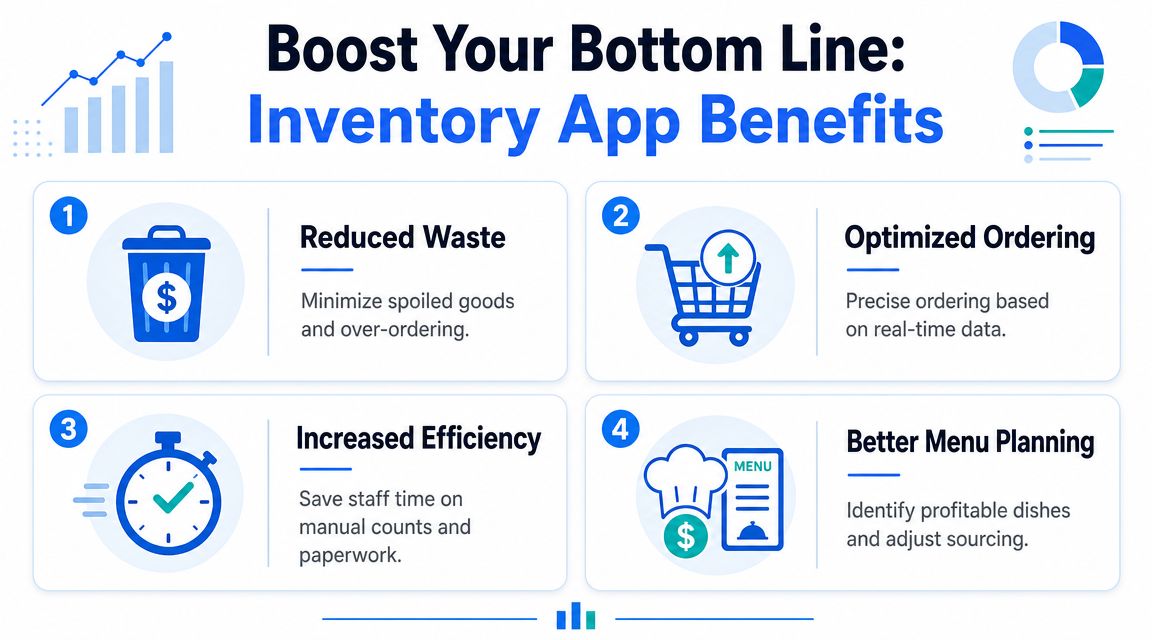
A strong inventory manager app helps operators do four things better:
- Order tighter: Buy against live usage instead of habit.
- Track waste accurately: Not vague “spoilage,” but where loss is happening and which products keep showing up in waste logs.
- Protect menu margins: Match recipe costs to actual depletion so price changes and sourcing decisions happen sooner.
- Run service cleaner: Stop selling items that can't be fulfilled properly.
Practical rule: If the app can't help you make better menu decisions, it's an admin tool, not an operating tool.
In restaurants and cafés, the most useful inventory systems aren't the ones with the longest feature list. They're the ones that make food cost visible enough for managers to act before the month is gone.
Your Must-Have Features Selection Checklist
Most software demos are a trap. They show shiny screens, broad claims, and workflows that look tidy in a test environment. Real operations are messier.
When you evaluate an inventory manager app, score it like an operator. Ask what happens during receiving, prep, waste logging, transfers, and the Friday night rush. If the feature doesn't help your team work faster or protect margin, it's noise.
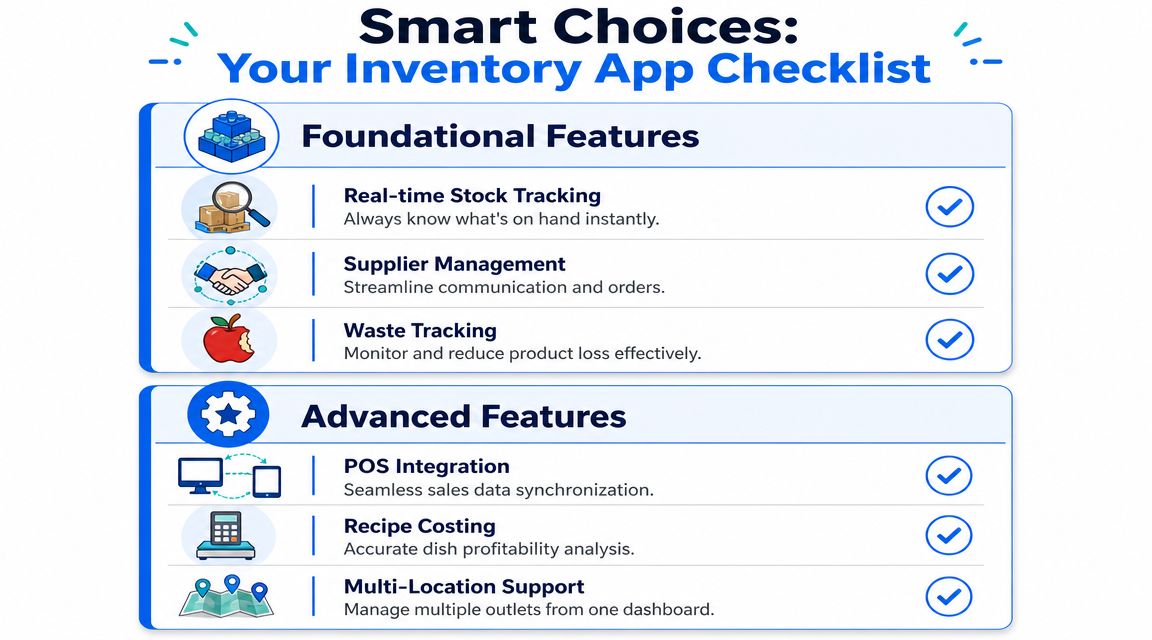
Modern systems should support real-time tracking, automated reorder alerts, multi-location management, reporting dashboards, mobile access, and analytics tied to inventory turnover, stock depletion rates, and dead stock, as outlined in RFgen's guide to inventory software features.
The non-negotiables
These are the baseline features. Don't compromise on them.
Real-time stock visibility
You need current stock by item and by location. Not yesterday's number. Not a count someone forgot to upload.Mobile access
Managers, receivers, and kitchen leads should be able to update information from the floor, the walk-in, or the stock room.Low-stock alerts and reorder logic
Good systems turn thresholds into action. You set the rule once. The app warns the team before the problem becomes a service issue.Multi-location visibility
If you operate more than one site, you need to see what's on hand across locations and where stock is trapped.Reporting dashboards
Basic counts aren't enough. You want trend visibility, slow-moving items, depletion patterns, and dead stock.
The features that matter once you grow
Some features move from “nice” to “essential” as complexity increases.
Recipe costing
Here, inventory starts helping menu engineering. You need ingredient-level mapping, not broad category costing.Supplier management
A proper app should help you track ordering rhythm, incoming stock, and vendor-related issues. If that matters to your operation, look at systems that sit cleanly beside broader restaurant management software for busy owners.Waste tracking
If waste isn't logged by item and reason, you'll keep repeating the same mistakes.POS integration
Sales should affect stock without manual re-entry.
Here's a buyer's shortcut.
| Feature | What It Does | Priority |
|---|---|---|
| Real-time stock tracking | Shows live on-hand inventory by item and location | Core |
| Mobile access | Lets staff receive, count, and adjust stock from phones or tablets | Core |
| Reorder alerts | Triggers action when stock falls below set levels | Core |
| Reporting dashboards | Surfaces depletion, dead stock, and inventory movement | Core |
| Recipe costing | Connects ingredient use to dish profitability | Growth |
| Supplier management | Helps manage purchasing flow and incoming stock | Growth |
| POS integration | Syncs sales activity with inventory usage | Growth |
| Multi-location support | Gives visibility across sites and transfers | Growth |
Don't buy for the demo. Buy for the worst day of the week in your operation.
Connecting Your POS, Suppliers, and Digital Menu
A restaurant gets real value from an inventory manager app when it stops being a separate tool.
The app should sit in the middle of your operating system. Sales go in. Stock updates. Supplier orders feed back in. Menu availability changes fast enough to protect service. That's the difference between tracking inventory and running a connected business.
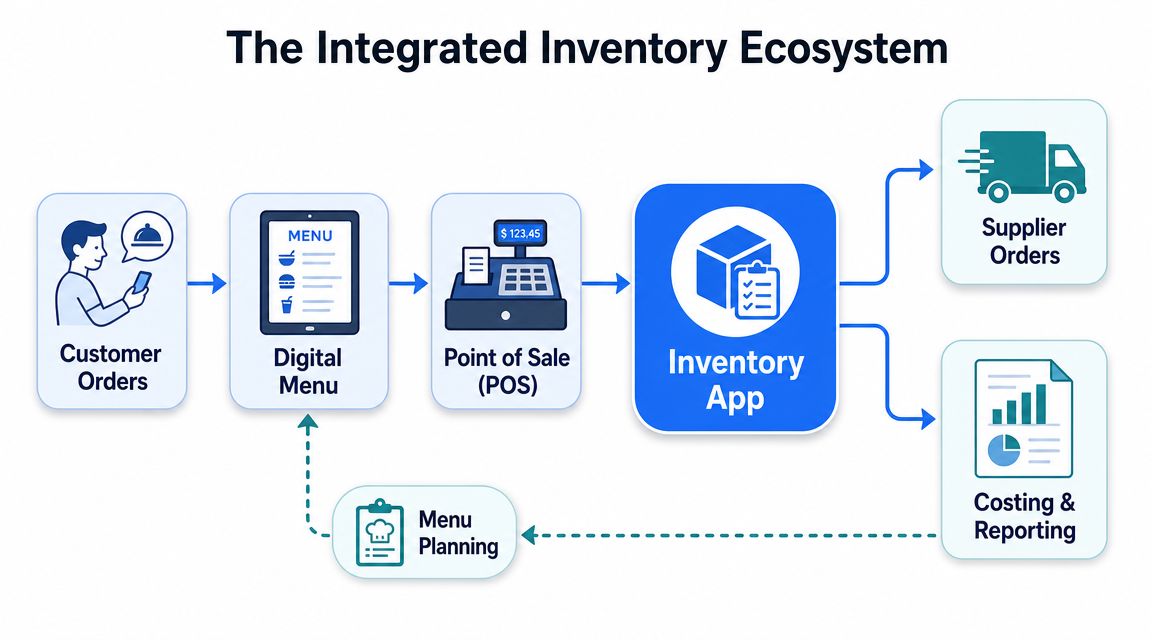
How the data should move
At the core of a modern system is a real-time ledger. Stock updates based on transactions, not delayed batch reconciliations. Google's AppSheet inventory example shows the basic logic clearly. Current stock is calculated from transaction records using a formula equivalent to Initial Stock + Purchases – Sales, and barcode scans feed those transaction tables directly in Google Cloud's inventory app example.
In restaurant terms, that means this:
- A guest places an order.
- The POS records the sale.
- The system deducts the related ingredients or menu item stock.
- If stock drops below threshold, the app triggers an alert or reorder action.
- If the item can't be fulfilled, your digital menu QR code setup should update fast enough to stop guests ordering what the kitchen can't deliver.
That's the operating loop you want.
What this looks like on the floor
A simple example makes it obvious.
Your café sells a turkey focaccia. The recipe depends on focaccia bread, turkey slices, aioli, tomato, and rocket. Lunch demand spikes. The POS keeps ringing orders. If those sales don't push inventory down automatically, the digital menu still shows the item as available, front-of-house keeps selling it, and the kitchen starts negotiating substitutions table by table.
That's sloppy service.
A connected setup does the opposite:
- Sales reduce stock automatically
- Receiving updates incoming product
- Managers see depletion patterns early
- Digital ordering stays aligned with real availability
- Reporting feeds menu changes and purchasing decisions
The customer experience improves when the menu tells the truth.
The same logic helps with upselling and average order value. If your digital menu is promoting a high-margin add-on tied to an item that's near depletion, you need the system to respond. Smart menu presentation only works when it reflects operational reality.
A Realistic Roadmap for Implementation and Migration
Most inventory projects fail before the software gets a fair shot.
The usual mistake is blaming the app. In reality, the breakdown happens earlier. Teams load dirty data, skip naming standards, rush training, and expect busy staff to “figure it out” during service. That never ends well.
Industry reporting repeatedly points to the same issue. Inventory systems often fail because of adoption friction and poor data hygiene, especially when teams can't maintain standardized item names, units, and recipes across POS, purchasing, and prep sheets, as noted in Square's inventory management guidance.
Clean the data before you touch the software
If your system has “tomatoes,” “roma tomatoes,” “tomato case,” and “tomato box” floating around as separate entries, your counts will be wrong no matter how good the platform is.
Start with a cleanup pass:
- Standardize item names: One product, one name.
- Fix units of measure: Case, box, bag, kilo, bottle. Pick the right unit and stick to it.
- Map recipes properly: Every menu item needs consistent ingredient links.
- Review par levels: Old pars often reflect old habits, not current demand.
- Decide ownership: Someone must own product setup and ongoing data discipline.
This is not glamorous work. It is the work.
Train by role not by system
Don't train everybody on everything. Train staff on the tasks they perform.
A workable rollout usually looks like this:
- Receiving team learns delivery checks, quantity updates, and discrepancy logging.
- Kitchen leads learn waste entry, prep conversion, and transfer handling.
- Managers learn ordering, report review, and exception handling.
- Front-of-house only learns what affects availability, menu communication, or item status.
That keeps training practical and lowers resistance.
If the process adds admin work during a rush, staff will stop using it. Then the data decays, and the system becomes expensive fiction.
Run the new system in parallel for a short period. Compare counts, recipe usage, and purchase entries against your old process. You're not doing that to stay comfortable. You're doing it to catch setup mistakes before they become operating mistakes.
A clean launch is usually boring. That's the point.
KPIs to Track for Smarter Business Decisions
If your inventory manager app only tells you what's on hand, you're missing its true value.
For restaurants, the key job is margin protection. The better question isn't “Can the app count items?” It's “Can it show which menu items, suppliers, or time periods are eroding profit?” That's the standard operators should use, and it's a point highlighted in this discussion on inventory tools and restaurant margin pressure.
The questions your reports should answer
Track KPIs that force a decision.
Inventory turnover
Which products move fast, and which ones are sitting too long? Slow movement usually means trapped cash, poor menu fit, or bad purchasing.Stock depletion rate
What's disappearing faster than expected? This helps you spot ordering problems and service-period pressure points.Dead stock
What are you still buying that the menu isn't really supporting anymore?Variance between expected and actual usage
Are recipes being followed? Are portions drifting? Is waste being logged accurately?
For operators who want better decision-making, this kind of reporting belongs alongside broader restaurant data analytics, because stock numbers matter most when they influence pricing, promotions, menu placement, and timing.
Use KPI reviews to change the menu
Don't treat reports as an end-of-month ritual. Use them to make practical calls.
If one salad sells well but burns margin because a volatile ingredient keeps spiking usage, adjust the portion, source differently, reprice it, or stop pushing it. If one dessert has stable cost and strong attachment to mains, feature it more aggressively on the menu. If one supplier keeps creating variance through poor consistency, fix the vendor issue instead of blaming kitchen execution.
A smart KPI review can lead to actions like:
- Repricing items with weak contribution
- Removing dishes with poor stock efficiency
- Changing suppliers on problematic ingredients
- Reducing menu clutter that creates needless inventory complexity
- Promoting items with cleaner margins and steadier availability
Operators don't lose money because they lack data. They lose money because nobody turns the data into menu and purchasing decisions.
If you want your inventory, menu, and ordering experience to work together instead of fighting each other, take a look at RevMenue. It helps restaurants turn digital menus into a profit tool, with faster updates, stronger menu control, and better visibility into what guests order and what drives margin.